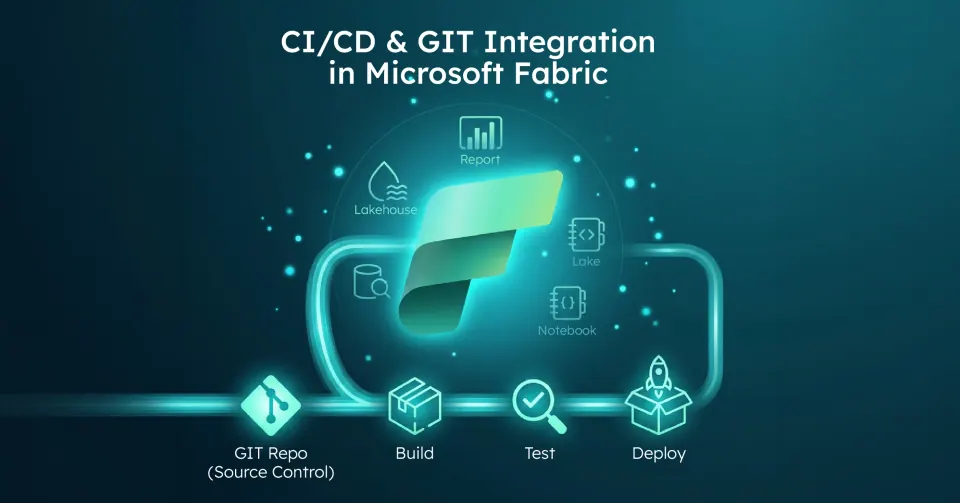
In Short: How does CI / CD actually work in Microsoft Fabric ?
Microsoft Fabric supports application lifecycle management (ALM) using two primary tools:
1. Git integration (source control): Connect a workspace to a Git repo (Azure Repos or GitHub) to commit change items to Git and pull updates back. It is a workspace - level integration designed for versioning and collaboration. 2. Deployment pipelines (release management): Promote content between Development, Test, and Production stages by cloning items while preserving relationships and applying deployment rules.
Fabric positions these under its lifecycle management tooling: standardized collaboration, continuous updates, and faster releases across the product lifecycle.
Why is CI / CD in analytics challenging?
Most organizations don't fail at analytics because they can't build pipelines; they fail because they can't reliably promote change. Standard challenges include:
- Dev changes breaking Prod reports.
- Environment - specific connections getting overwritten.
- Multiple authors creating competing semantic models.
- Hotfixes appearing in Prod that never make it back to Dev.
Fabric's ALM approach reduces this friction by providing Git for control and traceability, and pipelines for promotion and environment rules.
How does Git integration work in Microsoft Fabric?
What does "Git-Connected" mean in Fabric?
Fabric Git integration connects a workspace to a repo, branch, and folder: essentially making the workspace the unit of version control for supported items. It is designed to let teams back up work, collaborate with branches, revert to previous versions, and apply familiar source control practices to Fabric items.
Update, 1 October 2026: For Power BI content, the format underneath Git integration has moved on. Microsoft's Power BI September 2026 Feature Summary lists Power BI Projects (PBIP) as generally available and says the enhanced report format, PBIR, "is now the default report format for PBIX and PBIP files", with legacy reports converted automatically when they are edited. Microsoft Learn says Fabric Git integration and the Fabric REST APIs export report definitions using PBIR, so each page and visual arrives in the repository as its own file. Our guide to PBIP and PBIR in Power BI covers the conversion caveats and a migration checklist.
What is the core day - to - day Git workflow in Fabric?
The standard process involves connecting the workspace, developing items, and syncing changes: 1. Connect Workspace: A workspace admin connects the environment to a repo and branch. 2. Develop: Teams create or edit supported Fabric items directly in the workspace. 3. Commit Changes: Workspace changes are "committed" into the connected repo. 4. Update from Git: Changes are "pulled" from Git into the workspace: ideal for PR - based workflows or syncing across contributors. 5. Branching: Teams manage branches to isolate work and then merge via standard Git workflows.
Update, 29 September 2026: Microsoft announced at FabCon Europe 2026 that selective branching (branching out with only the items you need), compare and commit, and branch workspaces linked to their source workspace are now generally available. File-level commit, which commits only the finished files within a supported item, is in preview, as is the branch workspace admin profile, which lets developers create branch workspaces without permission to create workspaces or assign capacity. The bulk export and import item definition APIs are also generally available, and deployment plans (preview) add explicit deployment ordering - see our deployment pipelines guide.
Update, 8 October 2026: Microsoft's "Build, deploy, and govern Microsoft Fabric at scale" post gives more detail on deployment plans (preview). They are first-class workspace items: you set the deployment order on a visual canvas, and YAML is the source of truth. They can include pre- and post-deployment steps, such as hydrating a lakehouse with a notebook, running a pipeline before dependent items or validating data after deployment. The plan follows the solution through Git branch-out, initial sync, updates, deployment pipelines and bulk import. We explain how plans and branch workspaces fit together in Fabric deployment plans and branch workspaces.
Where do implementations usually get stuck with permissions?
Fabric separates workspace roles and Git permissions. For example, connecting a workspace or switching its branch typically requires the workspace Admin role, although contributor branch switching is now in preview for tenants where administrators enable it. Committing or updating requires workspace write permissions and: depending on tenant settings: item ownership or build permissions. Git - side permissions also differ between Azure Repos and GitHub and may require specific policy alignment for direct commits.
How do deployment pipelines work in Microsoft Fabric?
What do Fabric pipelines actually do?
Deployment pipelines provide staged environments: typically Dev, Test, and Production: and a deployment action that copies content from one stage to the next. During deployment, Fabric copies items, keeps connections intact, and applies deployment rules you configure in the target stage.
Why are rules the "Don't Break Prod" mechanism?
Rules prevent "deployment overwrites reality." A classic example is a Dev semantic model pointing to sample data while Prod must point to the production database: deployment rules let you keep those environment-specific settings intact.
What is the practical pipeline pattern for Fabric?
- Development stage: Build and iterate fast.
- Test stage: Validate data correctness, performance, access, and refresh behavior.
- Production stage: Publish stable, governed content for business consumption.
Why is CI / CD in Fabric a combination of Git and Pipelines?
Fabric's best - practice guidance frames it clearly: Git integration is for source control, while Deployment pipelines are for release. Use both to build a reliable lifecycle from creation to testing to production publishing.
A common high - confidence model is using Git to track what changed and why (history, PRs, reviews) and using pipelines to control what gets promoted and what stays environment-specific (rules).
Can you trigger Fabric CI / CD from Azure DevOps or GitHub Actions?
Yes, pipelines can be triggered manually or automated via APIs. External CI / CD systems like Azure DevOps or GitHub Actions can be used to automate build and deployment workflows. Fabric's lifecycle management documentation also includes guidance for automating ALM workflows using these APIs.
Who is this lifecycle management guide for?
Fabric CI / CD becomes valuable when you have:
- Multiple developers contributing to shared analytics assets.
- Regulated environments requiring traceability.
- Multiple workspaces (Dev, Test, Prod).
- A need for repeatable releases instead of "one-off" publishing.
What is the strategic point most organizations miss?
Fabric gives you the tools, but your success still depends on your operating model. You must decide who owns semantic models, what the branching strategy is, and what qualifies as "ready for Prod." Without these decisions, Git and pipelines just move chaos faster.
Why work with Solv Systems on Fabric CI / CD?
At Solv Systems, we implement Fabric lifecycle management as a repeatable product release process, not just a set of clicks. Source control works best alongside a clear workspace structure - see our guide to Power BI workspace governance. For AI-assisted development on top of a Git-connected workspace, see the Fabric Pro-Dev MCP Server.
Strategy Before Tooling
We define your environment strategy, branching and merge policies, and the ownership model for shared assets.
CI / CD That Matches Real Analytics Work
We build workflows that align with how Fabric works: workspace - level integration, deployment pipelines with protective rules, and automation hooks where they provide the most value.
Governance That Prevents "Noisy Releases"
We add guardrails including controlled promotion gates, validated dependency promotion, and predictable rollbacks via Git history.
Sources and Further Reading
- Fabric Git integration
- Fabric deployment pipelines
- Microsoft Fabric documentation
- Build, deploy, and govern Microsoft Fabric at scale
- Power BI Desktop projects (PBIP) (Microsoft Learn)
Frequently asked
Microsoft Fabric currently supports integration with Azure Repos and GitHub for workspace-level version control.
Deployment rules allow you to maintain environment-specific settings (such as connection strings or server names) so that moving content from Dev to Prod doesn't overwrite production-ready parameters.
Yes, Fabric provides APIs that allow external systems like Azure DevOps or GitHub Actions to trigger deployment pipelines as part of an automated CI/CD workflow.
Most core items including Notebooks, Semantic Models, Reports, and Lakehouses are supported. Microsoft continuously expands this list; checking the latest platform releases is recommended for newer item types.
By using standard Git practices in your connected repo (like reverting a commit) and then selecting "Update" in the Fabric workspace to sync the changes back.