In Short: How Should Fabric Environments Be Structured?
Development, test and production as separate workspaces, with a deployment pipeline moving content between them and deployment rules rewriting environment-specific settings. Git integration handles source control and history; pipelines handle promotion. Most serious estates need both, and the minimum viable rule is simple: nobody develops in the workspace people are reading from.
The Month-Two Problem
Fabric implementations rarely start with environment strategy, and that is usually fine. One workspace, a few people, changes made and published as they go.
It stops being fine at a predictable moment: someone edits a semantic model while the finance director has the report open, or a change that worked in testing behaves differently against production data, or a report is published broken at 2pm on a Thursday.
At that point you need environments. Setting them up before the incident is considerably cheaper than after.
Pipelines and Git Do Different Jobs
This confusion is common and worth settling, because the answer is "both, for different reasons".
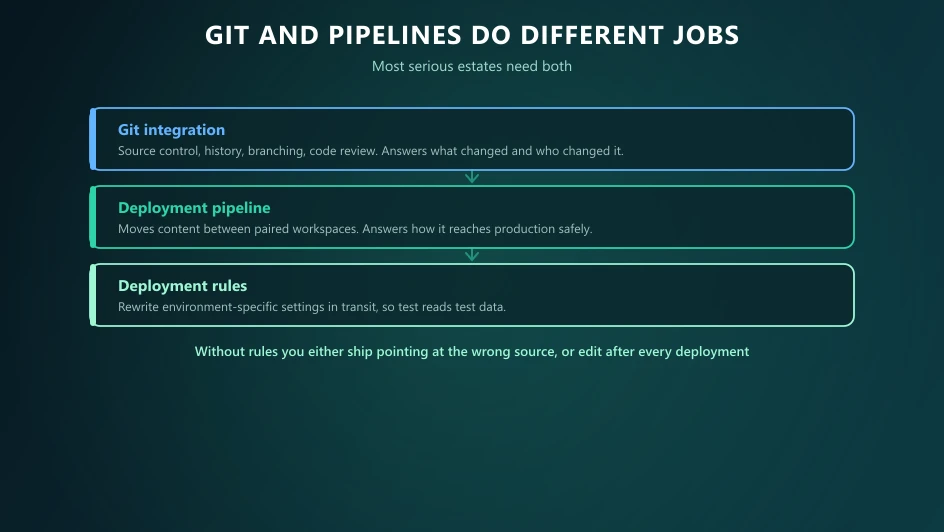
Git integration connects a workspace to a repository. It gives you version history, branching, code review and a definition of your content that lives outside Fabric. It answers what changed, when, and who changed it - and it lets you recover from a mistake.
Deployment pipelines connect paired workspaces representing stages. They compare content between stages, deploy selected items, and apply rules so environment-specific settings change on the way through. They answer how content reaches production safely.
You can run either alone. Git without pipelines means promotion is manual. Pipelines without Git means no history and no code review. Our CI/CD guide covers the Git side in more depth.
Deployment Rules Are the Important Part
This is the mechanism people miss, and missing it is what makes early attempts frustrating.
When content moves from test to production, some settings must change - most obviously the data source a semantic model points at. Without rules, you either promote a model still reading test data, or you edit it after every deployment, which reintroduces exactly the manual step the pipeline was meant to remove.
Deployment rules rewrite those settings automatically during promotion: data source connections, parameter values, and similar environment-specific configuration.
Set them up when you create the pipeline, not later. A pipeline without rules trains people not to trust it.
How Many Environments?
Two is the realistic minimum - development and production. Enough to stop people editing what others are reading.
Three is the usual answer for anything business-critical. The middle stage is where validation happens against representative data, and where a stakeholder signs off before an audience sees it.
More than three is rarely justified outside large regulated estates, and each additional stage adds promotion overhead that someone has to maintain.
The test is not the number. It is whether a change can reach a reader without a human deciding it should.
Structure That Works
Pair environments with workspace governance - the two designs are really one design.
A pattern that holds up: workspaces named by domain and stage, such as "Finance [Dev]", "Finance [Test]", "Finance [Prod]", with a deployment pipeline linking the three. Consumers receive an app published from production and never see a workspace at all.
Development and test do not need production-scale capacity. A smaller pay-as-you-go capacity, paused outside working hours, is both cheaper and safer - it means a runaway development job cannot throttle live reporting. See capacity administration.
What the Pipeline Will Not Do For You
Three things need deliberate handling:
Unsupported item types. Coverage is broad and has widened over time, but not everything is supported and the list changes. Check current documentation for the item types you actually use, and write down a manual step for anything that is not covered - otherwise it gets forgotten at release.
Data. Pipelines move content definitions, not data. Test environments need their own data strategy, whether that is a subset, a copy, or shortcuts to shared sources.
Update, 29 September 2026: Microsoft announced at FabCon Europe 2026 deployment plans, now in preview: a workspace item that sets the exact deployment order on a visual canvas, with YAML as the source of truth, and can run notebooks, pipelines, copy jobs, Dataflow Gen2 items and data functions before or after deployment - for example, hydrating a lakehouse before deploying a warehouse that depends on it. Microsoft says the same plan applies across Git integration and deployment pipelines, and a failed step stops the plan before dependent items deploy. The bulk export and import item definition APIs are now generally available too, moving many definitions in one call and updating references for the destination workspace.
Decisions. A pipeline makes promotion safe and repeatable. It does not decide whether something is ready. That still requires someone to look.
Getting There From One Workspace
If you are running everything in a single workspace today, you do not need a big-bang restructure.
1. Create a production workspace and move the content people actually read into it. 2. Keep the existing workspace as development. 3. Pair them in a pipeline and configure deployment rules. 4. Publish an app from production and move consumers onto it. 5. Add a test stage when the estate justifies it. 6. Add Git integration once the promotion path is stable.
Each step is independently useful, which means you can stop after step four and still be substantially better off than you started.
Where Solv Systems Comes In
Environment strategy is one of those things nobody asks for by name. Clients ask for a platform, and then two months later ask why a change broke a live report.
We set this up as part of the build rather than after the incident: workspace and environment structure, deployment pipelines with rules configured, Git integration where the team will use it, and capacity arranged so lower environments cannot disturb production. It is unglamorous, it takes days rather than weeks, and it is the difference between an estate people trust and one they are nervous about.
Sources and Further Reading
- Fabric deployment pipelines
- Fabric Git integration
- Microsoft Fabric documentation
- Build, deploy, and govern Microsoft Fabric at scale
Frequently asked
A managed way to move content between paired workspaces representing development, test and production. It tracks what differs between stages and deploys selected items, applying deployment rules so environment-specific settings such as data source connections are rewritten on the way through.
They solve different problems and most serious estates use both. Git integration gives you source control, history and branching for the definition of your content. Deployment pipelines move content between environments. Git answers what changed and who changed it; pipelines answer how it reaches production.
Rewriting settings that must differ per environment - most commonly the data source a semantic model points at, so the test copy reads test data rather than production. Without rules you either deploy content pointing at the wrong source, or you edit after every deployment, which defeats the purpose.
Two is the realistic minimum, and three is the usual answer for anything business-critical. What matters is that nobody develops directly in the workspace people are reading from. A single-workspace estate will eventually publish a broken report to an audience mid-afternoon.
Most item types are supported and coverage has broadened over time, but not everything, and support changes - check current documentation for the item types you rely on rather than assuming. Anything unsupported needs a documented manual step so it does not get forgotten at release.
Development and test do not need production-scale capacity. A common arrangement is a reserved production capacity plus a smaller pay-as-you-go capacity for lower environments, paused outside working hours - which also stops a runaway development job throttling live reporting.