In Short: Which F SKU Do You Need?
Not the one your data volume suggests. Fabric capacity is consumed by activity, not storage: how often you refresh, how many people query at once, and how efficiently the workloads are written. Two organisations with identical data sizes routinely need SKUs two tiers apart. The reliable method is to run real workloads on pay-as-you-go for two to four weeks, read the metrics, then reserve what the data supports.
Why Data Volume Is the Wrong Starting Point
The first question most people ask is "how much data do we have?", because that is how on-premises servers were sized. It is close to irrelevant here.
Storage in OneLake is billed separately and cheaply. What draws on capacity is work: a pipeline running, a notebook executing, a warehouse query resolving, a report rendering. A ten-terabyte archive that nobody touches consumes almost nothing. A fifty-gigabyte model refreshed every fifteen minutes and queried by two hundred people all morning consumes a great deal.
So the sizing question is really: how much work will happen, and when?
What Actually Drives Consumption
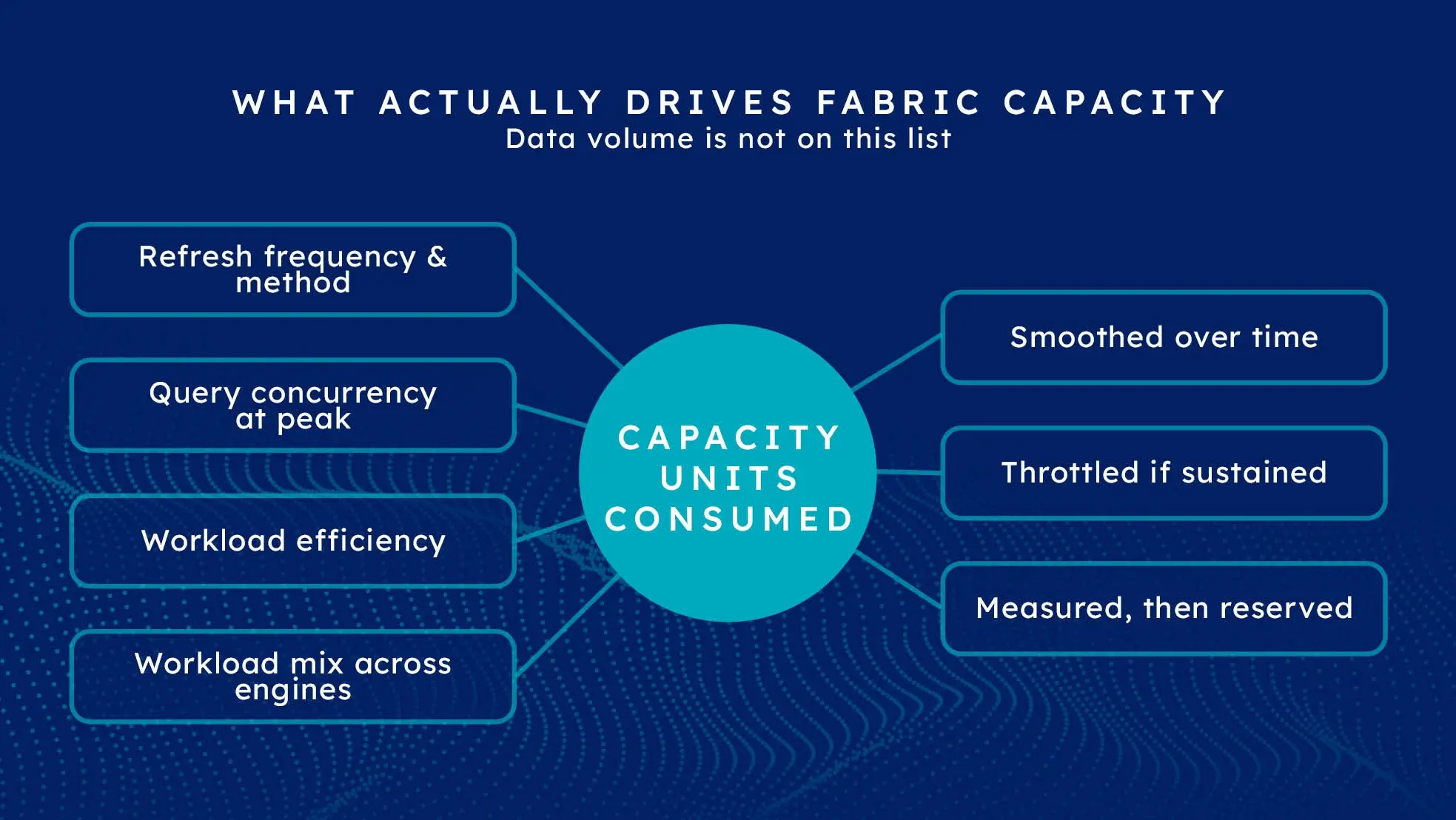
Four things, in rough order of impact:
Refresh frequency and method. A full daily refresh of a large model is expensive. The same model on incremental refresh is a fraction of it. Moving from four-hourly to hourly refresh does not add 25% - it can add considerably more, because each run carries fixed overhead.
Query concurrency. Not how many users exist, but how many are active simultaneously. Two hundred people who open a dashboard once a week are a lighter load than thirty analysts querying continuously from nine to eleven each morning. Concurrency peaks size your capacity; averages mislead.
Workload efficiency. This is the variable nobody budgets for and the one that most often decides whether an F16 is comfortable or throttled. An inefficient semantic model, a query scanning far more than it needs, or a pipeline reprocessing unchanged data can multiply consumption several times over for the same business output.
Workload mix. Spark notebooks, warehouse queries and Power BI rendering all draw from the same pool. An estate doing all three at once needs more headroom than one doing only reporting.
How Smoothing and Throttling Actually Work
This is the part that makes Fabric capacity behave differently from a server, and misunderstanding it produces both over-buying and nasty surprises.
Fabric does not fail the moment you exceed your capacity. It smooths consumption over time, spreading the cost of operations across a window so that short bursts are absorbed rather than rejected. Background operations such as scheduled refreshes are smoothed over a long window; interactive operations over a much shorter one.
When sustained demand exceeds what the capacity can smooth, you hit throttling: operations are delayed, and in the worst case rejected, until consumption falls back into range.
Two consequences worth internalising:
- Going over can cost money - check the overage setting. Without paid overflow, exceeding a capacity costs you performance, not budget, and the financial risk is over-buying. Capacity overage (generally available since September 2026) bills excess usage at three times the pay-as-you-go rate, and Microsoft's documentation is inconsistent on whether it is on by default - Learn calls it opt-in but also says it "is enabled by default when you create a Fabric capacity" - so check each capacity. Its 24-hour threshold is "a spending threshold, not a hard spending cap". On-demand billing (coming soon) adds billed compute behind spend limits. See capacity overage explained.
- Short spikes are fine. You do not need to size for your absolute peak second. You need to size so that sustained demand fits.
A Method That Works
1. Start one tier below instinct, on pay-as-you-go. Undersizing is visible within days and trivially fixed by scaling up. Oversizing is invisible - you simply pay for headroom, potentially for a reserved year.
2. Run genuinely representative workloads for two to four weeks. Not a demo. Real refresh schedules, real report usage, month-end included if that is your peak. A fortnight that excludes your busiest period tells you nothing useful.
3. Read the Capacity Metrics app. It shows consumption over time, which items are responsible, and whether throttling occurred. This is the single most useful artefact in the whole exercise and it is free.
4. Fix the obvious inefficiency before buying more. If one badly-written dataflow accounts for a third of consumption, the answer is not a bigger SKU. This step routinely saves a tier, which over a reserved year is real money.
5. Then reserve. Once the pattern is stable, a one-year reservation saves roughly 41% against pay-as-you-go. See the full F SKU price list, or compare both billing models for your SKU in the Fabric pricing calculator.
Update, 29 September 2026: Microsoft announced at FabCon Europe 2026 that this step is gaining an alternative. With on-demand billing, coming soon in preview, you can size the reserved capacity for sustained demand and move a bursty billing category outside it - Microsoft's example is Data Warehouse during a seasonal promotion - paying for the CU-hours it consumes behind a spend limit set over a rolling 24-hour window. Capacity overage, now generally available, handles rare peaks in a similar way, and a zero-provisioned F0 SKU is coming for workloads whose needs are not yet predictable. The measure-first method above still applies; see Fabric F0 and on-demand billing explained and our FabCon Europe 2026 recap.
The F64 Exception
One threshold overrides the sizing logic entirely. At F64 and above, report viewers no longer need individual Power BI Pro licences.
For an organisation with a large report audience, the arithmetic can invert the whole decision: a few hundred viewers on Pro licences can cost more per year than the jump from F32 to F64. Plenty of organisations run F64 for the licensing rather than the compute, and are right to.
Work this out before sizing on performance alone. Our licensing guide covers who needs what.
Development, Test and Pausing
Pay-as-you-go capacities can be paused, and a development capacity that runs only during working hours costs roughly a quarter of an always-on one. The common arrangement is a reserved production capacity plus a small pay-as-you-go capacity for development that pauses overnight and at weekends.
Reserved capacities cannot be paused, which is exactly why they suit steady production and not experimentation.
Common Sizing Mistakes
- Sizing on data volume. Covered above, and still the most frequent error.
- Reserving on day one. You do not yet know your consumption pattern. Reserve in month two or three, not week one.
- Sizing for the average. Capacity is sized by sustained peaks. Month-end usually sets the number.
- Ignoring the development estate. Building on the production capacity works until a bad notebook throttles live reporting.
- Treating the first number as permanent. Consumption changes as adoption grows. Re-read the metrics quarterly; that is what the app is for.
Where Solv Systems Comes In
Capacity sizing is part of every engagement our Microsoft Fabric consultants deliver, and we run it as a standalone review for organisations who have already built the platform and suspect they are on the wrong tier.
The work is unglamorous: instrument the estate, run representative load, read the metrics honestly, fix the inefficiency that is inflating consumption, and only then recommend a SKU and a reservation. It frequently ends with a recommendation to buy less than the client expected, which is the outcome that makes the exercise worth running. Once the capacity is running, our guide to Fabric capacity administration covers keeping it healthy.
Sources and Further Reading
- Fabric smoothing and throttling
- Fabric Capacity Metrics app
- Build, deploy, and govern Microsoft Fabric at scale
Frequently asked
Not from data volume, which is the input most people reach for first. Capacity consumption is driven by how often you refresh, how many people query concurrently, and how efficiently the workloads are written. The reliable method is to run real workloads on a pay-as-you-go capacity for two to four weeks, read the Capacity Metrics app, then reserve the SKU the measurements support.
A capacity unit, or CU, is the unit of compute a Fabric capacity provides. An F2 provides 2 CUs and each SKU up the range doubles the previous one, so an F64 provides 64. Every workload - pipelines, notebooks, warehouse queries, Power BI rendering - draws from the same pool.
Fabric smooths usage over time rather than failing instantly, so short bursts are absorbed. Sustained overuse leads to throttling, where operations are delayed or rejected until consumption falls back within the capacity. Without capacity overage, going over costs performance, not money. With it, excess usage that would otherwise be throttled is billed at three times the pay-as-you-go rate against a threshold that is not a hard cap - and Microsoft's documentation is inconsistent on whether overage is enabled by default, so check each capacity.
Start smaller than instinct on pay-as-you-go. Undersizing shows up quickly and clearly in the metrics, and scaling up is a simple change. Oversizing is invisible - you simply pay for headroom you never use, often for a year if you reserved it.
Barely, at the compute level. Storage in OneLake is billed separately and cheaply. What consumes capacity is activity: refreshing, querying, transforming. A large but rarely-touched dataset costs little; a small dataset refreshed every fifteen minutes and queried by 200 people costs a great deal more.
Not usually. Reservations save meaningfully but lock you in for a year, and most organisations do not know their real consumption pattern on day one. The common approach is pay-as-you-go while the platform is being built and measured, then reserve once the workload pattern is stable.