In Short: Fabric Apps Come to Power BI Pro
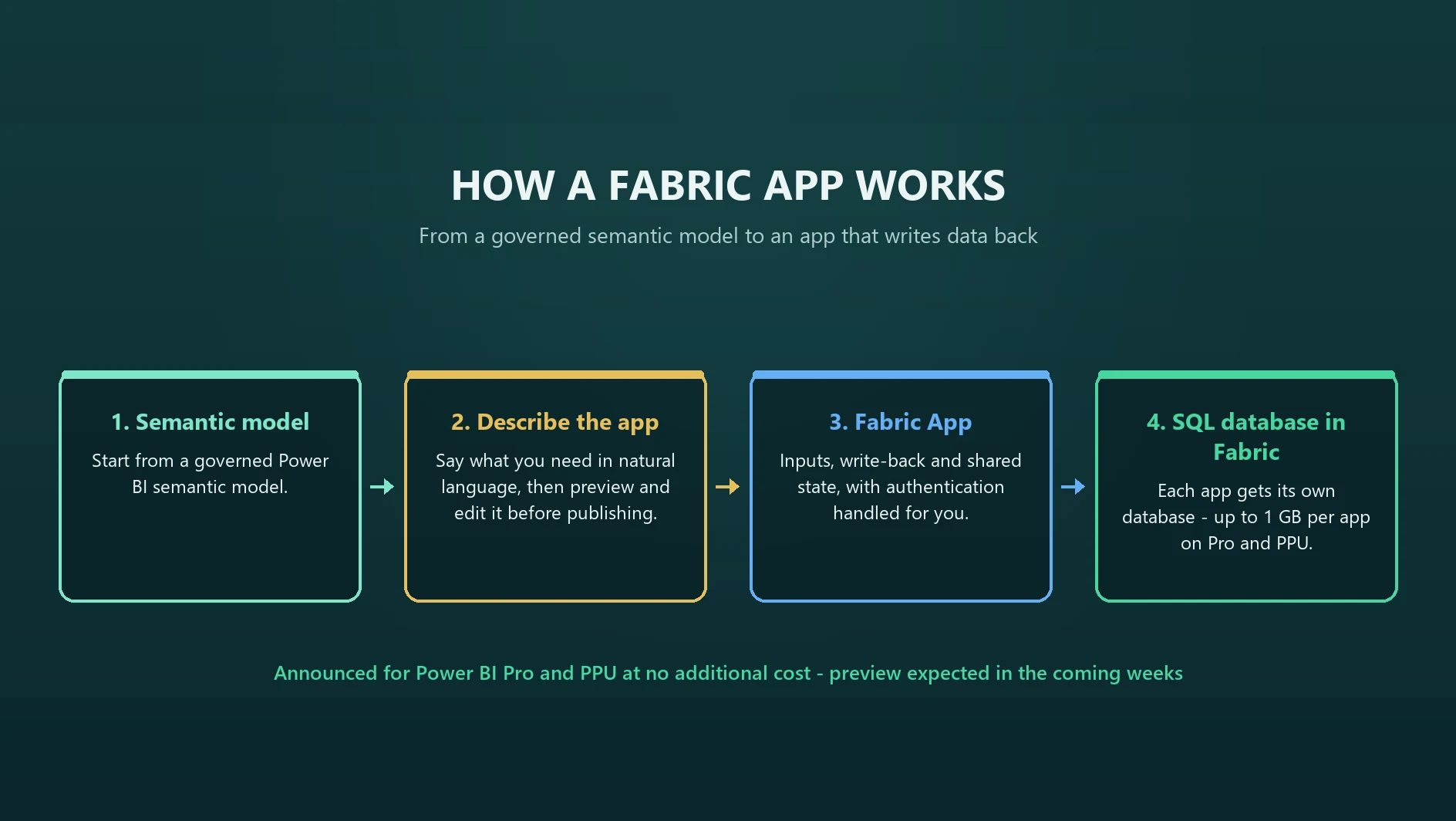
Microsoft announced at FabCon Europe 2026 (29 September 2026) that agentic app creation is coming to Power BI Desktop, powered by Fabric Apps. Starting from a trusted semantic model, you describe the application you need in natural language, generate it, preview and edit it, and publish it to Microsoft Fabric. The apps can accept inputs, write back data, preserve shared state and support operational workflows.
The licensing part is the headline for most organisations: Microsoft says apps in Power BI will be available in preview to Power BI Pro and Premium Per User customers, not only Fabric capacity customers, and that Pro and PPU customers get Fabric Apps and Fabric Database capabilities "at no additional cost" - "up to 1 GB per app". It is not available yet. This post covers what was announced, its status, how it relates to Rayfin and Power Apps, and what to govern first. For everything else from the week, see our FabCon Europe 2026 recap.
What Microsoft Announced
Arun Ulag's FabCon post describes the pattern Power BI has always followed - analysts model data, build reports, publish dashboards - and positions this as the next step: building tools, workflows and applications directly from the data. The flow he describes:
- Start from a semantic model you already trust
- Describe the application you need in natural language
- Preview and edit it in real time
- Publish it to Microsoft Fabric, rather than starting from a blank canvas
The resulting applications can "accept inputs, write back data, preserve shared state, and support operational workflows". Under the hood, the experience uses Fabric Apps "to provide each application with a SQL database in Fabric, authentication, and security". Microsoft also says that as an application grows, users can expand it and hand it off to developers and IT teams without rebuilding it.
Mohammad Ali's Power BI post adds that Pro and PPU customers "will also have access to Fabric Database capabilities, enabling them to build applications that support both analytical and transactional scenarios", and Bogdan Crivat's analytics post states that "Fabric Apps will be included with Power BI Pro". Microsoft has also opened a Fabric apps gallery of examples from Microsoft and the community.
Status and Timing: Two Different Phrases
The sources use different timing language, and both are worth stating precisely:
- Arun Ulag's post: apps in Power BI "will be available in preview in the coming weeks" to Pro, PPU and Fabric capacity customers
- Mohammad Ali's Power BI post: the experience "will be available for Power BI Desktop users in the coming months"
Read together, the safe position today is: announced, not yet available, arriving first as a preview. We would not plan a rollout date around either phrase until the preview actually appears in Desktop and the documentation lands.
Two further points on the allowance. "Up to 1 GB per app" is Microsoft's wording for the Fabric Apps and Fabric Database capabilities included for Pro and PPU; the announcement does not say what happens beyond it, and no separate pricing has been published. And Fabric capacity customers can, in Microsoft's words, "extend these apps with other Fabric workloads". The full per-licence picture is in our Power BI licensing guide for 2026.
How This Relates to Rayfin
If you read our explainer on what Rayfin is, the pieces fit together like this. Fabric Apps is the governed application layer on Fabric - it launched in June 2026 and is in preview. Rayfin is the open-source SDK and CLI that, per Microsoft, lets "developers and coding agents build application backends and deploy them to Fabric as Fabric Apps". The new Power BI Desktop experience is another route onto the same Fabric Apps layer, aimed at Power BI creators rather than developers; Microsoft's Power BI post links its "apps in Fabric" wording straight to the Rayfin feature page.
So: two front doors, one destination. Developers work in code with Rayfin; Power BI creators describe the app in Desktop. Microsoft does not spell out in these posts exactly how the handoff from a Desktop-built app to a developer works in tooling terms, so wait for the documentation before designing a process around it.
The developer side moved on this week too. Microsoft announced connections to Fabric warehouses, SQL databases, lakehouses and Power BI semantic models without duplicating data, plus TypeScript backend functions, a secret store, PostgreSQL support, private-by-default access and built-in usage metrics. The September feature summary is specific about write-back: Fabric Apps can read and write Fabric SQL databases and warehouses, but lakehouse SQL analytics endpoints and semantic models are read-only. Write-back lands in a database rather than in the semantic model itself.
Fabric Apps or Power Apps?
Microsoft's announcements do not compare the two, so this is our view. Both build business applications; they start from different places.
Fabric Apps in Power BI fits when the app belongs next to the numbers: it starts from a semantic model, lives with the reporting, and mainly exists to let people act on what they see. Data lands in a SQL database in Fabric, close to the analytics estate.
Power Apps fits when the app is a process in its own right: multi-step workflows on Dataverse, forms that feed several systems through connectors, mobile and field capture, and apps that lean on Power Automate. It is also the mature, generally available option today, with an established governance model. Our guide to clearing the IT backlog with Power Apps covers that ground.
A quick test: if the first screen of the app is a report, look at Fabric Apps; if it is a form, look at Power Apps.
Where It Could Earn Its Place
The use cases that suit write-back on a semantic model are the ones currently handled by exporting to Excel and emailing it back:
- Budget and forecast input - managers enter or adjust figures against the same model the reports use, with shared state so everyone sees the latest submission
- Data corrections - flag or correct a mapping, a customer classification or a missing attribute where it is spotted, rather than raising a ticket
- Approvals on reported numbers - sign-off on a month-end figure, a commission run or a stock adjustment, recorded rather than implied
- Commentary and targets - variance explanations and target-setting captured next to the figures they explain
Each depends on a well-built model underneath. If yours needs work first, start with what a semantic model is and why it matters.
Governance Cautions
Putting write-back in the hands of every Pro user is powerful and easy to get wrong. Before the preview arrives:
- It is a preview. Keep business-critical processes on generally available tools until it is not.
- Decide who can build and publish. Check which tenant settings govern app creation when the preview lands, and treat apps with the same care as workspace governance.
- Own the data, not just the app. Every app gets its own SQL database. Someone must own what is written to it, how long it is kept, and how it flows back into reporting - otherwise you have built a new spreadsheet with better authentication.
- Review sharing carefully. The September summary notes that sharing a Fabric App can grant recipients access to related items the app depends on.
- Watch the 1 GB line. Fine for inputs and corrections; not a place to replicate large datasets.
Where Solv Systems Comes In
Fabric Apps in Power BI will make app-building feel as easy as report-building, which is exactly why the groundwork matters: a trusted semantic model, clear ownership, and a view on which requests belong in Fabric Apps and which in Power Apps. Our Power BI consulting team can help you pick the first app worth building and get the model and governance ready for the preview.
Sources and Further Reading
- FabCon and SQLCon 2026 in Barcelona: Building the data foundation for Microsoft Copilot and agents
- Power BI's next chapter: The evolution of business intelligence
- Bringing governed analytics into the flow of work: Fabric Analytics at FabCon Europe 2026
- Fabric September 2026 Feature Summary
- Fabric apps gallery
Frequently asked
Microsoft announced at FabCon Europe 2026 (29 September 2026) a new app building experience in Power BI Desktop, powered by Fabric Apps. Starting from a semantic model, you describe the app in natural language, preview and edit it, and publish it to Microsoft Fabric. The apps can accept inputs, write back data, preserve shared state and support operational workflows.
Not according to the announcement. Microsoft says apps in Power BI will be available in preview to Power BI Pro and Premium Per User customers as well as Fabric capacity customers, and that Pro and PPU customers get Fabric Apps and Fabric Database capabilities at no additional cost, up to 1 GB per app.
Not yet. Microsoft's FabCon post says apps in Power BI will be available in preview in the coming weeks; the Power BI blog says the Power BI Desktop experience will be available in the coming months. Fabric Apps itself, the developer route built with the Rayfin SDK, is already in preview.
Fabric Apps is the governed application layer on Microsoft Fabric. Rayfin is the open-source SDK and CLI that developers and coding agents use to build app backends and deploy them to Fabric as Fabric Apps. The Power BI Desktop experience is a natural-language route onto the same Fabric Apps layer.
Use Fabric Apps when the app lives next to a Power BI semantic model and mainly captures inputs against it: forecasts, corrections, approvals on reported numbers. Use Power Apps for process applications built on Dataverse and connectors, mobile and field capture, and apps that need Power Automate orchestration.
Decide who may create and publish apps, where they are published, who owns each one and the data it writes, and how that data feeds back into reporting. Review sharing, because sharing a Fabric App can also grant access to the items it depends on, and treat anything in preview as unsuitable for business-critical processes.