In Short: Why Do Power BI Refreshes Fail?
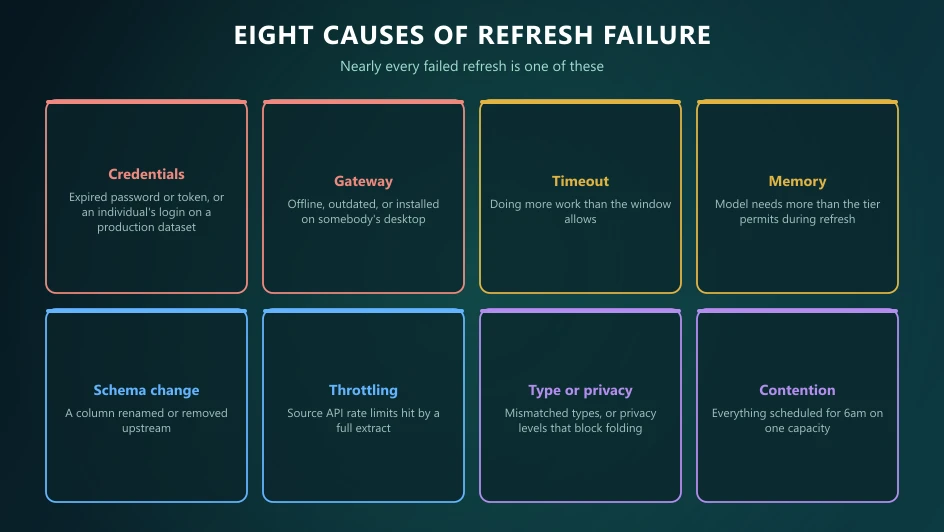
Eight causes account for nearly all of them: expired credentials, gateway problems, query timeouts, memory limits, source schema changes, source-side throttling, privacy or data-type conflicts, and refresh contention. The error message usually identifies which once you know the vocabulary. The durable fix is almost never "retry" - it is removing the condition that made the refresh fragile.
Diagnose Before You Fix
The most common mistake is restarting a failed refresh and hoping. It works often enough to feel like a fix, which is exactly why estates accumulate refreshes that fail once or twice a week forever.
Start in the refresh history for the dataset. It gives you the failure message, the duration before failure, and the pattern - and the pattern matters as much as the message. A refresh that fails at the same time each day is contending with something. One that fails after exactly the same duration is timing out. One that started failing on a specific date had something change under it.
The Eight Causes
1. Expired or invalid credentials
The most frequent cause by a wide margin, and the easiest to prevent. A service account password expires, an OAuth token needs reauthorisation, or someone leaves and their personal credentials go with them.
Fix: re-enter credentials on the dataset. Prevent: use service accounts with non-expiring passwords, owned by a team rather than a person, and never store an individual's credentials on a production dataset.
2. Gateway offline, outdated or misconfigured
On-premises sources refresh through the on-premises data gateway. If the machine hosting it reboots, the service stops, or the version falls too far behind, refreshes fail.
Fix: confirm the gateway is running and current. Prevent: install it on a server rather than someone's desktop, run it as a clustered pair so one node can fail, and keep it updated.
3. Query timeout
The refresh takes longer than the allowed window. Time limits differ by licence tier and are considerably stricter on shared capacity.
Fix in the moment: reduce what the refresh does. Fix properly: incremental refresh so you load days rather than years, and move transformation upstream into the source or a Fabric pipeline.
4. Memory limit exceeded
Often surfaces as a resource-exceeded error. The dataset needs more memory during refresh than the tier allows - and refresh needs meaningfully more than the model's resting size.
Fix: shrink the model. Remove unused columns, drop high-cardinality text you never group by, split datetime into date and time. Then: incremental refresh. Buying capacity works but is the expensive answer, and an inefficient model will simply grow into the new tier.
5. Source schema changed
Someone renamed a column, changed a data type, or removed a field. Power Query has the old shape hardcoded in its steps and fails.
Fix: update the query. Prevent: select columns explicitly rather than relying on position, avoid steps that break on unexpected columns, and where you control the source, put a view in front of the table so the contract is stable.
6. Source-side throttling
SaaS APIs enforce rate limits. A full extract of a large object will hit them, and the failure often looks like a generic connection error rather than an obvious quota message.
Fix: load incrementally against a modified timestamp, use batch endpoints, and stagger schedules. Our HubSpot and Business Central guides cover this per source.
7. Privacy levels and data type conflicts
Combining sources with incompatible privacy levels blocks folding and can fail outright. Type mismatches - a column that is text in one system and numeric in another - fail at load.
Fix: set privacy levels deliberately rather than leaving defaults to collide, and enforce types explicitly early in the query rather than letting them be inferred.
8. Refresh contention
Several large refreshes scheduled at the same time on the same capacity queue and time out. This is the classic cause of "it fails on Mondays" - because everything got scheduled for 6am.
Fix: stagger schedules deliberately. On Fabric, watch consumption in the Capacity Metrics app to see what is contending, and read our capacity sizing guide if throttling is routine.
The Pattern Behind Most of Them
Look at that list and a theme emerges: most refresh failures are architectural, not operational. Credentials tied to a person, transformation done in Power Query instead of upstream, full loads where incremental would do, schedules set by whoever created each dataset.
Estates that refresh reliably tend to share four properties: data transformed before it reaches Power BI, incremental loading on anything large, service accounts owned by teams, and schedules planned centrally rather than accumulated.
Make Failures Visible
The worst version of this problem is not the failure - it is the finance director discovering it, in a meeting, from a number that looks wrong.
Configure failure notifications to reach a monitored inbox or Teams channel rather than the dataset owner's personal email. Anyone relying on a report should be able to see when it last refreshed successfully. And log failures over time: three failures a month on the same dataset is a design problem, not bad luck.
Where Solv Systems Comes In
We are usually called in after the third month of weekly failures, and the work is rarely the refresh itself. It is moving transformation upstream, introducing incremental loading, replacing personal credentials with governed service accounts, and putting monitoring in place so problems surface before the business finds them.
If your refreshes fail often enough that someone checks them each morning, that is a fixable design problem rather than the cost of doing business.
Sources and Further Reading
Frequently asked
Most failures trace to one of eight causes: expired credentials, a gateway that is offline or outdated, a query timeout, exceeding the memory limit for your licence tier, a source schema change, source-side throttling, a data type or privacy-level conflict, or simply too many refreshes queued against the same capacity. The error message usually points at one of these once you know what to look for.
Refreshes are subject to time limits that differ by licence tier, and shared capacity is considerably stricter than dedicated capacity. Rather than memorising a number, treat a timeout as a signal that the refresh is doing more work than it should - the durable fix is incremental refresh or moving transformation upstream, not asking for more time.
Check the gateway is online and running a current version, then confirm the data source credentials stored against it are still valid. Gateway failures are more often a stale credential or an expired service account password than a genuine connectivity problem.
Because Desktop uses your local credentials and network, and the Service does not. The Service needs its own stored credentials, and any on-premises source needs a gateway. A refresh that only works locally almost always means one of those two is missing or misconfigured.
The dataset needs more memory than your licence tier allows during refresh, which typically means the model is too large, the transformations are too heavy, or both. Reducing columns, applying incremental refresh, and pushing transformation upstream all help - increasing capacity is the expensive answer, not the first one.
Treat reliability as a design property. Load incrementally rather than fully, transform upstream rather than in Power Query, use service accounts whose passwords do not expire silently, stagger refresh schedules so they do not contend, and alert on failure so you find out before the business does.