In Short: Bringing Business Central Data into Fabric
Dynamics 365 Business Central holds your core financial, inventory, purchasing, and sales data. Microsoft Fabric is where you build your unified analytical data estate. The gap between them - if left unaddressed - means your BI team is either maintaining separate pipelines to Business Central or leaving that ERP data out of your analytics altogether.
Integrating Business Central with Fabric puts your ERP data alongside CRM, operational, and external data in OneLake, enabling the unified analytics and AI capabilities that source-by-source reporting cannot provide.
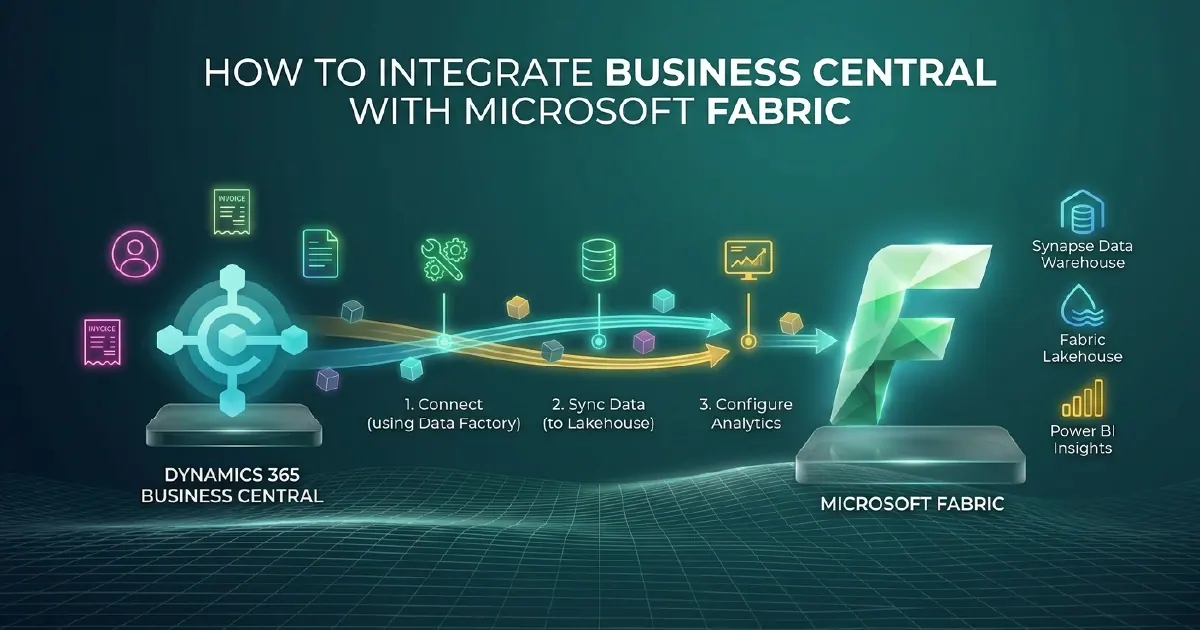
There are three primary integration paths: Dataverse link (if your Business Central is connected to Dataverse), native Fabric pipeline with the Business Central OData API, and Azure Data Factory. The right choice depends on your Business Central configuration.
Update, 29 September 2026: At FabCon Europe 2026, Microsoft announced "deeper integration with Microsoft Dynamics 365 Business Central", and its follow-up posts say what that is: Mirroring for Dynamics 365 Business Central, which will let you bring selected Business Central tables and company data directly into OneLake, with built-in monitoring (an overview and detailed logs) to track integration health and troubleshoot issues. The Fabric Data Factory announcement lists it as coming soon, so it is not available yet and the three options below remain the routes available today. When it arrives, weigh it against Option 1 before building new pipelines; our guide to mirroring in Fabric explains how mirroring works.
Option 1: Dataverse-Linked Integration (Preferred)
If your Business Central environment is linked to Microsoft Dataverse, Fabric's native Dataverse connector provides the cleanest integration path. Dataverse exposes Business Central entities as tables that Fabric pipelines can query directly, with change tracking built in.
How it Works
Fabric's Dataverse connector queries Dataverse tables using the OData API. You configure a pipeline that reads Business Central entities - customers, vendors, invoices, purchase orders, inventory, and general ledger entries - into your Bronze Lakehouse layer. Incremental load uses Dataverse's change tracking timestamps, so only changed records are extracted on each run.
Authentication uses a Microsoft Entra ID service principal, consistent with your wider Fabric governance framework.
Limitations
- Requires Business Central to be connected to Dataverse (standard for Business Central online, but not always configured)
- Not all Business Central entities are surfaced through Dataverse by default
- Dataverse API throttling limits apply for high-volume extractions
Option 2: Business Central OData API with Fabric Pipelines
Business Central exposes its own OData v4 API, which Fabric pipelines can query directly without Dataverse. This is the right path if your Business Central is not linked to Dataverse, or if you need entities not surfaced through it.
You create a Fabric pipeline with a REST connector pointing at the Business Central OData API endpoint, authenticated via a Business Central service-to-service application registration in Microsoft Entra ID. Incremental loads filter on lastModifiedDateTime.
Standard Entities to Prioritise
- General ledger entries (financials)
- Customer and vendor ledger entries (AR/AP)
- Sales and purchase invoice headers and lines
- Item ledger entries (inventory movements)
- Dimensions (cost centres, departments, projects)
- Chart of accounts
For high-volume entities such as general ledger entries or item ledger entries, partitioned extraction by date range or company is recommended to avoid pipeline timeouts.
Option 3: Azure Data Factory
ADF has a native Dynamics 365 connector that can read from Business Central, delivering data to OneLake or ADLS Gen2. For organisations with existing ADF pipelines and a preference for ADF orchestration, this is viable. However, for organisations starting fresh with Fabric, the native Fabric pipeline approach is simpler and avoids managing a second orchestration platform.
Medallion Architecture for Business Central Data
Apply the same Bronze-Silver-Gold pattern regardless of integration method:
Bronze: Raw Business Central data as extracted, with source timestamps and extraction metadata. Never transform at Bronze - preserve the raw state for auditability.
Silver: Cleansed and conformed data. Handle nulls, standardise date formats, and resolve Business Central's company-based multi-tenancy by consolidating entities across multiple companies into unified dimension tables.
Gold: Business-logic-enriched tables. Apply your financial reporting logic - calculate accruals, apply dimension hierarchies, join Business Central financials with other sources such as CRM revenue data or operational costs.
Power BI Reporting on Business Central Data
Once Business Central data is in your Fabric Gold layer, Power BI semantic models built on Direct Lake provide the reporting layer. Standard use cases:
- Financial performance dashboards (P&L, balance sheet, cash flow)
- Accounts receivable and payable ageing
- Inventory turnover and stock level monitoring
- Budget vs actual variance reporting
- Dimension-based cost centre and department performance
The advantage of building these reports on Fabric-managed data rather than directly on Business Central is that your financial reports share the same dimension tables as your CRM, operations, and HR reports - enabling cross-domain analysis that source-by-source BI cannot produce.
Our Microsoft Fabric team integrates Business Central with Fabric as part of data estate consolidation and analytics modernisation engagements.
Which Integration Option Should You Actually Choose?
The three options above are not equally good for equal situations. In practice the decision comes down to two questions: how fresh the data needs to be, and whether you already run Dataverse.
- Already on Dataverse, and daily data is enough - use the Dataverse link. It is the least code, the least maintenance, and Microsoft keeps it working across Business Central updates.
- No Dataverse, or you need specific tables it does not surface - use OData with Fabric pipelines. More control, more to maintain.
- Complex transformation or non-BC sources in the same flow - Azure Data Factory, though for most Business Central estates this is more machinery than the problem needs.
A reasonable default for mid-market finance teams: Dataverse link for the core financial entities, OData pipelines for the handful of tables it misses.
Business Central Gotchas Worth Knowing Before You Start
Four things reliably catch teams out on their first Business Central integration.
Dimensions are not columns. Business Central stores analytical dimensions as a separate structure rather than as fields on the transaction. If you extract the general ledger naively you get amounts with no department, project or cost centre attached. Dimension resolution belongs in your Silver layer and needs designing deliberately.
Deletions are quiet. Records removed in Business Central will not disappear from an incremental extract that filters on a modified timestamp - they simply stop being updated. Without a reconciliation step your lakehouse slowly accumulates rows the source no longer has.
Multi-company is the normal case. Most Business Central tenants hold several companies, and the company dimension has to be carried through every layer. Retrofitting it after the first company is live is painful; assume it from the start even if only one company exists today.
API throttling is real. Business Central enforces request limits, so a full extract of a large ledger will not complete as one greedy pull. Incremental loading against the modified timestamp with sensible page sizes is not an optimisation here - it is the only approach that finishes.
What Good Looks Like After Integration
The point of the exercise is not a copy of Business Central in a lakehouse. It is answering questions Business Central cannot answer alone: customer profitability once support and delivery costs are included, cash flow forecasting against a real sales pipeline, or margin by product line combining finance with operational data.
If the reporting after integration looks like the reports you already had in Business Central, the integration has not paid for itself yet. See breaking down data silos for the wider pattern. Running Odoo rather than Business Central? See our Odoo to Fabric integration guide.
Sources and Further Reading
- Dynamics 365 Business Central documentation
- Fabric Data Factory documentation
- Microsoft Fabric documentation
- Microsoft Purview
- FabCon and SQLCon 2026 in Barcelona: Building the data foundation for Microsoft Copilot and agents
- FabCon/SQLCon Barcelona 2026: What's new in Fabric Data Factory
Frequently asked
If your Business Central environment is linked to Microsoft Dataverse, the Fabric Dataverse connector is the preferred integration path - it provides native change tracking and Microsoft Entra ID authentication with no third-party tooling. If Dataverse is not configured, the Business Central OData v4 API with a Fabric REST pipeline connector is the standard alternative.
No. Business Central has its own OData v4 API that Fabric pipelines can query directly without Dataverse. Dataverse is the simpler integration when available, but the Business Central API supports the full range of entities and is appropriate for environments not linked to Dataverse.
The most commonly required entities are: general ledger entries, customer and vendor ledger entries, sales and purchase invoice headers and lines, item ledger entries, chart of accounts, and dimensions (cost centres, departments, projects). These form the foundation for financial performance, AR/AP, and inventory analytics.
Yes. For multi-company Business Central environments, the integration pipeline extracts from each company and lands data in Bronze with a company identifier column. Silver transformation then consolidates entities across companies into unified dimension and fact tables, enabling group-level reporting across multiple Business Central companies.
With incremental load using change tracking (Dataverse) or lastModifiedDateTime filters (Business Central API), pipelines can run every 15 to 30 minutes for near-real-time analytics. With Direct Lake semantic models, Power BI reports reflect each OneLake update without a separate scheduled refresh cycle.
Medallion architecture organises Business Central data in three layers in OneLake: Bronze (raw extracted data, unchanged from source), Silver (cleansed and conformed - nulls handled, dates standardised, companies consolidated), and Gold (business-logic-enriched tables ready for Power BI - financial measures applied, dimensions joined, cross-source data combined).