In Short: HubSpot Data in Your Unified Analytics Estate
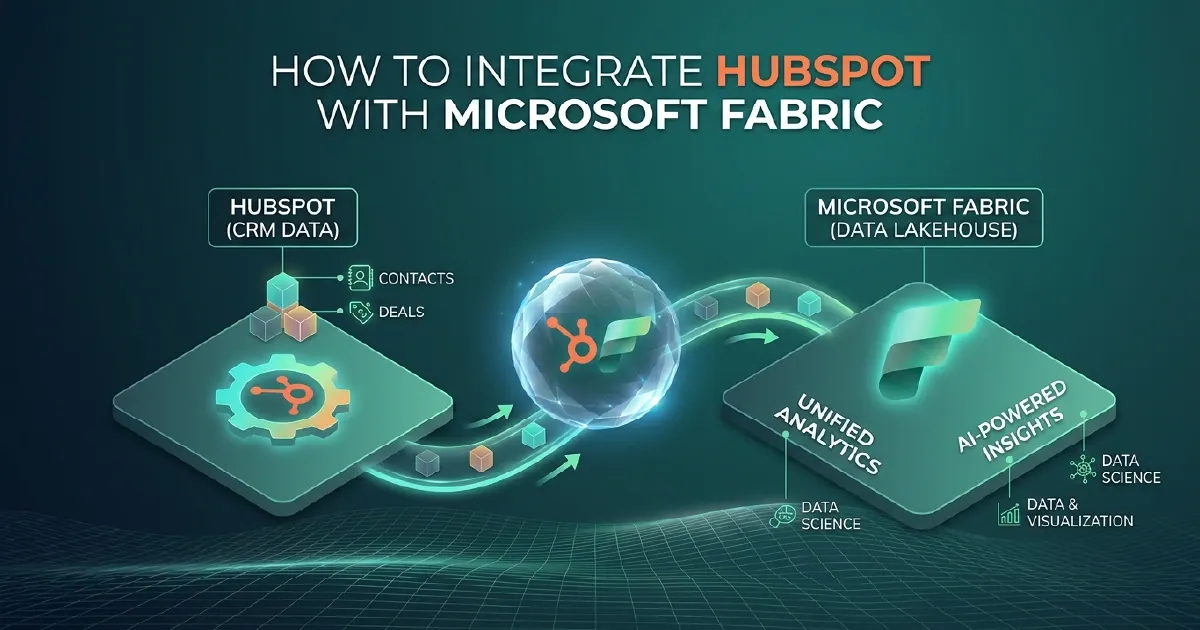
HubSpot is one of the most widely used CRM and marketing platforms. Microsoft Fabric is where organisations build their unified data estate. Without an integration between the two, sales and marketing data lives in HubSpot's own reporting tools - siloed from financial, operational, and product data that could give it full context.
Integrating HubSpot with Microsoft Fabric brings contacts, deals, companies, marketing campaigns, and engagement data into OneLake alongside your other business data - enabling revenue analytics that span the full customer journey from first marketing touch to invoiced revenue.
Integration Options
HubSpot does not have a native Microsoft Fabric connector, so the integration is built using one of three approaches: the HubSpot API with a Fabric REST pipeline, a third-party data connector platform, or Azure Data Factory.
Option 1: HubSpot API with Fabric REST Pipeline (Recommended)
HubSpot's v3 API provides access to all core CRM objects - contacts, companies, deals, tickets, engagements, and marketing emails. Fabric's REST connector queries the HubSpot API using a private app token for authentication.
The standard approach:
- Create a HubSpot private app with the scopes required for your integration (crm.objects.contacts.read, crm.objects.deals.read, marketing-email.read, and others as needed)
- Build a Fabric pipeline with REST connector pointing at the HubSpot v3 API endpoint
- Use HubSpot's cursor-based pagination and filter on the updatedAt property for incremental loads
- Land raw data in Bronze OneLake tables
- Apply Silver and Gold transformations
Rate limiting: HubSpot allows 100 API requests per 10 seconds for most endpoints. Design your pipeline to handle 429 responses with exponential backoff.
Option 2: Third-Party Connector Platform
Platforms like Fivetran, Airbyte, and Stitch have pre-built HubSpot connectors that handle pagination, rate limiting, schema changes, and incremental loading, delivering data to OneLake or ADLS Gen2. For organisations that want a managed connector with minimal pipeline maintenance, this is a pragmatic choice. The trade-off is additional platform cost and dependency on the vendor's coverage of HubSpot custom properties.
Option 3: Azure Data Factory
ADF's REST connector can query the HubSpot API with similar capability to the Fabric approach. For organisations with existing ADF pipelines, this adds HubSpot alongside other integrations in a consistent orchestration environment.
Core HubSpot Objects to Integrate
Prioritise these objects for maximum analytical value:
Contacts: Email addresses, lifecycle stages, lead source, persona, subscription status, and custom contact properties.
Companies: Account-level data - name, domain, industry, size, HubSpot owner, and lifecycle stage. The join between contacts and companies enables account-based analytics.
Deals: Pipeline stage, deal value, close date, deal owner, associated contacts and companies. The primary table for sales performance analytics.
Engagements: Calls, emails, meetings, and notes associated with contacts and deals. Enables sales activity analysis and pipeline velocity tracking.
Marketing emails: Campaign sends, opens, clicks, and unsubscribes. Combined with deal data, this enables marketing attribution analysis.
Line items: Products associated with deals, enabling product-level revenue analysis.
Medallion Architecture for HubSpot Data
Bronze: Raw HubSpot API responses in OneLake with extraction timestamp. HubSpot returns nested JSON (associations, properties objects) - preserve the raw structure for reprocessing.
Silver: Flattened and normalised tables. Unpack HubSpot's property structure into clean columns. Resolve associations by joining deals to companies and contacts via the associations API. Standardise date fields (HubSpot uses millisecond Unix timestamps in v1; ISO 8601 in v3).
Gold: Business-logic tables. Calculate deal velocity (average days from creation to close by stage), marketing attribution (first touch, last touch, linear across interactions), and pipeline coverage ratios. Join HubSpot deal revenue with financial system invoiced revenue for pipeline-to-revenue reconciliation.
Power BI Reporting on HubSpot Data
The most valuable reporting combines HubSpot CRM data with financial and operational data that HubSpot alone cannot provide:
- Pipeline vs revenue reconciliation: HubSpot closed-won deal value vs invoiced revenue from your ERP
- Marketing channel attribution: Revenue traced back through deal creation to the originating campaign or channel
- Sales rep performance: Deal volume, average deal size, and win rate by rep, cross-referenced with activity engagement data
- Customer lifetime value: HubSpot deal history joined with financial system repeat purchase data
- Lead-to-revenue cycle time: End-to-end funnel timing from first marketing touch through sales stages to closed revenue
Our Power BI consulting team and Microsoft Fabric practice build HubSpot analytics implementations that combine CRM data with financial and operational data for genuinely unified revenue reporting.
Incremental Loading and API Limits
HubSpot enforces daily API call limits that vary by subscription tier, which makes a full nightly extract of every object a poor design as soon as the portal has real volume behind it.
The workable pattern is incremental: filter on the last-modified property, keep a watermark per object, and only pull records changed since the previous run. Full refreshes get scheduled rarely - weekly or monthly - as a reconciliation safeguard rather than the primary load.
Batch endpoints matter too. Reading associations or properties one record at a time will exhaust your quota long before it exhausts the data.
Four Things That Catch Teams Out
Associations are a separate call. The link between a deal and its contacts, or a contact and its company, does not come down with the object itself. Modelling the relationships properly means retrieving associations explicitly and materialising them as bridge tables in Silver - and it is the part most first integrations skip, which is why their reporting cannot answer anything relational.
Custom properties drift. Marketing teams add properties continuously and rarely tell anyone. A pipeline with a hardcoded column list silently stops carrying new fields. Metadata-driven extraction that reads the property schema at runtime is materially more durable.
Deal stage history is not on the deal. The current stage is a property; how the deal moved through the pipeline lives in property history. Velocity and conversion analysis - usually the whole reason for the project - needs that history pulled deliberately.
Deleted and merged records need handling. HubSpot merges duplicate contacts routinely. Without reconciliation your lakehouse keeps both sides of every merge and quietly overstates contact counts.
The Reporting That Justifies the Work
HubSpot's own dashboards are perfectly good at HubSpot questions. The integration earns its keep on questions HubSpot cannot see: true customer acquisition cost including delivery, pipeline weighted against actual finance data, or retention by acquisition channel over multiple years.
If you are only rebuilding HubSpot reports in Power BI, the project is not yet paying for itself. If you are weighing a CRM vendor's own data platform against Fabric, our Salesforce Data Cloud vs Microsoft Fabric comparison sets out the trade-offs. The same pattern extends to work-management data - see our monday.com to Fabric guide.
Sources and Further Reading
- HubSpot API reference
- Fabric Data Factory documentation
- Microsoft Fabric documentation
- OneLake overview
Frequently asked
Not natively. HubSpot integration with Microsoft Fabric is built using the HubSpot v3 API with Fabric's REST pipeline connector, a third-party connector platform such as Fivetran or Airbyte, or Azure Data Factory's REST connector. The HubSpot v3 API provides full access to all CRM objects and custom properties.
The highest-value objects for analytics are: contacts (lead and customer data), companies (account-level data), deals (pipeline and revenue), engagements (sales activity - calls, emails, meetings), marketing emails (campaign performance), and line items (product-level revenue). Prioritise these before custom objects.
HubSpot allows 100 API requests per 10 seconds for most endpoints. Design your Fabric pipeline to handle 429 rate limit responses with exponential backoff retry logic. For large historical loads, spread extraction across multiple pipeline runs rather than loading all history in a single run.
Yes. HubSpot custom properties appear in the contacts, companies, deals, and other object API responses alongside standard properties. Your Silver transformation layer should include custom properties in the flattened schema. Document custom property names and expected values in your Fabric metadata layer for discoverability.
For sales and marketing analytics that inform daily team decisions, pipeline runs every 30 to 60 minutes are typical. HubSpot's updatedAt filter enables incremental loads that only fetch changed records, keeping run times short even at high frequency. With Direct Lake semantic models, Power BI reports reflect each pipeline run without a separate scheduled refresh.
The HubSpot v3 API is the current standard and returns properties as flat JSON - easier to process than the v1 property wrapper format. It supports cursor-based pagination scalable for large object sets and provides unified access to contacts, companies, deals, engagements, and associations. Build new Fabric integrations on the v3 API as v1 endpoints are deprecated.