In Short: Fabric From the Terminal
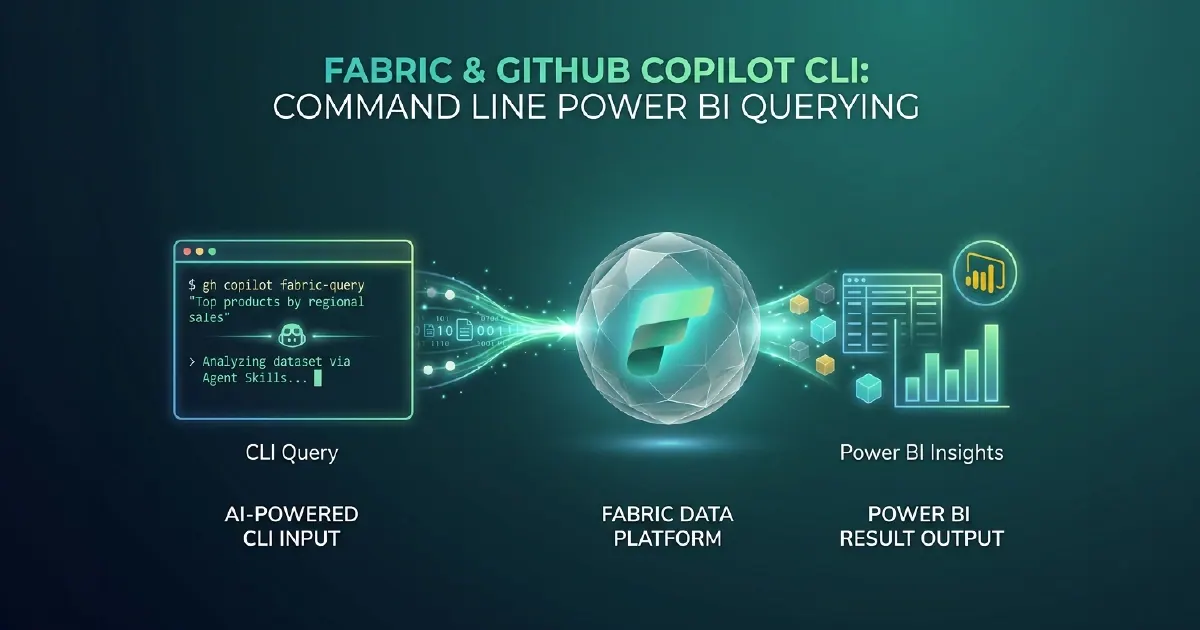
Agent skills for Microsoft Fabric are developer-focused extensions for the GitHub Copilot CLI that allow engineers to query Power BI datasets, explore Fabric schemas, trigger pipeline runs, and manage workspace assets using natural language - without leaving the terminal or opening a browser.
For engineering teams that live in the terminal and treat browser-based data tools as context-switching interruptions, Fabric agent skills are a meaningful change to how Fabric development and data exploration works.
If you are weighing up what this means for your own estate, our Microsoft Fabric consulting services and implementation cost guides for the UK, US and South Africa are a practical starting point.
What Agent Skills Are
Agent skills (also called extensions or plugins in the GitHub Copilot context) are defined capability sets that GitHub Copilot can invoke when a developer's prompt requires specific actions. A Fabric agent skill defines a set of operations - query a dataset, list workspace assets, check pipeline status, generate a DAX measure - that Copilot triggers when asked in natural language in the CLI.
The key distinction from a conventional CLI tool is intent understanding. A developer typing "show me the revenue measures in the Sales semantic model" does not need to know the exact XMLA query, the dataset ID, or the Fabric workspace endpoint. The agent skill interprets the request, constructs and executes the appropriate query, and returns results in a readable format.
This means less time spent translating mental intent into CLI syntax and more time spent on the actual work.
What Fabric Agent Skills Enable
Schema and Data Exploration
Engineers can query OneLake table schemas, browse Lakehouse contents, list semantic model measures and relationships, and run table previews from the terminal. Schema exploration tasks that previously required opening Fabric Studio or Power BI Desktop become terminal operations that stay within the development environment.
DAX and SQL Generation
Natural language prompts generate DAX measures or SQL queries against your Fabric data schema, using the actual column names and measure definitions from your semantic model. "Write a DAX measure for rolling 12-month revenue using our revenue measure" generates a correct expression - not a generic template that requires manual substitution.
Engineers can refine the generated code in the same session, test it, commit it to their repository, and deploy through their CI/CD pipeline without context-switching.
Pipeline Monitoring and Control
Data engineering teams can check pipeline run status, view recent run history, retrieve error logs for failed runs, and trigger manual pipeline executions from the CLI. For teams that manage pipelines as part of automated workflows or need to investigate failures during incident response, CLI access is faster and lower-friction than the Fabric Portal.
Workspace Asset Management
List assets in a Fabric workspace, check dataset refresh schedules, review semantic model metadata, and identify stale or unused assets from the terminal. For platform teams managing multiple workspaces, CLI-based asset inspection reduces the operational overhead of workspace hygiene without requiring portal navigation.
The Developer Workflow Impact
Standard Fabric development involves multiple browser contexts: Fabric Portal for data engineering, Power BI Desktop for semantic modelling, the Azure Portal for monitoring, and GitHub or Azure DevOps for version control. Context-switching between these has a real cognitive cost - especially in the middle of a debugging or development session.
Fabric agent skills in GitHub Copilot CLI collapse a subset of this workflow into the terminal. A data engineer can remain in VS Code with a terminal open, issue natural language queries to explore Fabric data, generate and test DAX, check pipeline state, and commit results - all without opening a browser tab.
This does not replace visual tools entirely. Power BI Desktop and Fabric Studio remain important for relationship editing, visual report layout, and complex model design. But for the exploration, query generation, and monitoring tasks that currently pull engineers out of their primary development context, CLI agent skills reduce that interruption cost materially.
Getting Started
Fabric agent skills for GitHub Copilot CLI require:
- GitHub Copilot for Individuals or Business licence
- GitHub Copilot CLI installed and authenticated
- Microsoft Fabric workspace access via Microsoft Entra ID
- The Fabric agent skill extension installed in GitHub Copilot CLI
Authentication uses your existing Microsoft identity - no separate credential management is required beyond what you already use for browser-based Fabric access. The extension connects to Fabric using the same permissions and RLS configuration as your standard Fabric access.
The practical onboarding time for a Fabric developer team familiar with GitHub Copilot is typically one day: installation, authentication, and structured exploration of the agent skill capabilities against a development workspace.
Our Microsoft Fabric team and AI Solutions practice can advise on integrating Fabric agent skills into your engineering team's development workflow as part of Fabric implementation or optimisation work.
When Agent Skills Help, and When They Do Not
Terminal-driven, agent-assisted work suits some tasks considerably better than others.
Genuinely useful for: repetitive scaffolding across many similar items, bulk operations that would otherwise be a lot of portal clicking, and anything you want reproducible rather than remembered. Creating twenty similarly-shaped items by hand is error-prone in a way that a scripted approach is not.
Less useful for: anything requiring judgement about your specific data model, first-time design decisions, or work where the cost of a confidently wrong action is high. An agent that provisions the wrong thing quickly has not helped.
The distinction is roughly: use it where you already know what you want and the work is mechanical.
Governance Before You Roll This Out
Agent-assisted platform operations create a governance question that portal-based work does not, and it is worth settling before the capability spreads through the team.
Identity and permissions. Agents act as someone. Establish whose credentials are in use, and ensure the permissions match the human's rather than a broadly-scoped service principal that quietly bypasses the access model.
Environment boundaries. Development and production should not be equally reachable from the same terminal session. If they are, the first serious incident is a matter of time.
Auditability. Actions taken through an agent need to land in the same audit trail as actions taken through the portal, or your change history develops gaps precisely where velocity is highest.
None of this is an argument against the capability. It is an argument for deciding these things deliberately rather than discovering them after an incident. For the server that exposes Fabric's core APIs to agents, see the Fabric Core MCP Server.
Sources and Further Reading
Frequently asked
Agent skills for Fabric are GitHub Copilot CLI extensions that let engineers interact with Microsoft Fabric - querying Power BI datasets, exploring Lakehouse schemas, triggering pipeline runs, and managing workspace assets - using natural language from the terminal. They interpret developer intent and execute the appropriate Fabric API calls without requiring knowledge of specific endpoints or query syntax.
Yes. Fabric agent skills are GitHub Copilot CLI extensions and require a GitHub Copilot for Individuals or Business licence. You also need the GitHub Copilot CLI installed and authenticated, and a Microsoft Fabric workspace with your Microsoft Entra ID account having the appropriate permissions.
Yes. Fabric agent skills for GitHub Copilot CLI can query Power BI semantic models published to Fabric workspaces - listing measures, exploring relationships, running DAX queries, and generating new DAX measures from natural language descriptions. The queries use the same permissions and row-level security as your standard Fabric access.
The Fabric REST API requires specific API knowledge, endpoint construction, authentication headers, and response parsing. Fabric agent skills in GitHub Copilot CLI wrap the API with natural language understanding - you describe what you want in plain language and the agent skill constructs and executes the appropriate API calls. Agent skills are for interactive developer workflows; the REST API is for programmatic integrations and automation.