In Short: Copilot Studio Lets You Build Custom AI Assistants on Your Own Data
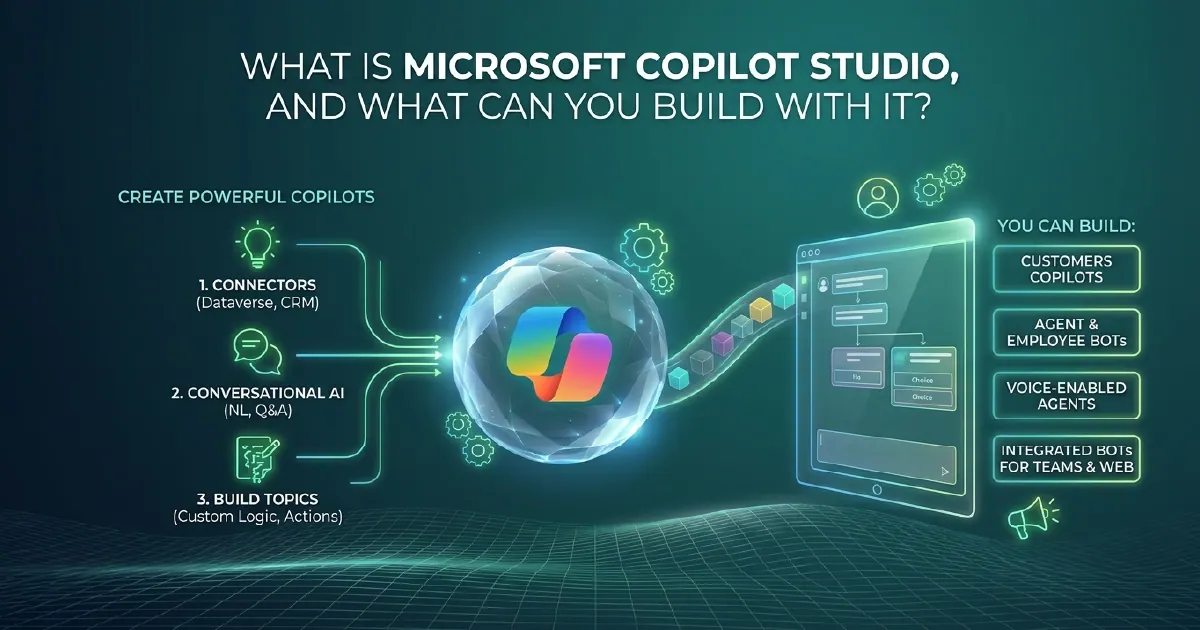
Microsoft Copilot Studio is a low-code platform for building custom AI assistants - called copilots - that connect to your organisation's data and systems. It replaced Power Virtual Agents in 2023 and has expanded significantly since, gaining generative AI capabilities, Microsoft Fabric integration, and support for multi-agent workflows.
You do not need to write code to build a basic copilot, but you can extend with custom logic and connectors when you need to. This guide explains what Copilot Studio is, how it connects to your data, and when it is the right tool.
From Power Virtual Agents to Copilot Studio
Microsoft rebranded Power Virtual Agents as Copilot Studio when it became clear that rule-based chatbots and generative AI assistants were converging into the same product category.
The rebrand was not cosmetic. Copilot Studio gained:
- Generative AI answers drawn from documents and SharePoint sites, not just predefined topics
- Integration with Microsoft 365 Copilot as a custom extension - end users can reach your copilot from within Copilot in Teams or Word
- Connections to Fabric Data Agents and OneLake via Power Platform connectors
- Multi-agent orchestration through the Copilot Studio agent hub
If you built something in Power Virtual Agents, it still works in Copilot Studio. But the platform has moved well beyond what was possible in 2022.
What You Can Build With Copilot Studio
Internal Knowledge Assistants
Connect Copilot Studio to SharePoint, OneDrive, or uploaded documents and give your teams an AI assistant that answers questions from your own policies, procedures, and knowledge base. The assistant cites its sources, so users can verify answers.
This is the most common starting point: replacing the experience of searching through SharePoint - which rarely works well - with a conversational assistant that surfaces the right document for the right question.
Data Query Assistants
Connect Copilot Studio to a Power BI semantic model or Fabric Data Agent and let users query operational data in plain language. "What were our top ten customers by revenue last month?" - asked in Teams, answered from a governed semantic model.
This requires a well-structured semantic model with clean measure names. Ambiguous or technical naming produces ambiguous or wrong answers. Clean semantic models and Copilot Studio are mutually reinforcing: one gives you the governance, the other makes it useful to the whole organisation.
Process Automation Assistants
Combine Copilot Studio with Power Automate flows to build assistants that can take action, not just answer questions. An HR assistant that raises a leave request. A procurement assistant that checks supplier status and raises a purchase order. An IT support assistant that logs a ticket and assigns it to the right team.
The copilot handles the conversation. Power Automate handles the system interaction. The user never needs to leave Teams.
Customer-Facing Copilots
Copilot Studio supports authenticated and unauthenticated channels. You can publish a copilot to your website, to a custom app, or to channels like WhatsApp. Customer-facing copilots handle FAQs, triage support requests, and collect information before routing to a human agent.
How Copilot Studio Connects to Your Data
Copilot Studio connects to data through four mechanisms:
- Knowledge sources - SharePoint sites, uploaded documents, public URLs. Generative AI answers are drawn directly from this content.
- Power Platform connectors - over 1,000 pre-built connectors to line-of-business systems, plus custom connectors via Azure API Management.
- Fabric Data Agents - expose a Fabric semantic model or Lakehouse as an agent that Copilot Studio can query. This is the recommended path for structured analytics questions.
- Azure AI Foundry - for more complex orchestration, Copilot Studio can act as the conversational front end while Foundry handles reasoning and tool use.
Data accessed through connectors and Fabric agents respects the permissions of the authenticated user - the copilot can only return data the user is permitted to see.
Copilot Studio vs Azure AI Foundry: Which to Use
This is the most common architectural question when starting an AI assistant project.
Use Copilot Studio when:
- You need to deploy quickly with low-code tooling
- Your primary integration is with Microsoft 365, SharePoint, or Power Platform systems
- The conversation flow is relatively straightforward
- You want governance within the Microsoft Power Platform compliance perimeter
- Your team does not include AI engineers
Use Azure AI Foundry when:
- You need complex multi-step reasoning or tool use across many systems
- You are building production-grade agent pipelines with custom orchestration
- You need fine-grained control over model selection, prompting, and evaluation
- You are integrating with non-Microsoft infrastructure at scale
In practice, Copilot Studio and Foundry are increasingly complementary rather than competing - a decision we unpack fully in Copilot Studio vs Microsoft Foundry. A common pattern: Copilot Studio as the conversation front end in Teams, Foundry as the reasoning and data retrieval backend, Fabric as the data layer underneath both.
Licensing
Copilot Studio is licensed on a message-based model: you purchase message packs, and each interaction with the copilot consumes messages. Classic rule-based interactions consume fewer messages than generative AI interactions.
Copilot Studio is included in Microsoft 365 Copilot licences for internal use cases. For customer-facing copilots or high-volume internal use, message packs are the right model.
One consideration: generative AI answers from knowledge sources consume significantly more messages than topic-based answers. Model the message consumption before deployment if your use case relies heavily on document-grounded generative AI.
Where to Start
The fastest path to a useful copilot is narrow scope and high-quality knowledge sources.
Start with a single use case where the questions are predictable and the source material is well-maintained - a policies copilot on a curated SharePoint library, or a data assistant over a clean semantic model. Resist the temptation to build a copilot that knows everything.
Once a narrow copilot is working well and users trust it, expand its scope incrementally. Trust is built by accurate answers on a small domain, not by ambitious but unreliable coverage of a large one.
If you want help scoping a first copilot, our Automation & AI team designs and builds Copilot Studio solutions end to end, and we run hands-on Copilot Studio training for teams taking ownership in-house.
Sources and Further Reading
Frequently asked
Microsoft Copilot Studio is a low-code platform for building custom AI assistants (copilots) that connect to your organisation's data and systems. It replaced Power Virtual Agents and supports generative AI answers from documents, data queries via Power BI and Fabric, and process automation via Power Automate.
Copilot Studio is the evolution of Power Virtual Agents, rebranded and significantly expanded to include generative AI capabilities, Fabric Data Agent connections, Microsoft 365 Copilot extensibility, and multi-agent orchestration. Existing Power Virtual Agents solutions continue to work in Copilot Studio.
Yes. Copilot Studio can connect to Fabric Data Agents, which expose Power BI semantic models and Lakehouses as queryable agents. This allows users to ask questions about governed organisational data in plain language from within Teams or other Microsoft 365 surfaces.
Copilot Studio is a low-code tool for building conversational AI assistants quickly within the Power Platform ecosystem. Azure AI Foundry is a code-first platform for building complex, production-grade AI agent pipelines with full control over models and orchestration. They are increasingly used together rather than as alternatives.
Copilot Studio is licensed by message consumption. Message packs are purchased and consumed per interaction, with generative AI interactions consuming more messages than rule-based ones. Copilot Studio for internal use is included in Microsoft 365 Copilot licences.
Common builds include: internal knowledge assistants connected to SharePoint and policies, data query assistants connected to Power BI semantic models, process automation assistants that trigger Power Automate flows, and customer-facing copilots published to websites or messaging channels.