In Short: What actually is the Microsoft Fabric Database Hub ?
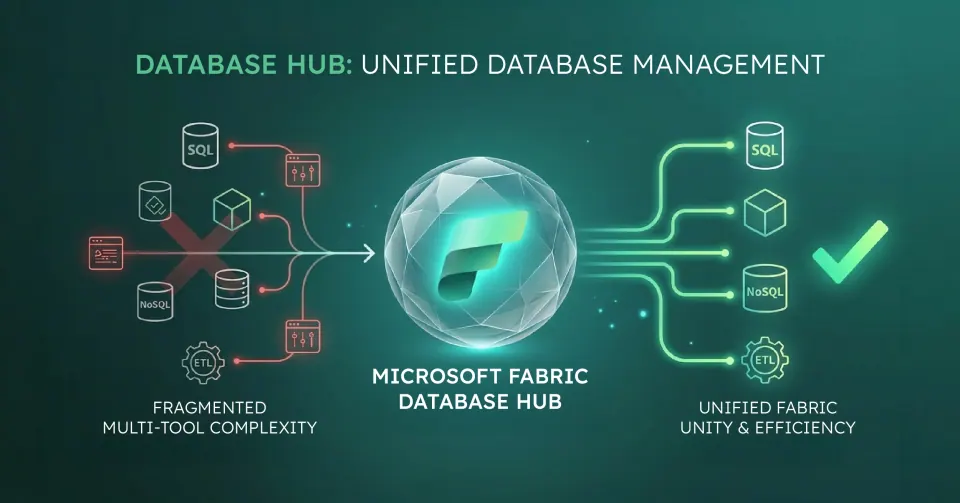
Microsoft Fabric's Database Hub is a single control plane for managing databases across Azure SQL, SQL Server (via Azure Arc), Azure Database for PostgreSQL, Azure Cosmos DB and SQL database in Fabric, all without switching between portals. It is not a replacement for your databases. It is a replacement for the fragmented way you currently manage them.
Why Do Organisations Struggle With Database Management Today?
Most organisations running modern data estates are not short of capability. They are short of coherence.
A typical enterprise manages Azure SQL for transactional workloads, Cosmos DB for flexible document storage, PostgreSQL for open-source applications, and on-premises SQL Server still humming in the background. Each has its own portal, its own monitoring surface, and its own set of alerts nobody is quite sure who owns.
The result is not a database strategy. It is a collection of database habits.
This creates three compounding problems:
- Fragmented visibility: no single view of health, performance, or cost across the estate
- Slow incident response: engineers switch between tools to diagnose issues that span services
- Governance gaps: inconsistent policies applied service-by-service rather than estate-wide
What Is Microsoft Fabric's Database Hub?
Database Hub is a unified management experience built into Microsoft Fabric. It provides a single surface to view, monitor, and manage databases across your cloud, edge, and Fabric environments.
Services covered in the public preview, per Microsoft's Database Hub announcement:
- Azure SQL Database
- SQL Server enabled by Azure Arc
- Azure Database for PostgreSQL
- Azure Cosmos DB
- SQL database in Fabric
Microsoft adds that "available capabilities and signals vary by service and preview configuration", and its September 2026 feature summary also lists Azure SQL Managed Instance and SQL Server on Azure Virtual Machines - check the documentation for the engines you run.
It was introduced at FabCon and SQLCon 2026 in Atlanta and, as Microsoft announced at FabCon Europe 2026 (29 September 2026), is now in public preview. A Fabric administrator may need to enable the "Users can access the Database hub (preview)" tenant setting first.
What Does "Agent-Assisted" Database Management Actually Mean?
Microsoft VP of Databases Shireesh Thota described Database Hub as introducing "an agent-assisted, human-in-the-loop approach to database management." In practice, this means:
- Intelligent agents monitor signals across your database estate continuously
- They surface changes, anomalies, and recommendations proactively
- A human reviews and approves the action, as the agent does not act unilaterally
This is a meaningful distinction. It is not autonomous database management. It is managed database intelligence with human oversight, which is the right approach for enterprise environments where unilateral automation carries risk.
Update, 30 September 2026: At FabCon Europe 2026 Microsoft introduced database agents for SQL and PostgreSQL on Azure, accessible in Database Hub and VS Code, which analyse performance and workload health, prioritise recommendations and help investigate issues within role-based access controls, approvals and auditing. Microsoft's wording on status differs: Arun Ulag's post says they "will soon be available in preview", Shireesh Thota's databases post says "now rolling out in preview", and the SQLCon post says the preview begins with the SQL agent in Database Hub and the PostgreSQL agent in Visual Studio Code. Microsoft also says the preview investigation workflow "does not automatically remediate issues".
Copilot integration provides health views, performance insights, and trend analysis across all supported services from a single dashboard.
How Does This Compare to What Databricks and Snowflake Are Doing?
Both Databricks and Snowflake have moved into transactional database services within their analytics platforms. The direction is the same across the industry: analytics platforms are absorbing operational data workloads, and database vendors are adding analytics capability.
Microsoft's approach is distinct in one important way. Rather than building a new database product and asking organisations to migrate, Database Hub manages the databases they already have. Azure SQL, Cosmos DB, and on-premises SQL Server via Arc remain where they are while Database Hub provides the unified management layer on top.
For most enterprises, that is a more practical entry point than platform migration.
What Business Problems Does Database Hub Solve?
1. It Eliminates Portal Sprawl Teams no longer need to context-switch between the Azure portal, Fabric portal, and individual database management tools to get a complete picture of their data estate.
2. It Standardises Governance Across Services Policies, access controls, and audit configurations can be applied estate-wide rather than service-by-service, reducing the risk of inconsistent governance.
3. It Accelerates Incident Response When an issue spans services, such as a slow query in Azure SQL affecting a pipeline that writes to Cosmos DB, engineers see the full chain in one place rather than reconstructing it manually.
4. It Creates a Foundation for Cost Visibility With all database services visible in a single surface, capacity and consumption patterns become easier to analyse, attribute, and optimise.
Who Is Database Hub For?
Database Hub is particularly relevant for organisations that:
- Run multiple database services across Azure and on-premises
- Have grown their data estate through acquisition or organic expansion
- Are consolidating tooling as part of a broader Microsoft Fabric adoption
- Want to reduce operational overhead without migrating databases
What Is the Strategic Point Most Organizations Miss?
Database Hub is not primarily a technical feature. It is an operational model decision.
The question it answers is not "which database should we use?" It is "how do we manage the databases we already have at scale?" Organisations that treat it as another portal to log into will not get the value. Organisations that use it as the foundation for a managed database governance model will.
Why work with Solv Systems on Database Management?
At Solv Systems, we transform database management from a series of routine tasks into a unified, strategic capability.
Strategy Before Build
We align your database management model with your broader Fabric and cloud data strategy.
Patterns That Scale
We implement standardized monitoring and governance patterns that work across your entire database estate.
Proactive Engineering
We leverage "agent-assisted" insights to identify and resolve performance issues before they affect your users.
Governance and Adoption
We ensure that your consolidated management layer simplifies operations without compromising security or sovereignty.
Should You Actually Move an Operational Database?
The capability existing is not an argument for using it. Operational databases run the business, and moving one has a different risk profile to moving a reporting workload.
Reasonable candidates: new applications being built inside the Microsoft estate, databases whose main consumer is analytics anyway, and workloads where being adjacent to the lakehouse removes an integration you currently maintain.
Poor candidates: anything with hard latency requirements, databases with deep dependencies on features specific to their current engine, and systems where the operational risk of migration outweighs an integration cost you have already absorbed.
The honest default for most mid-market organisations: leave the operational estate where it is, and let Fabric consume from it. The convergence of operational and analytical storage is a genuine architectural direction, but being early to it is a choice rather than a requirement.
What This Means for Your Architecture Either Way
Whether or not you move a database, the direction of travel is worth planning around.
The gap between operational and analytical data is closing across the industry - mirroring, shortcuts and now database workloads inside the analytics platform all point the same way. The practical consequence is that the traditional nightly-batch mental model is becoming a choice rather than a constraint, and architectures assuming it may be conservative by the time they ship.
What does not change is the part that always mattered: agreed definitions, clear ownership and quality enforced in the platform. Convergence moves data closer together; it does not make it mean the same thing. That remains a governance problem. To put an application-facing API over those databases, see Fabric's API for GraphQL.
Sources and Further Reading
- Microsoft Fabric documentation
- OneLake overview
- Microsoft Purview
- Database Hub in Fabric: Now in Public Preview
Frequently asked
No. It was introduced at FabCon 2026 in March 2026 and, as Microsoft announced at FabCon Europe 2026 on 29 September 2026, is now in public preview. General availability timing has not been confirmed.
No. It provides a unified view within Fabric. Azure Portal remains available and continues to function.
No. Database Hub manages databases in their current locations, including on-premises SQL Server via Azure Arc.
Microsoft's public preview announcement lists Azure SQL Database, SQL Server enabled by Azure Arc, Azure Database for PostgreSQL, Azure Cosmos DB and SQL database in Fabric, with capabilities varying by service; the September 2026 feature summary also lists Azure SQL Managed Instance and SQL Server on Azure Virtual Machines. Engines outside those lists, such as MySQL, are not covered - check current documentation for additions.
Copilot provides natural language queries, health summaries, and performance recommendations within the Database Hub interface. It does not execute changes without human approval.