In Short: What Is the Fabric RTI MCP Server?
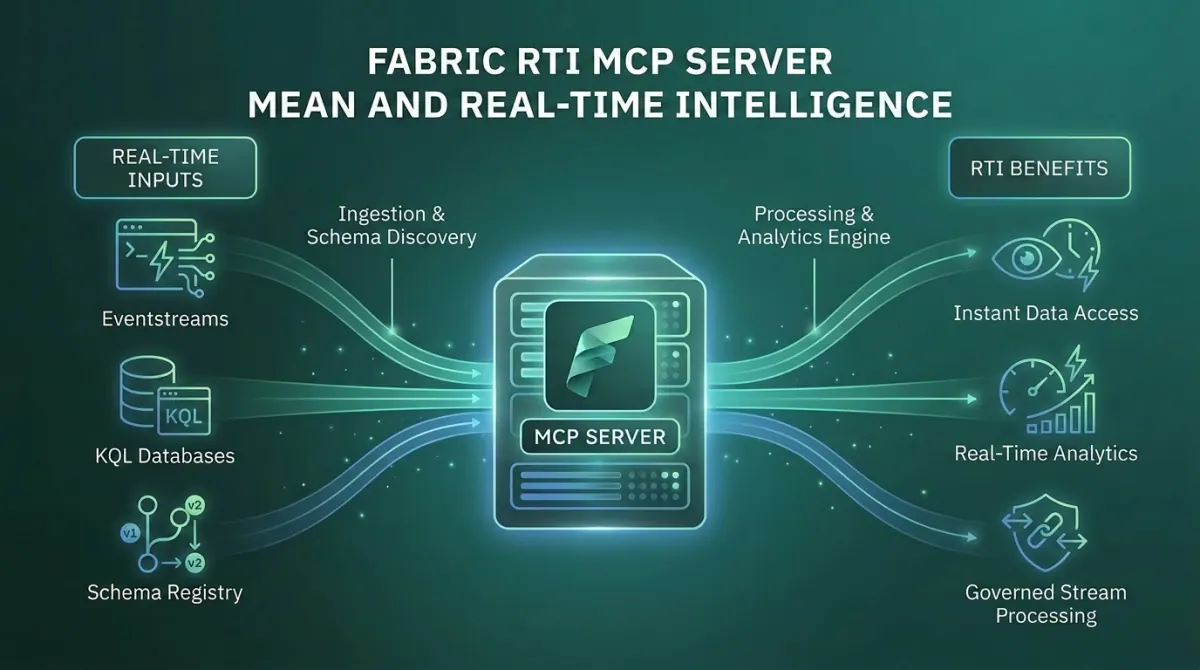
The Fabric Real-Time Intelligence MCP Server is the bridge between AI agents and live data in Microsoft Fabric. It exposes Eventhouse, Azure Data Explorer, Eventstreams, Activator, and Map operations as Model Context Protocol tools that any MCP-compatible agent can call. The headline capability is natural language to KQL: a developer or analyst describes what they want in English, and the agent generates and executes the correct KQL query against live data.
It comes in two forms. The local server, open source on GitHub and installed via pip, runs as a subprocess on the developer's machine. The remote server, hosted by Microsoft, is configured per Eventhouse and pointed at a specific workspace and KQL database. Both are in public preview.
For organisations running Real-Time Intelligence workloads, this is the most consequential of the Fabric MCP servers. It is the only one that puts AI agents in direct contact with live operational data.
If you are weighing up what this means for your own estate, our Microsoft Fabric consulting services and implementation cost guides for the UK, US and South Africa are a practical starting point.
What Problem Was Microsoft Trying to Solve?
KQL is a great query language. It is also a barrier.
Real-Time Intelligence in Fabric runs on Kusto. Eventhouse is Kusto. Azure Data Explorer is Kusto. The query language is powerful, well-designed for time-series and event data, and unfamiliar to most data professionals. SQL developers struggle with it. Power BI developers rarely touch it. Business analysts almost never see it. The result is that the data flowing into Eventhouse - often the most operationally valuable data in the organisation - is reachable only by a small group of specialists.
That bottleneck shapes how organisations actually use real-time data. Operational dashboards get built by the few people who know KQL. Ad-hoc questions wait in a queue. Anomaly investigations happen long after the anomaly. The data is current, but the insight rarely is.
The Fabric RTI MCP Server addresses this directly. It exposes Kusto operations as MCP tools and bundles a KQL Copilot Skill that gives the agent deep KQL expertise: syntax patterns, time-window discipline, join behaviour, datetime pitfalls, memory-safe query design. The agent translates natural language into well-formed KQL, executes against the live cluster, and returns results. The KQL specialist is no longer the bottleneck for every real-time data question.
What Is the Fabric RTI MCP Server, Exactly?
The RTI MCP Server is one server with two delivery modes and a wide tool surface.
- Local RTI MCP Server - Open source. Installed from PyPI as microsoft-fabric-rti-mcp. Runs as a Python subprocess on the developer's machine. Authenticates through Azure Identity. Connects to Eventhouse, Azure Data Explorer, Eventstreams, Activator, and Maps. Provides full read and management capability subject to the user's RBAC.
- Eventhouse Remote MCP Server - Hosted by Microsoft. Configured by pointing your MCP client at a URL containing your Workspace ID and KQL Database ID. No installation. Read-only access to the configured KQL database. Best for production agent scenarios in Copilot Studio or Foundry.
The local server has the broader tool surface. The remote server has the simpler operational story. Most teams will use the local server during development and the remote server in production agent deployments.
Eventhouse and KQL
kusto_query executes KQL. kusto_list_entities discovers databases, tables, materialised views, functions, and graphs. kusto_describe_database and kusto_describe_database_entity expose schema. kusto_sample_entity returns sample rows. kusto_ingest_inline_into_table pushes data in. kusto_graph_query runs graph operations. kusto_deeplink_from_query generates URLs that open queries in Azure Data Explorer Web Explorer.
Eventstreams
List, inspect, and manage Eventstream definitions for streaming data processing.
Activator
activator_list_artifacts enumerates triggers. activator_create_trigger creates new triggers with KQL source monitoring and email or Teams alerts. This is the operational angle: agents can not only investigate real-time data but also set up the alerting that keeps watching.
Maps
List, get, create, update, and delete geospatial Map items - completing the loop from data to visualisation for organisations doing real-time location intelligence.
Few-shot semantic search
kusto_get_shots retrieves semantically similar query examples from a shots table populated with natural-language prompts paired with the correct KQL. With Azure OpenAI embeddings, the agent learns from your team's prior queries, not just generic KQL. New queries inherit the patterns of queries the team has already validated.
What Changes for Teams Working with Real-Time Data?
The change is bigger than "easier KQL". For organisations running Real-Time Intelligence at scale, it lands in five concrete ways.
- The KQL bottleneck breaks - Anyone who can describe a question can now get an answer from Eventhouse. The bench of people who can investigate a real-time anomaly expands from the small KQL-fluent group to the entire team. Everything else flows from this.
- Operational alerting becomes conversational - With the Activator tools, an agent can not only investigate a problem but also set up the trigger that watches for it. "When this metric crosses this threshold, post in the operations Teams channel" is now a single prompt.
- Schema discovery happens automatically - The agent reads the schema before generating queries. New users do not need to learn the data model upfront. Onboarding to a real-time data platform stops being "spend two weeks understanding the tables" and starts being "ask questions, learn through use".
- Few-shot examples make the agent better at your data over time - The shots table pattern is genuinely powerful. Your team's curated query library becomes context the agent uses. The agent improves at queries against your specific data with each validated example added - one of the few places where MCP tooling materially improves with usage.
- Real-time data becomes part of the agentic stack - In a Foundry agent or a Copilot Studio agent, the RTI MCP exposes live data as just another tool. The same agent that reads from a Lakehouse, generates a draft email, and triggers a Power Automate flow can also query Eventhouse for the latest sensor readings.
Where Does It Fit in the Broader Fabric MCP Story?
Microsoft now has six MCP server families across Fabric and Power BI. The RTI MCP occupies a specific seat.
- Fabric Pro-Dev MCP Server - Local development companion. Generally available. Knows the Fabric API surface. Used to write code and move data.
- Fabric Core MCP Server - Cloud operations layer. Public preview. Manages workspaces, items, permissions, capacities.
- Fabric RTI MCP Server - Real-time data access layer. Public preview. Local and remote. Operates where time matters and data is already in motion.
- Power BI Modeling MCP Server (now listed as the Power BI Authoring MCP server) - Builds and modifies semantic models. Generally available as a local server, with a hosted remote version in preview.
- Power BI Remote MCP Server - Queries published semantic models. Public preview. Cloud-hosted.
Two servers can be combined in the same conversation. An agent with the Pro-Dev server, the RTI MCP server, and a generic web search tool can investigate a production incident from start to finish: look up the relevant Eventhouse table schema, query the live data, correlate with the Lakehouse, generate the diagnostic notebook, and create the Activator trigger to catch a recurrence. This is the agentic data platform Microsoft has been describing, and the RTI MCP is the piece that makes the real-time leg of it work.
The Strategic Point Most Organisations Miss
The RTI MCP is not really about productivity. It is about who has access to real-time data.
The first reaction most teams have is "this saves time on writing KQL queries". For the small group already fluent in KQL, that is true and incremental. For everyone else, it is the wrong framing.
The bigger shift is that the access frontier moves. Real-time operational data, which has historically lived behind a query language barrier, becomes legible to engineers, analysts, and operations teams who would never have written a Kusto query themselves. The number of people who can ask useful questions of live data multiplies. The pace at which the organisation responds to operational signals goes up with it.
There is a real risk here that needs naming. Natural language to KQL can produce plausible queries with subtly wrong semantics - particularly around time windows, joins across tables with different keys, and the difference between materialised views and base tables. A query that returns numbers without erroring can still be wrong. The right pattern is the same one that applies to AI-generated DAX: use the agent for fast access and exploration, validate carefully before any number drives a decision, and lean on the shots table to anchor the agent in patterns the team has already proven correct.
Who Will Get the Most From the Fabric RTI MCP Server?
The RTI MCP is most relevant for organisations that:
- Run Real-Time Intelligence workloads in Fabric - IoT telemetry, application logs, security signals, or operational metrics
- Have a small group of KQL-fluent specialists serving a much larger group of would-be data consumers
- Use, or could use, Activator for operational alerting and want to make trigger creation accessible to more of the team
- Are comfortable establishing the validation and curation discipline that AI-generated queries require
- Want their real-time data to be a first-class participant in agentic workflows alongside the rest of the Microsoft data stack
Organisations not running RTI workloads will not get value from this server. It is purpose-built for live data access, and the value scales with the volume and importance of that data.
Why Work With Solv Systems on Fabric RTI MCP?
At Solv Systems, we help teams use the Fabric RTI MCP Server to expand access to real-time data without losing the analytical rigour that makes the data useful.
Validation Discipline First
We start with the patterns and standards that distinguish a trustworthy real-time data answer from a fast wrong one. The MCP server amplifies whatever discipline you already have. Without that discipline, fast access becomes fast confusion.
Shots Tables That Reflect Your Domain
We help teams build and maintain the few-shot example library that makes the agent good at your data, not just at KQL. This is one of the highest-leverage investments in the platform and one of the most overlooked.
Operational Alerting That Holds Up
We design the Activator trigger patterns and the validation gates around them so that AI-created alerts are useful, not noisy. The path from observation to monitoring is genuinely shorter with this server, but only if the alerts that get created are the right ones.
Connected to the Broader AI Stack
Real-time data has the most value when it participates in agentic workflows that span the wider platform. We help design those workflows across RTI, Pro-Dev, Core, Foundry, and the rest of the Microsoft AI stack so the pieces reinforce each other.
This article is part of our Fabric MCP series. For how the servers fit together - and why you likely need more than one - start with The Fabric MCP Stack: What Each Server Does.
Sources and Further Reading
Frequently asked
No. Both the local and remote versions are in public preview. The local server is open source and updated frequently on GitHub. The remote Eventhouse MCP currently supports read-only query operations.
The local server runs as a subprocess on your machine, has the full tool surface across Eventhouse, Eventstreams, Activator, and Maps, and supports both query and management operations. The remote server is hosted by Microsoft, configured per Eventhouse, and read-only. Use local for development; use remote for production agent deployments.
Yes. The local server connects to ADX clusters using the same KQL tools that operate against Eventhouse. The query language and tool surface are the same.
Any MCP-compatible client. The most common setups are VS Code with GitHub Copilot, Claude Desktop, and Cline. Custom MCP clients in Foundry or Copilot Studio are also supported.
Through Azure Identity using DefaultAzureCredential. The server picks up whichever credential is already configured: Azure CLI, Visual Studio, environment variables for CI/CD, or an interactive browser sign-in as a fallback. No tokens are stored by the server itself.
Yes. The local server includes kusto_ingest_inline_into_table, which pushes inline CSV data into a specified table. This is most useful for testing and small-scale ingestion. Production ingestion still flows through the standard Eventhouse and Eventstream pipelines.
Yes. KQL is particularly sensitive to time windows, join semantics, and the distinction between materialised views and base tables. Use the shots table to anchor the agent in proven patterns, validate any query that drives a decision, and treat the agent as an exploration tool first.