In Short: What Is the Fabric Core MCP Server?
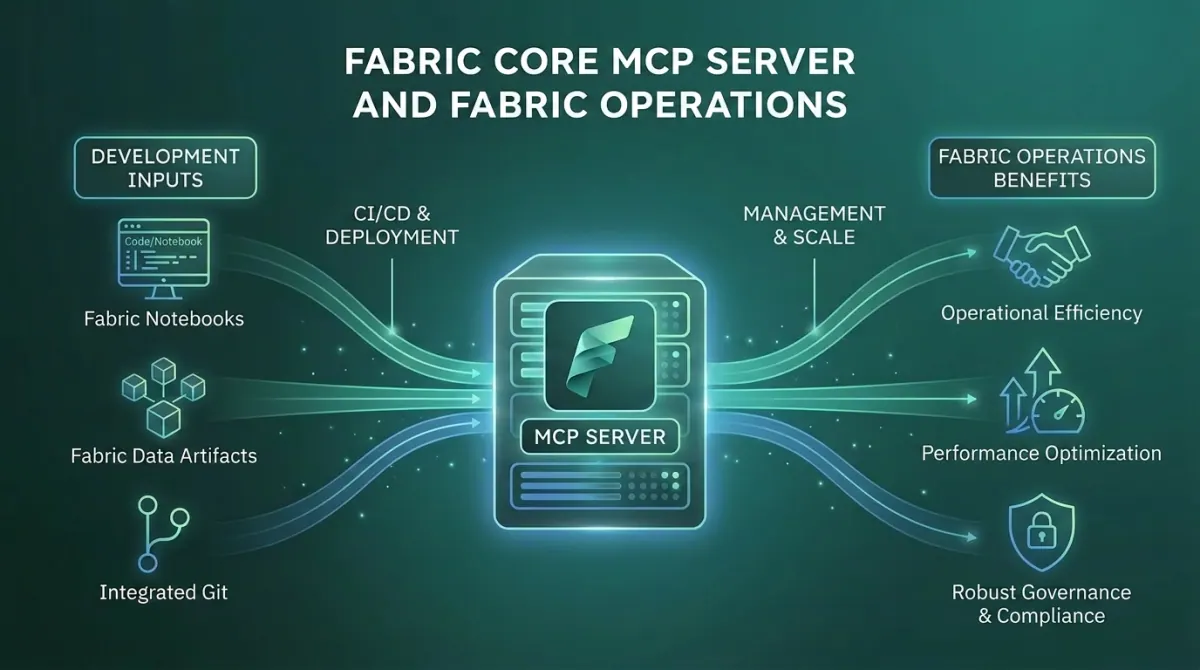
The Fabric Core MCP Server is a Microsoft-hosted Model Context Protocol endpoint that lets AI agents perform real, authenticated operations against your Microsoft Fabric tenant. Workspaces. Items. Permissions. Folders. Capacities. The full administrative surface, exposed as tools any MCP-compatible agent can call.
It sits at https://api.fabric.microsoft.com/v1/mcp/core. There is no local install. Authentication is OAuth 2.0 through Microsoft Entra ID. Every operation runs under your identity and respects your existing RBAC. It is currently in public preview.
For organisations that manage dozens or hundreds of Fabric workspaces, and for consultancies that provision Fabric environments for clients, this is the first time those operations have been available through natural language conversation rather than custom REST API plumbing or PowerShell scripts.
If you are weighing up what this means for your own estate, our Microsoft Fabric consulting services and implementation cost guides for the UK, US and South Africa are a practical starting point.
What Problem Was Microsoft Trying to Solve?
Anyone who has built tooling against the Fabric REST API knows the shape of the problem. The APIs are well-designed. The plumbing around them is not.
Building an agent that can simply "create a workspace, add three users with the right roles, attach it to capacity F4, and seed it with a starter Lakehouse" requires a full OAuth 2.0 stack, token refresh handling, async operation polling, rate-limit logic, error handling, and version awareness. None of that work is interesting. All of it is necessary. For most teams, the cost is high enough that the agent never gets built, and the work continues to be done by hand or through brittle scripts.
The Fabric Core MCP Server eliminates this plumbing. The MCP standard handles authentication, tool discovery, and the request and response shape. The server handles the API mapping, async operation tracking, and the security boundary. The agent handles the conversation. The developer or administrator describes the outcome in natural language.
What used to require a custom integration project is now a configuration change.
What Is the Fabric Core MCP Server, Exactly?
There are two Fabric MCP servers, and confusing them is the most common first mistake.
- Fabric Core MCP Server - Cloud-hosted by Microsoft. Connects directly to your live Fabric tenant. Performs real operations: creating workspaces, assigning roles, listing items, managing folders, attaching capacities. This is what this article is about.
- Fabric Pro-Dev MCP Server - Local subprocess on your machine. Provides AI agents with API specifications, schemas, OneLake data operations, and best practice guidance for development workflows. Generally available. Does not perform operations against your live environment.
The distinction matters. Pro-Dev is for building with Fabric. Core is for operating Fabric. Most teams will use both, often together, because they answer different questions in the same workflow.
The Core server is set up by pointing your MCP client at the endpoint URL and authenticating through a browser. In VS Code with GitHub Copilot, the command palette gives you MCP: Add Server and the rest is two clicks. In Claude Desktop, you edit the configuration file with the URL and a bearer token. In a custom agent, you implement the OAuth 2.0 flow with Microsoft Entra ID and connect.
The tools exposed by the server map directly to Fabric REST API operations. List workspaces. Create a workspace. Add a user to a workspace with a specific role. Move items between folders. Check the status of a long-running operation. The agent picks the right tool based on the conversation, the server calls the underlying API, and the result returns through the agent.
Two operational details worth knowing. First, async operations return an operation-id that the agent uses to poll for completion - this is how multi-step workflows like provisioning a workspace and attaching capacity actually work. Second, access tokens expire after about an hour. The MCP client typically refreshes them automatically, but for custom integrations this is something to plan for.
What Changes for Fabric Administrators and Consultancies?
The change is bigger than "AI for Fabric admin tasks". For organisations operating Fabric at scale, and for consultancies running Fabric environments for clients, the workflow shifts in five concrete ways.
- Workspace provisioning becomes a conversation - The standard new-workspace setup - creating the workspace, attaching it to capacity, adding users with the right roles, applying tags, and seeding a starter folder structure - is now a single prompt. For consultancies onboarding a new client, this is the kind of work that previously took an hour and now takes a minute.
- Bulk operations finally work without custom code - Listing every workspace in a tenant and identifying ones without a capacity assigned. Auditing role memberships across a portfolio of workspaces. Moving items between folders to match a new naming convention. These tasks were always too small to justify a custom script and too tedious to do manually. With the Core MCP, they collapse into prompts.
- RBAC discipline becomes more visible - Every operation runs under your identity. The agent cannot do anything you cannot already do. This is the right design, but it does mean that if your RBAC is sloppy, the agent surfaces the sloppiness rapidly. Workspaces you forgot you had access to. Roles assigned that should have been removed. The MCP server is a clarity tool as much as it is an automation tool.
- Audit trails stay intact - Every operation through the MCP server hits the standard Fabric API and produces standard audit logs. There is no separate "AI did this" channel. Compliance and governance teams see the same trail they always saw, with the same user identity attached. This matters in regulated environments where new automation typically requires a separate review cycle.
- Pairing with Microsoft Graph MCP unlocks user resolution - Out of the box, the Core MCP needs user principal IDs for role operations, which is a friction point for non-technical users. Adding the Microsoft Graph MCP Server alongside it lets the agent resolve email addresses to identities automatically. Two MCP servers, one conversation, full coverage.
Where Does It Fit in the Broader Fabric MCP Story?
Microsoft is committing heavily to MCP across the Fabric and Power Platform stack. The cleanest mental model:
- Fabric Pro-Dev MCP Server - The local development companion. Runs on your machine, ships with the full Fabric API specification, and grounds AI-generated code in the actual API surface. Used for building Fabric notebooks, pipelines, and custom items.
- Fabric Core MCP Server - The cloud operations layer. Runs in Microsoft's cloud, performs real operations against your live tenant, and respects your existing security boundary.
- Fabric RTI MCP Server - The real-time intelligence layer. Exposes Eventhouse, Eventstream, and KQL operations as tools, so AI agents can query and manage real-time data.
- Power BI Modeling MCP Server - The semantic model layer. Local server, builds and modifies semantic models through natural language.
- Power BI Remote MCP Server - The data query layer. Cloud-hosted, queries published semantic models.
These overlap, complement each other, and combine. An agent with the Pro-Dev server for code generation, the Core server for operations, the Modeling server for the semantic model, and the Microsoft Graph server for user resolution has the full Fabric and Power BI surface available in one conversation. This is what Microsoft means by "agentic Fabric" - not a single feature, but a platform pattern that composes.
The Strategic Point Most Organisations Miss
The Fabric Core MCP Server is not really an automation tool. It is an inflection point in how Fabric environments get standardised.
The first reaction most teams have is "this saves time on workspace provisioning". That is true. It is also the lowest-value framing of what the tool actually changes.
The bigger shift is that prompts become the new infrastructure-as-code for Fabric. A team that captures "this is how we provision a new client workspace, with the right capacity, the right roles, the right folder structure, the right starter items" as a set of agent prompts has codified a standard. Every new environment follows it from day one. Drift between environments stops happening because the standard is the prompt, not a checklist someone might forget.
For consultancies in particular, this changes the economics. The repeatable parts of Fabric delivery become genuinely repeatable. Time previously spent on environment setup, role management, and capacity assignment redirects to the higher-value work clients actually want - data modelling, integration, and analytics design.
Organisations that adopt the Core MCP for ad-hoc convenience capture maybe a tenth of the value. Organisations that build a prompt library reflecting their operational standards, version it, and use it as the basis for every Fabric environment they manage, capture the rest.
Who Will Get the Most From the Fabric Core MCP Server?
The Fabric Core MCP is most relevant for organisations that:
- Operate multiple Fabric workspaces - ideally tens or hundreds rather than a handful
- Have repeating provisioning, role management, or audit operations that consume meaningful time
- Run multi-tenant or multi-environment Fabric estates, including consultancies, MSPs, and large enterprises
- Already have, or are willing to invest in, RBAC discipline and operational standards
- Want to reduce custom REST API tooling without losing the auditability of standard Fabric operations
Smaller organisations with a single workspace and a stable team will find the day-to-day savings modest. The bigger the operational surface, the bigger the case.
Why Work With Solv Systems on Fabric MCP?
At Solv Systems, we use the Fabric Core MCP Server to standardise and accelerate Fabric environment delivery for our clients, and we help organisations adopt it as the basis for their own operational practice.
Operational Standards First
We start with what your Fabric environments should look like, not with the agent. Standards make the prompts useful. Without them, the prompts amplify whatever you already do - including the inconsistencies.
Prompt Libraries That Reflect Your Operation
We design and maintain prompt libraries for environment provisioning, capacity management, RBAC audits, and other recurring operations, so the value is reusable across teams rather than living in one administrator's head.
Governance That Holds Up
We integrate Fabric MCP usage into your existing Entra, Purview, and audit framework. Agents perform real operations under real identities, and the governance has to match that reality.
The Right MCP Stack for the Job
Most useful Fabric workflows touch more than one MCP server. We help you design and configure the right combination of Core, Pro-Dev, Modeling, and Microsoft Graph MCP servers for your team's actual work.
This article is part of our Fabric MCP series. For how the servers fit together - and why you likely need more than one - start with The Fabric MCP Stack: What Each Server Does.
Sources and Further Reading
Frequently asked
No. It is in public preview. Features and configuration may change before general availability. The Pro-Dev server is generally available; the Core server is not yet.
No. The agent operates under your Entra identity and your existing RBAC. It cannot do anything you cannot already do. There is no privilege escalation by design.
Core is cloud-hosted and performs real operations against your live Fabric tenant. Pro-Dev is local, focused on development workflows, and provides API specs, schemas, and best practice guidance without connecting to your environment. Most teams use both.
Any MCP-compatible client. The most common setups are VS Code with GitHub Copilot, Claude Desktop, and custom MCP clients. The setup pattern is the same across them.
OAuth 2.0 through Microsoft Entra ID. The MCP client typically handles the browser-based sign-in flow on first connection. Tokens expire after about an hour and refresh automatically in supported clients.
Yes, and you generally should. Microsoft Graph MCP resolves email addresses to user principal IDs, which makes role operations far more practical than typing GUIDs.
Standard Fabric API audit logs, with the user's identity attached. There is no separate AI channel. Operations through the MCP server are indistinguishable from operations through the standard API for audit purposes.