In Short: How Do You Stop Re-Keying Data Between Systems?
Capture data once, at the source, and let it flow everywhere else on its own. On the Microsoft platform that means Power Automate for workflow-level connections (with hundreds of pre-built connectors), custom API integration for the high-volume joins between core systems, and orchestration across whole processes - so humans handle judgement and exceptions, not transport. Every re-key in your business is a missing connection wearing a person as a disguise.
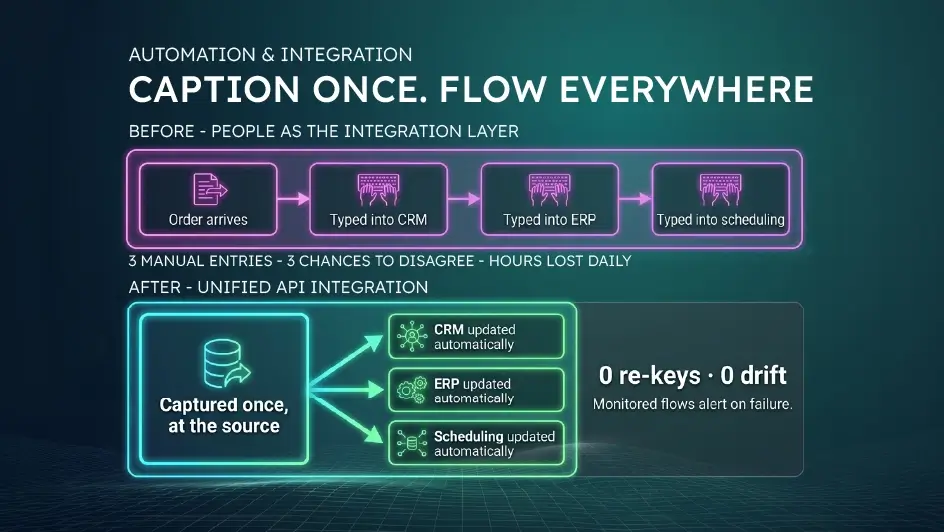
Follow the Order
Watch an order travel through a typical mid-sized business.
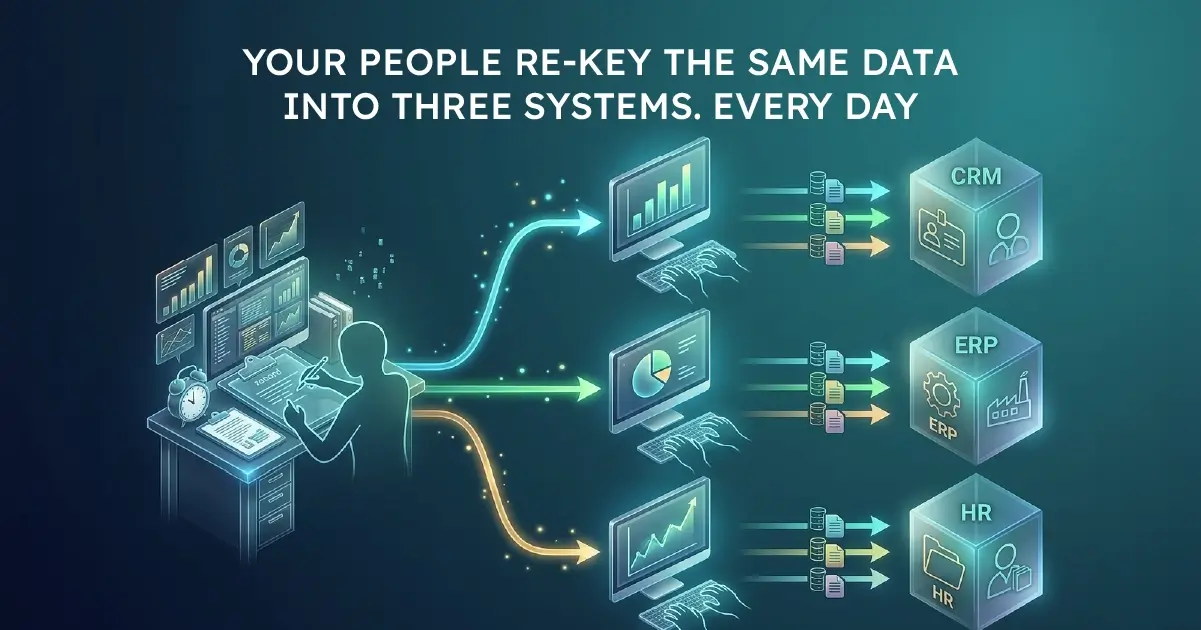
A customer emails a purchase order. Someone types it into the CRM. Someone else - or the same person, an hour later - types it into the ERP so it can be invoiced. Operations copies the details into the scheduling tool. When the delivery date changes, all three systems need updating, so someone updates two of them and forgets the third. Three weeks later, finance is on the phone with the customer, apologising for an invoice that doesn't match the order.
None of this is anyone's fault. It's the predictable behaviour of a business whose systems don't talk to each other - so its people have become the integration layer.
The True Cost of Human Middleware
The hours are bigger than you think. Ten minutes of re-keying, twenty times a day, across a handful of roles, is thousands of hours a year - performed by people you hired to serve customers, manage suppliers, or close books, not to transcribe.
Errors are structural, not occasional. Every manual transfer has an error rate; that's not a discipline problem, it's arithmetic. And re-keying errors are uniquely poisonous because they create disagreement between systems - the CRM says one thing, the ERP another - which then takes far longer to detect and reconcile than it took to make.
Everything moves at the speed of the queue. Orders wait to be entered. Invoices wait for the order to exist. Reports wait for month-end catch-up. Your quote-to-cash cycle carries days of pure transcription latency.
Your best people feel it most. Repetitive double entry is demoralising precisely for the capable staff you most want to keep. "I spend half my day copying and pasting" is a sentence that appears in exit interviews.
And your data foundation inherits all of it. Every analytics, reporting, and AI ambition sits downstream of data that was typed in twice, slightly differently. Fix the double entry and you fix the data at its source.
Why It Persists
Re-keying survives because each instance looks too small to fix. No single ten-minute task justifies an integration project, so nothing changes - even though the aggregate dwarfs the cost of fixing it. And past integration efforts may have burned trust: brittle point-to-point scripts that broke whenever a system updated, or "integration projects" that took a year and delivered one connection.
The technology has moved on from both.
What Good Looks Like: Systems That Talk, People Who Don't Transcribe
On the Microsoft Power Platform, connecting systems is no longer a bespoke engineering saga. The modern toolkit has three tiers, and a good solution usually blends them:
Power Automate for workflow-level connections. With hundreds of pre-built connectors - Outlook, SharePoint, Dynamics, SQL, Salesforce, SAP, and most major SaaS tools - Power Automate moves data between systems the moment something happens. New order in the CRM? It's created in the ERP seconds later, with an approval step in Teams if the value crosses a threshold. Attachment arrives in a mailbox? AI Builder reads the document, extracts the fields, and files the data - no typing at all.
API development for the heavy-duty joins. Where volumes are high or logic is complex, custom API integrations provide robust, monitored, real-time connections between core systems - built once, running unattended, alerting someone if anything fails rather than failing silently.
Workflow orchestration for end-to-end processes. The real win isn't automating one hop; it's orchestrating the whole journey - order to invoice to fulfilment - so every system stays in step automatically, with humans involved only where judgement is required (approvals, exceptions), not transport.
The design principle throughout: data should be captured once, at the source, and flow everywhere else on its own. It's the transactional twin of breaking down data silos - one fixes how data moves between systems, the other fixes how it comes together for analysis. (And when the gap is a missing application rather than a missing connection, low-code with Power Apps is the third leg.)
How to Get There
1. Follow one document through your business. An order, an invoice, a new-customer form. Count how many times its contents are typed by a human. That count is your roadmap.
2. Rank by volume × error cost. High-frequency transfers and transfers where errors are expensive (billing, compliance, customer-facing data) go first.
3. Automate the first flow in weeks, not quarters. A well-chosen first automation - typically order entry or invoice processing - ships fast, saves visibly, and builds the appetite for the next one.
4. Build monitoring in from day one. The difference between automation you trust and automation you babysit is knowing immediately when something fails. Insist on it.
Where Solv Systems Comes In
Automation and integration is one of Solv Systems' core services - Power Automate workflows, custom API development, and full workflow orchestration, delivered by a Microsoft Partner with 50+ system integrations in production. We've connected ERPs, CRMs, e-commerce platforms, and industry systems across the US, UK, Europe, and South Africa.
Two things distinguish how we do it. First, we engineer automations to production standard - monitored, documented, resilient to the schema changes and API updates that quietly kill hobbyist flows. Second, we design around your processes rather than pushing a tool: some connections belong in Power Automate, some need proper APIs, and knowing which is which is most of the craft.
Clients feel the result quickly. In one verified review, the client's team reported the work "saved time and improved data accuracy" - which is exactly the pair of benefits double-entry elimination delivers: the hours come back, and the systems finally agree with each other.
Retire the Copy-Paste Department
If your people are still acting as the interface between your systems, every one of those hours is recoverable - and the errors go with them.
Our automation and AI team will look at your most annoying re-keying example, tell you honestly what it would take to eliminate it, and what to automate first.
Sources and Further Reading
Frequently asked
More than it looks. Ten minutes of re-keying, twenty times a day, across a handful of roles adds up to thousands of hours a year - plus a structural error rate that creates disagreement between systems, days of latency in processes like quote-to-cash, and real damage to morale among the capable staff stuck doing it.
Microsoft's workflow automation service. With hundreds of pre-built connectors - Outlook, SharePoint, Dynamics, SQL, Salesforce, SAP and most major SaaS tools - it moves data between systems the moment something happens: a new CRM order created in the ERP seconds later, an emailed document read by AI Builder and filed automatically, an approval routed through Teams.
When volumes are high, logic is complex, or the connection is business-critical. Custom API integrations provide robust, monitored, real-time links between core systems - built once, running unattended, and alerting someone when anything fails rather than failing silently. Most good solutions blend both tiers.
Yes. AI Builder within the Power Platform reads inbound documents - purchase orders, invoices, forms - extracts the relevant fields, and files the data into your systems with no typing at all. Document-heavy intake processes are among the highest-payoff first automations.
Rank your manual transfers by volume times error cost. High-frequency flows and flows where errors are expensive - billing, compliance, customer-facing data - go first. A well-chosen first automation, typically order entry or invoice processing, ships in weeks and pays for itself visibly.
Insist on monitoring from day one: every flow and integration should alert someone when it fails, and critical connections should be checked for drift after system updates. The difference between automation you trust and automation you babysit is knowing immediately when something goes wrong.