In Short: What Is Microsoft Copilot Cowork?
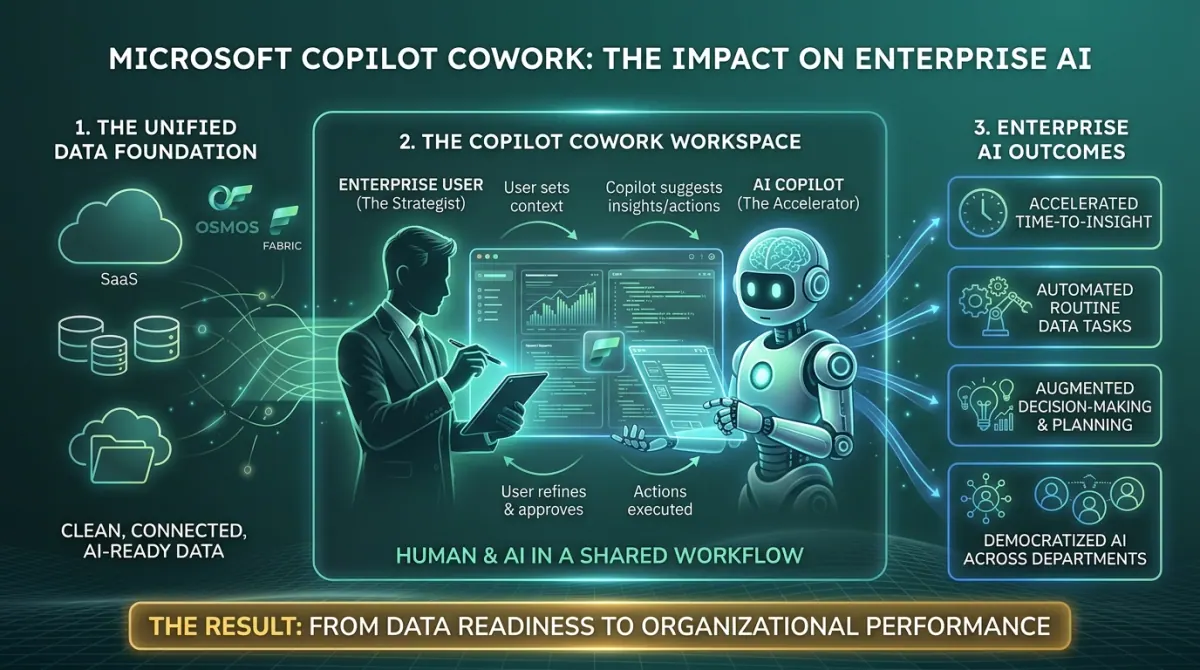
Microsoft Copilot Cowork is the new long-running, multi-step execution layer for Microsoft 365 Copilot. Instead of asking Copilot a question and getting an answer, you describe an outcome and Cowork plans, executes, and checks in until the work is done.
It is built on the technology behind Anthropic's Claude, integrated into Microsoft 365 with Work IQ providing the context layer across Outlook, Teams, Excel, Word, SharePoint, and the rest of the estate. It entered Microsoft's Frontier preview programme in late March 2026 and reached general availability on 16 June 2026, running on Anthropic models including Claude Opus 4.8 and Sonnet 4.6.
For organisations that have been treating Copilot as a faster way to draft emails, Cowork is a different category of product. It is worth understanding why now, before the conversation moves from "should we trial it" to "everyone else has it".
Update, 8 October 2026: Cowork has changed since launch. Microsoft's 25 September announcement puts it inside Home, the new starting point where Chat and Cowork come together, and Cowork is billed on usage in Copilot Credits, with a Copilot licence still required. Model choice has widened: Claude Fable 5.1 (from 1 September) and OpenAI's GPT-6 Astra (from 4 September) are both rolling out in Cowork, and admins can use model profiles in spending policies to control which models it may use. Cowork can now also run event-driven tasks, triggered by an email or a Teams message, and take plugins from the Microsoft 365 App Store. More in the new Microsoft Copilot explained and how Copilot Credits are billed.
What Problem Was Microsoft Trying to Solve?
Most enterprise AI deployments to date have been single-turn. A user asks a question, Copilot returns an answer, and the user takes that answer and does the next step manually. The model is a faster typewriter, not a coworker.
That model has limits. Useful work in a knowledge worker's day is rarely a single turn. Preparing for a customer review involves checking the calendar, pulling the last meeting notes, summarising the relevant deal data, drafting a briefing document, and scheduling a prep call. Five tools, four artefacts, an hour of context-switching.
Cowork addresses this directly. The user delegates the outcome - "prepare me for the Acme review on Thursday" - and Cowork breaks it into steps, executes them across the relevant tools, and surfaces the result with checkpoints along the way. The model becomes the coordinator. The user steers, approves, and intervenes when the plan drifts.
This is the shift from AI as an answer engine to AI as an execution engine. The first wave of enterprise Copilot adoption normalised the answer engine. Cowork is Microsoft's bet on what comes next.
What Is Copilot Cowork, Exactly?
Cowork sits inside Microsoft Copilot, accessible in the browser at copilot.cloud.microsoft, in the Microsoft Copilot desktop app for Windows and macOS, and in the Copilot mobile app for iPhone and Android. Three things make it different from the Copilot most users already know.
- Plan-then-execute architecture - When you give Cowork a task, it produces a plan first and shows you the steps. The plan runs in the background. Cowork checks in if it needs clarification, surfaces recommended actions for approval, and applies changes only after you confirm. Tasks can run for minutes or hours rather than seconds.
- Skills as the unit of capability - Cowork ships with 13 built-in skills, including Word, Excel, PowerPoint, PDF, Email, Scheduling, Calendar Management, Meetings, Daily Briefing, Enterprise Search, Communications, Deep Research, and Adaptive Cards, and Microsoft has since added an App skill, in Frontier preview, that builds lightweight interactive apps from a description. You can also add up to 50 custom skills by dropping a SKILL.md file in your OneDrive /Documents/Cowork/skills/ folder, making the skill available across all future conversations.
- Action gates with risk levels - Before Cowork takes a meaningful action on your behalf - sending an email, posting in a Teams channel, scheduling a meeting - it pauses and asks for approval. Approval prompts include a risk level indicator so you can see the impact before saying yes. This is enterprise-grade by design, not bolted on after the fact.
The underlying intelligence is multi-model. Cowork launched on Anthropic models as a subprocessor for the agentic reasoning, and since September OpenAI's GPT-6 Astra has been rolling out in Cowork alongside Claude Fable 5.1, with Microsoft and OpenAI models used elsewhere in the Copilot stack. The point Microsoft is making, repeatedly, is that the Copilot experience is not tied to one model family.
What Changes for Knowledge Workers?
The practical change is bigger than it looks on the surface.
- The unit of work shifts from artefact to outcome - Asking Copilot to "draft an email" is artefact-level. Asking Cowork to "follow up with the three customers we missed last week and propose a meeting time" is outcome-level. The user no longer manages the steps.
- Recurring work becomes scheduled work - Cowork can run prompts on a schedule. A weekly competitor scan, a monthly budget review, a daily inbox triage at 7am. The work gets done whether you remember to ask for it or not.
- The inbox stops being the to-do list - When Cowork triages your inbox, declines low-value meetings, drafts the routine replies, and surfaces only the items that actually need your attention, the inbox returns to being a communication tool rather than a workload queue.
- Custom skills make org-specific patterns reusable - The SKILL.md format means a well-built skill for "prepare a customer health summary using our internal template" can be shared across a team. Once written, it becomes part of how that team works. This is closer to lightweight automation than to a chat product.
- Trust and adoption decouple - Because Cowork shows its plan, asks for approval on consequential actions, and operates entirely within Microsoft 365 security and compliance boundaries, IT and compliance leaders have something concrete to point at when users ask whether it is safe to use for real work. That is not a small thing in regulated environments.
Where Does Copilot Cowork Fit in the Microsoft AI Stack?
The cleanest way to think about the layers:
Microsoft Fabric is the data layer. OneLake is the storage. Power BI and Fabric Data Agents are the consumption layer over governed data.
Microsoft Foundry is the platform layer for building, deploying, and operating production AI agents and applications. It is where engineering teams build custom agentic systems with private networking, full observability, and multi-model flexibility.
Microsoft 365 Copilot, including Cowork, is the productivity layer. It is where knowledge workers experience AI in the apps they already use, with execution capabilities that turn intent into completed work.
Cowork is not a replacement for Foundry. It is a different product for a different audience. Foundry is for teams building custom agents that operate over your data estate or business systems. Cowork is for end users who need a coworker that can do multi-step work inside Microsoft 365 today, without anyone building anything. For most organisations, both will be relevant. The question is which use cases sit where.
The Strategic Point Most Organisations Miss
Cowork is not a productivity feature. It is a workflow design question.
The first instinct of most organisations rolling out Copilot Cowork will be to enable it for everyone, run a few internal demos, and assume value follows. It will not.
The value comes from identifying which workflows in the organisation are worth handing to Cowork. Triaging the executive inbox. Preparing for board meetings. Compiling weekly customer health reports. Running competitive intelligence sweeps. Each of these has a structure, a set of inputs, and a deliverable. Each one, once captured as a skill or a saved prompt, becomes repeatable.
Organisations that treat Cowork as a self-serve tool will get scattered usage and unclear ROI. Organisations that treat it as a workflow design exercise - identifying the high-value patterns, building the custom skills, training the people who run them - will compound the value over time.
This is the same lesson the early Power Automate and Copilot Studio rollouts taught. The platform is rarely the bottleneck. The intentional design of what to automate, and the change management around how work shifts, is what determines whether the investment pays back.
Who Will Get the Most From Copilot Cowork?
Cowork is most relevant for organisations that:
- Already have a meaningful Microsoft 365 Copilot deployment with active users
- Operate in environments where multi-step coordination across calendar, email, documents, and chat is part of every knowledge worker's day
- Have identifiable recurring workflows that consume meaningful time and follow a repeatable pattern
- Are willing to invest in skill design and change management, not just licence enablement
- Are willing to invest in skill design and rollout discipline while the product and its patterns are still young
Organisations still scaling base Copilot adoption, or those without a clear set of workflows worth automating, should not start with Cowork. The platform is impressive. Without the workflow analysis underneath, it ends up being a more expensive way to draft the same emails.
Why Work With Solv Systems on Copilot Cowork?
At Solv Systems, we help organisations move from Copilot as a chat tool to Copilot as an execution platform that compounds value over time.
Workflow Identification First
We work with your team to identify the highest-leverage workflows for Cowork before any technical rollout. The pattern matters more than the platform.
Custom Skills That Reflect Your Operation
We design and build custom Cowork skills using the SKILL.md format, so the way your team actually works becomes reusable across the organisation.
Governance and Change Management
We integrate Cowork into your existing M365 governance and compliance framework, and we work with your people leaders on the adoption and trust questions that determine whether knowledge workers actually use the tool.
Connected to the Broader AI Strategy
Cowork sits in a stack that includes Fabric, Foundry, and Power Platform - mapped end to end in our executive guide to the Microsoft AI stack. We help you see and build the connections, so productivity AI, custom agents, and your data layer reinforce each other rather than operate in silos.
Sources and Further Reading
- Azure AI Foundry
- Microsoft Copilot Studio documentation
- Copilot Cowork overview (Microsoft Learn)
- Introducing the new Copilot with Home, Code and Autopilot (Microsoft)
- Available today: OpenAI GPT-6 Astra in Microsoft Copilot (Microsoft Copilot Blog)
Frequently asked
Yes. Cowork reached general availability on 16 June 2026, having entered the Frontier preview programme in late March. At GA it ran on Anthropic models, including Claude Opus 4.8 and Sonnet 4.6, alongside a Microsoft 365 Copilot licence. Since September 2026 Claude Fable 5.1 and OpenAI's GPT-6 Astra have been rolling out in Cowork, and Cowork usage is billed in Copilot Credits on top of the licence.
At launch, yes: Cowork ran on Anthropic models as a subprocessor, so tenants needed Anthropic enabled. Since September 2026 OpenAI's GPT-6 Astra is also rolling out in Cowork, and admins choose which providers and models are allowed in the Microsoft 365 admin centre, including through model profiles on Cowork spending policies. Check your tenant's provider settings rather than assuming either way.
Copilot Chat is single-turn. You ask, it answers, you take the next step. Cowork is multi-turn and multi-step. You delegate an outcome, and Cowork plans, executes, and checks in until the work is complete.
Yes. Cowork access is managed through the Microsoft 365 admin centre. Administrators can disable it for specific users, control deployment of the Microsoft 365 Copilot app, and manage availability through standard Copilot admin settings.
In OneDrive, under /Documents/Cowork/skills/. Each skill is a SKILL.md file with a YAML frontmatter block and instructions. Cowork picks them up automatically at the start of each conversation.
Cowork operates over OneDrive and SharePoint. It does not work with files stored locally on a device, and it cannot delete files or folders by design.
Cowork is the productivity AI layer for end users in Microsoft 365. Foundry is the platform for engineering teams building custom production agents. They are complementary - most organisations will use both.