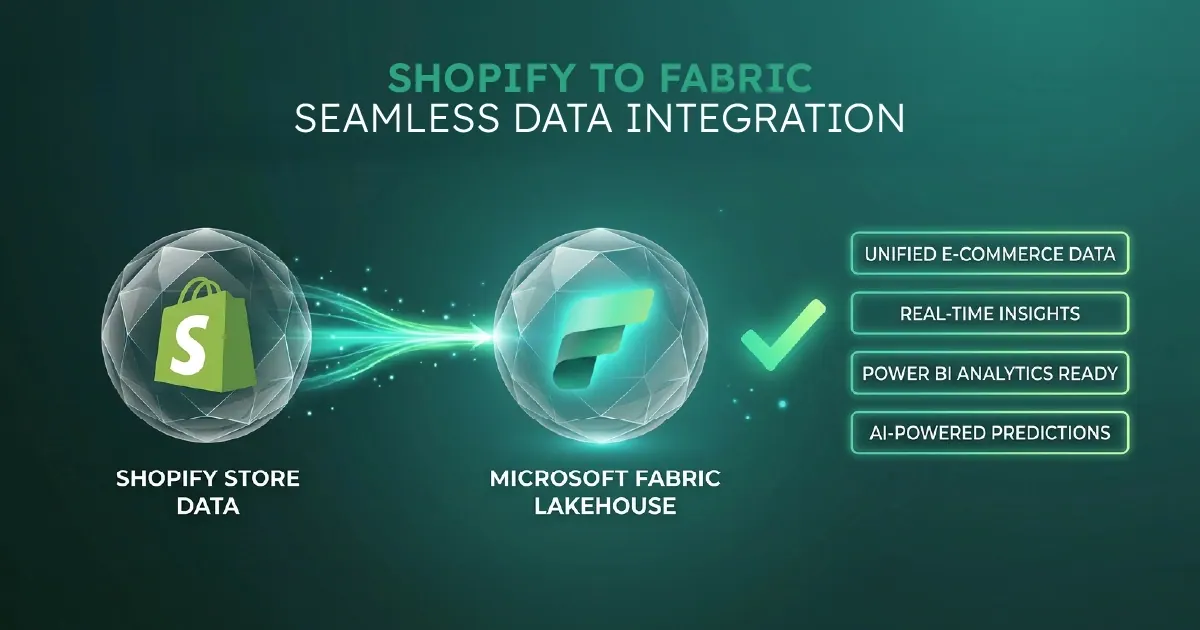
In Short: How Should You Integrate Shopify With Microsoft Fabric?
Shopify is one of the most common data sources we are asked to land in Microsoft Fabric. The Shopify Admin API gives access to roughly 40 data entities: orders, customers, products, fulfilments, refunds, draft orders, transactions, and more, all of which carry real analytical value if you bring them in cleanly.
Most teams approach the integration the wrong way. They either hard-code a pipeline per table and end up with 40 brittle copies of the same logic, or they hand it to a third-party connector and lose control over transformation logic, scheduling, and cost. There is a third path, and it is the one we have built across multiple production engagements: a metadata-driven medallion architecture where the pipeline is configuration, not code.
This article walks through what that architecture looks like in practice, the work we have delivered for a real South African e-commerce client, and why this is the shape Shopify integrations should take in Fabric in 2026.
Why Shopify-to-Fabric Is the Common Ask
Shopify is the e-commerce platform of choice for a meaningful share of mid-market and upper-mid-market retailers globally. Once a business is doing more than a few million in annual revenue on Shopify, three questions appear almost simultaneously.
Reporting. Shopify's native analytics are competent for operational queries but insufficient for the analytical and BI work the business actually needs. Margin by product over time, customer lifetime value by acquisition channel, inventory turn by SKU and warehouse, fulfilment cost by carrier. These questions need data outside Shopify's reporting layer.
Integration. Shopify is rarely the only system in the estate. Accounting, ERP, CRM, marketing automation, fulfilment platforms, and review tools all hold pieces of the customer and product picture. Pulling them together requires a real data platform, not a series of one-off CSV exports.
AI and Copilot. Once you have data in Fabric, the AI surface (Fabric Data Agents, Copilot in Power BI, Microsoft Foundry agents) becomes accessible. Most organisations starting their Fabric journey do so because they want to enable this surface for their data, and Shopify is often the first source they want to bring in.
The integration question is therefore strategic. The wrong architecture creates a brittle dependency that breaks every time Shopify changes the API surface or the business adds new tables. The right architecture is the foundation everything else gets built on.
The Three Ways Most Teams Build This, and Why Two of Them Fail
There are three common patterns for Shopify-to-Fabric integration.
Hard-coded per-table pipelines. Build a separate Fabric pipeline or notebook for each Shopify table: one for orders, one for customers, one for products. Each pipeline has its own connection logic, pagination handling, incremental load logic, and error handling. When the Shopify API changes, you update 40 pipelines. When a new table is added, you build a new pipeline from scratch. This works for one or two tables and fails for 40.
Third-party SaaS connectors. Fivetran, Hightouch, Airbyte, Stitch, and similar tools offer Shopify-to-data-warehouse connectors as a managed service. This is faster to start but significantly more expensive at scale, less transparent about transformation logic, and creates a dependency on the connector vendor for any change you want to make. For organisations committed to Microsoft Fabric as their strategic platform, third-party connectors duplicate the orchestration layer that Fabric already provides.
Metadata-driven medallion architecture in Fabric. Build one pipeline, parameterised by metadata. A configuration table defines which Shopify tables to load, how to load them, where to land them, and how to transform them. The pipeline reads the configuration and applies it. Adding a new table is a metadata change, not a code change.
There is a place for SaaS connectors. We have used them where speed of initial delivery matters more than long-term cost or control. The general case for Fabric-first organisations is that the metadata-driven approach is materially better.
The Architecture, In Detail
The architecture has five components.
Configuration Metadata Table
A single table that defines every Shopify entity being ingested: its target Bronze table name, the load type (full refresh or incremental), the incremental key, the schedule, and any transformation rules. The table lives in a Fabric Warehouse and is the single source of truth for what the pipeline does.
For a 39-table Shopify ingestion, the configuration table has 39 rows. Adding a fortieth table means adding a fortieth row. No new code.
Orchestration Pipeline
A single Fabric Data Pipeline using the ForEach activity. The pipeline reads the configuration table at the start and iterates across every row, calling a parameterised sub-pipeline or notebook for each Shopify entity.
The entire ingestion is one pipeline definition. Changes to logic (error handling, logging, alerting, retry behaviour) are made once and apply uniformly to every table.
Bronze Ingestion Notebook
A parameterised Python or PySpark notebook that handles the actual API calls. It accepts the metadata row and uses it to call the Shopify Admin API (REST or GraphQL depending on the table and the data volume), handle pagination including the Link header semantics Shopify uses, manage rate limits using Shopify's bucket throttling pattern, and write the result to a Delta table in Bronze.
For larger tables (orders for high-volume stores, transaction history), the notebook switches to Shopify's Bulk Operations API, which returns a JSONL file ingested in bulk rather than paginating row-by-row. Incremental loads use the updated_at field where Shopify exposes it, with a watermark table tracking the high-water mark per entity.
Silver Transformation Layer
Bronze tables are the raw API responses, typically with nested JSON structures, Shopify's idiosyncratic field naming, and entity relationships expressed via foreign keys that are not always intuitive. Silver flattens and standardises these.
Silver decomposes the complex orders entity (which in Shopify combines order header, customer, line items, fulfilments, refunds, and transactions into a single nested response) into properly normalised tables. The transformations are metadata-driven where patterns repeat, with table-specific transformations where they do not.
Gold Layer
Business-ready, semantic-model-friendly tables designed for direct consumption by Power BI through Direct Lake mode. Fact tables for orders, fulfilments, and refunds. Conformed dimensions for customers, products, dates, and locations.
The Gold layer is where business logic lives: margin calculations, customer segmentation, lifetime value definitions. It is the layer that Power BI semantic models bind to, giving sub-second query performance on retail-scale data without separate import or DirectQuery overhead.
A Real Engagement: 39 Delta Tables in Production
We delivered this architecture in production for a South African e-commerce business operating on Shopify with the analytical complexity that comes with multi-warehouse, multi-channel retail. The engagement covered three components.
Metadata-driven ingestion for 39 Shopify tables. The Bronze layer is faithful to the Shopify API: minimal transformation, full audit trail of when data was loaded, and complete recoverability if downstream layers need to be rebuilt.
Incremental load optimisation for high-volume tables. Using the Shopify Bulk Operations API and watermark-based incremental loading rather than full refreshes. This compressed the daily refresh window dramatically and removed pressure from the Shopify API rate limit budget.
CI/CD pipelines via Azure DevOps. Changes to the platform are version-controlled, peer-reviewed, and promoted through environments rather than edited directly in production. The platform is engineered, not just built.
The Silver layer standardised the Shopify entities into business-readable shapes, and the Gold layer was designed against the actual analytical questions the business needed to answer: margin by product and channel, customer cohort behaviour over time, inventory turn by warehouse. Power BI semantic models bind directly to the Gold layer through Direct Lake.
What This Enables
The deliverable is not just a working Shopify-to-Fabric pipeline. It is a platform that compounds in value over time.
- Adding new Shopify tables is a metadata change. Shopify ships new API endpoints occasionally. Supporting a new endpoint is a single configuration row, not a new pipeline build. The same is true for previously-ignored entities such as draft orders or abandoned checkouts.
- API version upgrades are uniform. Shopify versions its API quarterly. When a version upgrade matters, the change is applied in one place in the Bronze notebook and propagates to every table the pipeline ingests. Maintenance burden drops by an order of magnitude.
- Error handling and observability are consistent. Every Shopify entity uses the same error handling, the same logging structure, the same alerting thresholds, and the same recovery patterns. Operational support is dramatically simpler because the patterns are uniform.
- The platform extends to non-Shopify sources. The metadata-driven pattern is not specific to Shopify. The same orchestration framework, with different Bronze notebooks, supports any source that can be parameterised. We have extended the same pattern to HubSpot CRM, SAP Concur, Microsoft Dynamics, and several others - and to spatial sources such as ArcGIS.
- Production support is realistic. Internal teams can support a metadata-driven platform far more easily than 40 hand-rolled pipelines. The cognitive load is proportional to the architecture, not the number of tables.
What This Says About How We Build at Solv
The Shopify integration pattern reflects a broader engineering philosophy that runs through the work we do for clients.
The pattern is the asset, not the implementation. We have built the metadata-driven framework once. It has compounded across client engagements. Each engagement makes the framework slightly better. The investment compounds.
Standardisation produces better outcomes than bespoke. There are situations where bespoke architecture is the right answer. Shopify integration is not one of them. The patterns repeat enough across clients that an opinionated, reusable framework is materially better than starting from scratch.
The platform engineering layer matters. Building a Fabric pipeline is not the same as engineering a production platform. CI/CD, version control, environment separation, peer review, and operational runbooks distinguish the two.
Why Work With Solv Systems on Shopify-to-Fabric
At Solv Systems, we are a specialist Microsoft Fabric, Power BI, and AI consultancy. Three skillset components we combine that most consultancies do not.
Real production Shopify experience. We have built and delivered Shopify-to-Fabric pipelines at production scale, not as proofs of concept. The 39-table implementation described above handles incremental loads, bulk operations, rate limit management, error recovery, and the Shopify API edge cases that show up only in real operation.
Metadata-driven architecture as standard. The metadata-driven medallion pattern is our default for any multi-table source integration, not just Shopify. We have extended the same framework to HubSpot CRM, SAP Concur, MyCrops, ConnectWise, and several others. The framework continues to evolve and compound across engagements.
Microsoft Fabric engineering discipline. Building on Fabric is one skill. Engineering a production platform on Fabric, with CI/CD, environment separation, governance, monitoring, and operational runbooks, is a different skill. We deliver both as standard.
Senior-led delivery. The same senior engineers who designed the metadata-driven framework lead the engagements that deploy it. The thinking that goes into our internal IP goes into client work too. For the wider retail picture - stock, channels and trading speed - see our guide to Fabric for retail analytics.
Sources and Further Reading
- Shopify Admin GraphQL API
- Fabric lakehouse and medallion architecture tutorial
- Microsoft Fabric documentation
- Fabric Data Factory documentation
Frequently asked
A focused Shopify-only implementation in Fabric Bronze and Silver, with a basic Gold layer and Power BI semantic model, runs four to eight weeks for a single Shopify store. Multi-store, multi-region implementations with complex consolidation logic run longer, typically three to four months. The metadata-driven architecture saves time across larger scopes because the orchestration framework is reusable.
Both, depending on the table and the volume. For most reference data and lower-volume entities, REST is straightforward. For high-volume entities (orders, transactions on high-volume stores) we use the Bulk Operations API via GraphQL, which is materially more efficient at scale. The metadata-driven framework selects the right approach per table based on configuration.
Yes. The metadata configuration supports multi-store by including the store identifier and credential reference per row, with the orchestration pipeline iterating across the cross product of stores and tables. This is a common pattern for retailers running separate Shopify stores per country or per brand.
Shopify Plus shares the same Admin API as standard Shopify, so the integration pattern is identical at the API level. Plus customers typically have higher data volumes, more complex order patterns (B2B, wholesale, draft orders at scale), and more demanding analytical requirements. The architecture handles these without modification, though the Gold layer often includes additional complexity.
Yes. The pattern extends naturally to incorporate Shopify webhooks landing into Fabric Eventstream and Eventhouse, which then flow into the same Silver and Gold transformations as batched data. Real-time use cases are typically operational dashboards and exception alerting rather than analytical queries, and the architecture supports both.
The same metadata-driven framework supports Magento, BigCommerce, WooCommerce, and other e-commerce platforms with similar API surfaces. The Bronze ingestion notebook is platform-specific. The rest of the framework is shared.
Bronze captures the raw API response, so schema changes are caught immediately and can be reviewed before they propagate downstream. Silver transformations are versioned and tested in CI/CD before promotion to production. Breaking changes are handled deliberately, not by surprise.
The metadata-driven framework supports backfill loads alongside incremental ones. Historical Shopify data is backfilled in a single bulk operation, after which the pipeline switches to incremental loading. The two patterns share the same Bronze targets, so the historical and ongoing data are seamlessly combined.