In Short: How Do You Protect Sensitive Data Without Locking Everything Down?
By applying security at the data layer instead of the report layer. On the Microsoft platform that means row-level security so one report shows each user only their rows, role-based access managed through Entra groups, sensitivity labels that travel with the data via Purview, and governed self-service good enough that people stop exporting to Excel. Done well, sharing more and exposing less stop being opposites.
The Tension Nobody Names
Every organisation now lives with a tension it rarely names. On one side: the push to be data-driven, to give more people access to more information, to make dashboards and self-service analytics available across the business. On the other: the fact that much of that data is sensitive - salaries, margins, customer records, personal information - and that every additional person with access is an additional way for it to leak.
Most businesses resolve this tension badly, in one of two directions. Either they lock data down so tightly that nobody can use it (and the business quietly routes around IT with exported spreadsheets - the least secure channel of all). Or they share generously and hope: reports forwarded with full data attached, one dashboard shown to everyone, an export emailed to a distribution list that nobody has reviewed in two years.
If a salary file, a customer list, or a margin report in your organisation is one wrong "Reply All" away from the wrong audience, this post is for you.
Where the Risk Actually Lives
When leaders think about data breaches they picture hackers. The likelier failure modes are more mundane:
The over-shared report. A dashboard built for the exec team gets shared "temporarily" with a wider group and never unshared. Access accumulates; it almost never gets revoked.
The export escape hatch. The moment data leaves a governed platform for Excel, every control disappears. It gets emailed, copied to laptops, uploaded to personal drives. Most organisations' most sensitive data circulates precisely this way - because the governed platform didn't give people what they needed, so they took it out.
One report, every audience. Without fine-grained control, organisations build separate reports per region or team - a maintenance nightmare - or one report showing everything to everyone, which is a disclosure incident on a schedule.
The departed employee. Access tied to individuals rather than roles, never cleaned up. Ex-employees and changed-role employees retain visibility nobody remembers granting.
Regulatory drift. Under GDPR, POPIA, and industry rules, "who can see personal data, and can you prove it?" is a question you must be able to answer. If access is managed by habit and memory, you can't.
What Good Looks Like: Share Widely, Expose Narrowly
The way out of the lockdown-versus-leak dilemma is not choosing a side. It's an architecture where broad access and tight control are the same system. On the Microsoft platform - Power BI, Fabric, Purview, and Entra - that architecture has well-established parts:
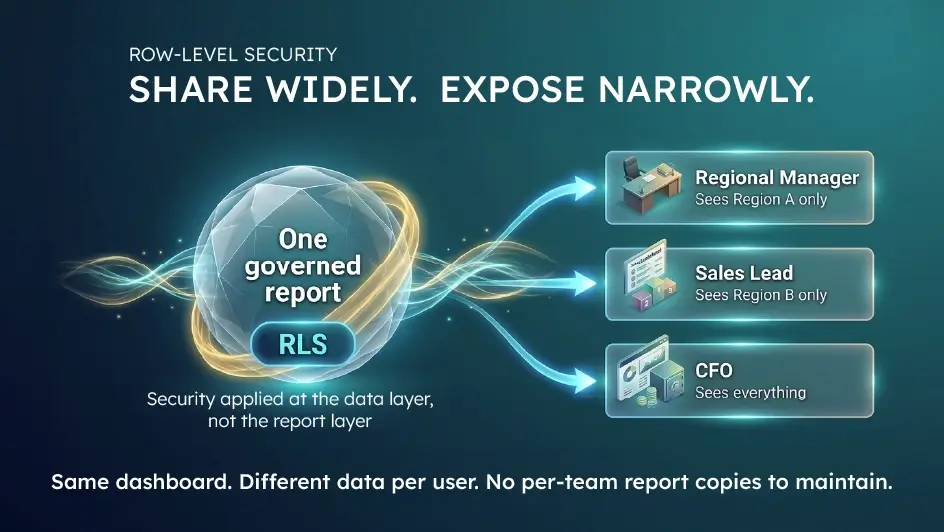
Row-level security (RLS). One report, many audiences: each user sees only the rows they're entitled to. The regional manager opens the sales dashboard and sees their region; the CFO opens the same dashboard and sees everything. Dynamic RLS drives this from your organisational structure automatically - no per-person report copies, no maintenance sprawl. Done well, this single capability removes the biggest reason people build shadow copies of reports. (We've written a practical guide to RLS in Power BI if you want the detail.)
Role-based access, centrally managed. Permissions attached to roles and groups in Microsoft Entra, not to individuals. People change jobs, groups update, access follows - and offboarding actually offboards.
Sensitivity labels and data loss protection. With Microsoft Purview, data is classified where it lives - "Confidential," "Personal data" - and the labels travel with it, into exports and downstream files, carrying encryption and usage policies along.
Governed self-service instead of exports. The deeper fix for the Excel escape hatch: give people certified datasets they can explore safely inside the platform, with security applied at the data layer. When the governed route is the convenient route, the ungoverned routes wither.
Auditability by default. Who accessed what, when, and what changed - logged by the platform. When an auditor or regulator asks, the answer is a report, not an archaeology project.
The principle across all of it: security applied at the data layer, not the report layer. Controls that live in the data follow it everywhere; controls bolted onto individual reports fail every time someone builds a new report.
How to Get There
1. Find your crown jewels. Classify the data that would actually hurt - personal data, remuneration, margins, strategy. Most organisations have less truly sensitive data than they fear, concentrated in fewer places than they think.
2. Audit current exposure honestly. Who can see these today, through what shares, exports, and inherited permissions? This audit is always sobering, and it defines the priority list.
3. Rebuild access around roles and RLS. Implement dynamic row-level security on your core datasets and move sharing to group-based permissions. This is detailed, skilled work - RLS that's misconfigured gives false confidence, and RLS that's badly designed slows every report.
4. Close the export loop. Roll out sensitivity labels and give users governed self-service good enough that they stop needing exports. Security that fights the business loses; security that serves it sticks.
Where Solv Systems Comes In
Governance and security are built into every platform Solv Systems delivers - and we also fix them retrospectively for organisations that grew faster than their controls. As a Microsoft Partner, we implement the full stack described here: dynamic row-level security in Power BI, role-based access through Entra, sensitivity labelling and lineage with Purview, and governed self-service on Fabric that gives people a safe alternative to the export habit.
We've done this in regulated and privacy-sensitive environments across the UK, EU, US, and South Africa, so GDPR and POPIA obligations are familiar ground, not an afterthought. And because we design security into the data layer from the start, the result isn't a locked cabinet - it's a platform where sharing more and exposing less finally stop being opposites.
Open Up Your Data Without Opening Up Risk
If you're currently choosing between analytics adoption and data safety, the choice is false - you can have both, on the platform you already own.
Our Power BI and analytics team will review how your data is shared today, where the real exposure sits, and what a governed access model would look like. Straight answers, no scare tactics.
Sources and Further Reading
Frequently asked
A capability that filters data per user within a single report: the regional manager sees their region, the CFO sees everything, from the same dashboard. Dynamic RLS drives the filtering from your organisational structure automatically, eliminating both per-audience report copies and all-data-to-everyone sharing.
Not hackers - habits. Over-shared reports that never get unshared, data exported to Excel where every control disappears, access tied to individuals that outlives their role, and one-report-for-everyone designs. The most sensitive data in most organisations circulates in ungoverned exports.
Classifications applied to data where it lives - such as 'Confidential' or 'Personal data' - through Microsoft Purview. The labels travel with the data into exports and downstream files, carrying encryption and usage policies along, so protection doesn't stop at the platform boundary.
When permissions attach to roles and groups in Microsoft Entra rather than to individuals, access follows organisational reality automatically: people change jobs and their group memberships update; people leave and their access genuinely ends. No more visibility that nobody remembers granting.
Usually the opposite. When the governed platform can't give people what they need, they take data out of it - exports, email attachments, personal drives - which is the least secure channel of all. The effective fix is governed self-service good enough that the safe route is also the convenient one.
Both regimes require you to answer 'who can see personal data, and can you prove it?' Security applied at the data layer - RLS, role-based access, sensitivity labels, platform audit logs - makes that answer a report rather than an archaeology project.