In Short: Governance in Fabric Is Built on Microsoft Purview
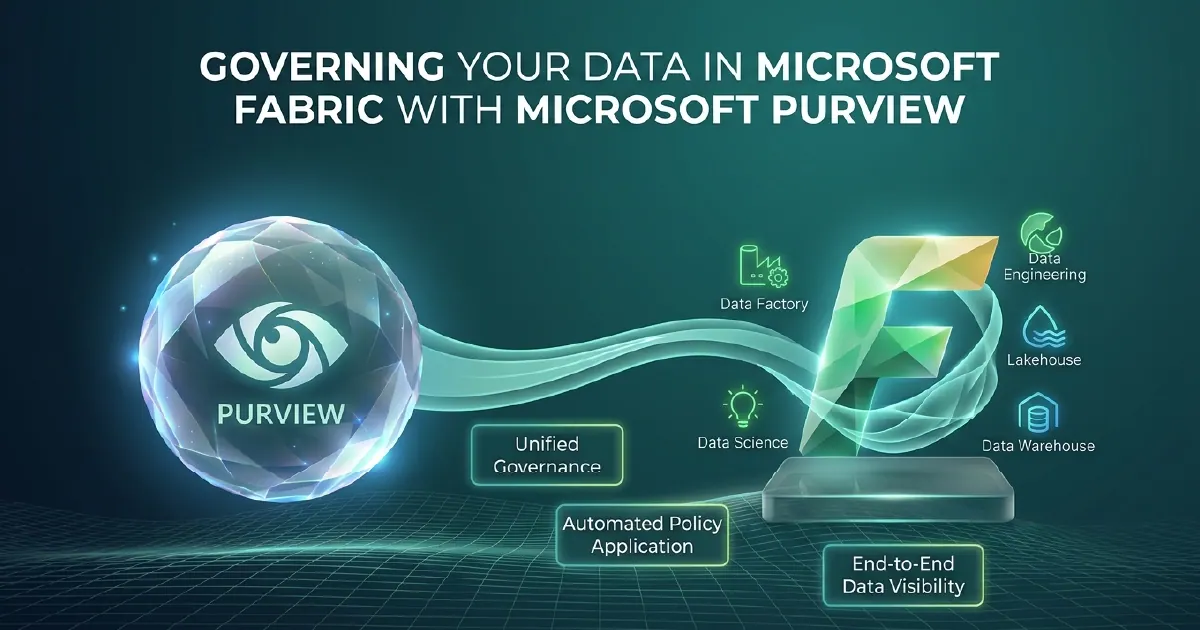
Data governance in Microsoft Fabric is not a bolt-on feature - it is built into the platform through the integration between Fabric and Microsoft Purview. Purview provides the data catalogue, lineage tracking, and policy enforcement layer. Fabric provides the workspace permissions, item-level access controls, and sensitivity label enforcement that together form a complete enterprise governance posture.
This guide explains how each layer works and what a practical governance implementation looks like.
Why Governance Comes Before AI
The appetite for AI-powered analytics - natural language querying, Fabric Data Agents, Copilot integration - is creating a governance imperative that did not exist five years ago.
When a business user asks an AI agent a question, the agent needs to know: what data can this user access? Which columns contain sensitive information? Where did this data come from? Is it current?
Without governance, agents produce confident answers from data they should not be accessing, or from data that is stale, poorly defined, or inconsistent across sources. The visibility of AI outputs makes governance failures more visible than they were in traditional BI.
Getting governance right before deploying AI capabilities is not bureaucracy - it is the foundation that makes AI trustworthy. Two deep dives continue this thread: Purview DSPM for AI on oversharing, and governing AI agents with Entra Agent ID on the identity side.
Workspace Permissions and Item Access
Fabric organises all content into workspaces. Workspace roles - Admin, Member, Contributor, Viewer - control what users can do within a workspace. Viewer access lets a user see reports and dashboards but not access underlying datasets directly.
Below workspace level, individual items such as Lakehouses, Warehouses, semantic models, and reports have their own permission settings. A user can be granted read access to a specific Lakehouse without being a workspace Member.
For OneLake specifically, access is controlled at the folder level within a Lakehouse. This enables fine-grained control: different teams can have access to different folders within the same OneLake without seeing each other's data.
The practical recommendation: design your workspace structure around governance boundaries before you design it around team preferences. Retrofitting governance to a convenience-first workspace structure is significantly harder than designing it correctly from the start.
Microsoft Purview Integration
Microsoft Purview connects to Fabric automatically when both are in the same Microsoft 365 tenant. Once connected, Purview provides three core governance capabilities.
Data Catalogue
Every Fabric item - Lakehouses, Warehouses, semantic models, pipelines - is automatically catalogued in Purview. Data stewards can add descriptions, owners, glossary terms, and classifications to each item.
The catalogue becomes the answer to a question most organisations cannot currently answer reliably: what data do we have, where is it, and who owns it?
Data Lineage
Purview tracks lineage automatically across Fabric. For any Power BI report, you can see the full chain: which semantic model it uses, which Lakehouse that model reads from, which pipeline populated that Lakehouse, and what the upstream source was.
Lineage is essential for impact analysis - if I change this table, which reports are affected? - and for regulatory compliance - where did this figure in this report come from?
Sensitivity Labels
Microsoft Information Protection sensitivity labels - Public, Internal, Confidential, Highly Confidential - apply across the entire Microsoft estate including Fabric. Labels set in Purview flow through to Power BI semantic models, reports, and exports.
When a user exports a Highly Confidential report to Excel, the Excel file inherits the label and the associated protection policy. The protection travels with the data, not just the container.
Access Policies: Data Owner-Managed Permissions
Purview access policies for OneLake allow data owners to grant read access to specific OneLake folders directly from Purview, without involving workspace admins.
This is a significant governance improvement: it separates the data access decision (which belongs to the data owner) from the platform administration decision (which belongs to IT). Data owners can manage who sees their data without raising an IT ticket every time.
For regulated industries - finance, healthcare, insurance - this separation of duties is often a compliance requirement, not just a best practice.
A Practical Governance Implementation Sequence
Starting from scratch, the sequence that works:
- Design workspace topology first - governance boundaries before team convenience
- Set up Microsoft Entra groups for data access, aligned to business roles rather than individuals
- Connect Purview and run an initial asset scan to populate the catalogue
- Assign sensitivity labels to your highest-sensitivity data sources
- Appoint data owners for each domain - finance, sales, operations - and give them catalogue edit rights
- Enable lineage and run a lineage review with stakeholders before going live
- Document your governance policies in the Purview data governance portal
- Schedule quarterly reviews of access permissions and catalogue completeness
Governance is not a project with an end date - it is an ongoing practice. Build the review cadence in from the start.
The Governance Payoff
The return on governance investment comes in three forms.
Faster AI adoption: Every AI capability in Fabric - Data Agents, Fabric IQ, Copilot - becomes safer and more useful when the underlying data is catalogued, classified, and access-controlled.
Lower audit cost: Regulatory audits, GDPR data subject access requests, and internal compliance reviews become significantly cheaper when lineage is tracked and access is documented.
Reduced incident risk: Data breaches and accidental disclosures are more likely in ungoverned environments. The cost of a single significant incident typically exceeds several years of governance programme investment.
Governance That Survives Contact With the Business
Purview supplies the tooling. What makes governance stick is ownership, agreed definitions and quality rules the platform enforces on every refresh, rather than a policy document nobody reads.
If that is where you are, data governance consulting is the work we do, and fixing data quality as a system rather than a clean-up covers the background.
Sources and Further Reading
Frequently asked
Microsoft Purview connects automatically to Fabric when both are in the same Microsoft 365 tenant. Once connected, Purview catalogues all Fabric items automatically, tracks data lineage across pipelines and reports, and enforces sensitivity labels across the estate.
Data lineage in Fabric shows the full chain from source data to report: which sources feed which pipelines, which Lakehouses those pipelines populate, and which semantic models and reports read from those Lakehouses. Lineage is tracked automatically by Microsoft Purview and is essential for impact analysis and regulatory compliance.
Sensitivity labels from Microsoft Information Protection apply across the Fabric estate. Labels set on data sources flow through to Power BI reports and exports. If a user exports a Highly Confidential report to Excel, the file inherits the label and associated protection policy.
The Microsoft Purview data catalogue automatically inventories all Fabric items - Lakehouses, Warehouses, semantic models, pipelines, and reports. Data stewards can enrich the catalogue with descriptions, owners, glossary terms, and classifications, giving the organisation a searchable map of its data assets.
Fabric workspaces have four roles: Admin (full control), Member (can publish and share), Contributor (can create and edit content), and Viewer (can view reports and dashboards only). Below workspace level, individual items have their own permission settings for more granular access control.
Purview is the recommended and most comprehensive governance layer for Fabric, providing catalogue, lineage, and policy capabilities. Basic access control can be configured through Fabric workspace roles and Entra groups alone, but without Purview you lose catalogue discovery, lineage tracking, and cross-tenant sensitivity label enforcement.