In Short: How Do You Get Odoo Data into Fabric?
Odoo is the fastest-growing open-source ERP in the mid-market, and it is increasingly the system we are asked to land in Microsoft Fabric. Sales, accounting, inventory, manufacturing, HR, CRM: Odoo's modular footprint means most clients have meaningful operational and financial data spread across a dozen or more Odoo modules, all of which carry analytical value if you bring them in cleanly.
There are four practical ways to integrate Odoo with Fabric, and the right answer depends on whether you are on Odoo Online, Odoo.sh, or self-hosted, plus how heavily you have customised the system. Direct PostgreSQL access is the fastest and most flexible path for self-hosted environments. Odoo's external API is the right path for cloud-hosted environments. The architecture around either is where the durable value lives.
This guide walks through the four approaches, when each one fits, and how we build production Odoo to Fabric integrations that survive Odoo customisation, version upgrades, and the modularity that makes every Odoo implementation different.
What Problem Does Odoo to Fabric Solve?
Odoo's native reporting is competent within each module and limited across them.
The Sales module gives you sales reports. The Accounting module gives you financial reports. The Inventory module gives you stock reports. Each is sensible inside its own scope. The work an organisation actually wants to do almost always crosses module boundaries: profitability by customer joining sales to accounting to fulfilment costs, working capital by inventory turn against sales velocity by SKU, margin by salesperson with commission accruals and cost-of-goods-sold. Odoo Studio and the built-in pivot views handle simple cross-module work. They do not scale to the analytical questions a finance director or operations lead actually asks.
The other constraint is that Odoo's operational performance suffers when heavy analytical queries run against it. Direct reporting in Odoo means analysts ask big questions of the same database that runs the business, and the trade-off is visible at month-end when both reporting and operational performance compete for the same resources.
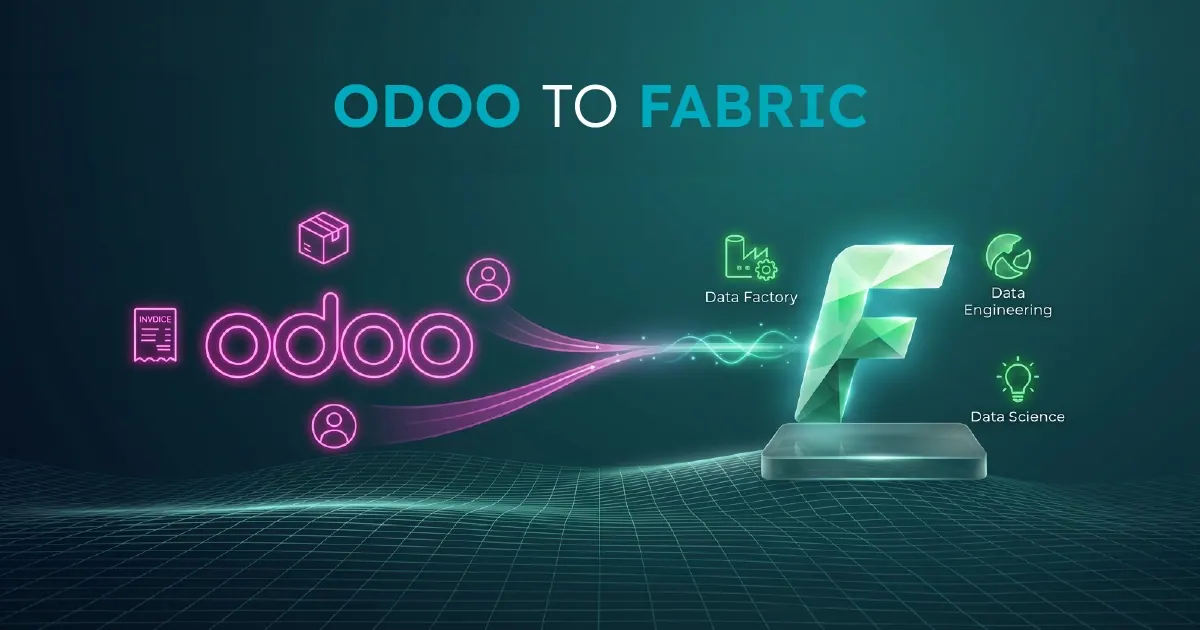
A proper Odoo to Fabric integration moves analytical work to a platform built for it. Odoo continues to run the business. Fabric holds a governed, modelled copy of the data, joined to your CRM, e-commerce, fulfilment, and other systems, ready for analytical work that would slow Odoo down or break it entirely.
What You Need Before You Start
An Odoo to Fabric integration has a small set of hard prerequisites.
A clear picture of which Odoo modules and tables you actually need. Odoo's standard data model covers hundreds of tables, and customisation usually adds more. Most analytical work uses 30 to 80 of them. Identifying which ones before you start is the single largest factor in how fast and how clean the integration ends up.
Network and credential access to the Odoo source. For self-hosted Odoo, this means PostgreSQL read access from your Fabric environment, ideally via private networking. For Odoo Online or Odoo.sh, this means a configured API user with appropriate access rights across the modules you want to integrate.
A paid Fabric capacity. F2 or higher for evaluation. F4 to F16 for most mid-market production deployments. Capacity sizing depends more on the analytical workload than on the Odoo extraction itself, since the extraction is typically scheduled rather than continuous.
Awareness of your customisation footprint. Odoo's modularity is also its biggest integration risk. Heavily customised Odoo implementations often have business logic in custom Python code or computed fields that do not exist in the raw database tables. The integration needs to account for this from the start, not discover it three weeks in.
If any of these are missing, the integration will be slower and more expensive than it should be. Most first-time issues are around scoping (which tables) and customisation (which computed fields matter), not Fabric configuration.
The Four Ways to Integrate Odoo with Fabric
There are four real integration patterns. The right choice depends primarily on your Odoo hosting model.
1. Direct PostgreSQL Access
For self-hosted Odoo, the fastest and most flexible path is direct read access to Odoo's underlying PostgreSQL database from Fabric pipelines or notebooks. Performance is excellent, the data model is well-documented, and the integration bypasses Odoo's application layer entirely. The trade-off is that database access means you skip Odoo's business logic, so computed fields and any logic that lives in Python rather than the database need to be reconstructed in Silver. This is the default pattern for organisations on Odoo.sh or self-hosted Odoo Community or Enterprise.
2. Odoo External API (XML-RPC and JSON-RPC)
The strategic default for Odoo Online environments where direct database access is not available. Odoo exposes a well-documented external API that lets you read any model the API user has access to. Computed fields come through correctly because the API runs through Odoo's business logic. The trade-off is performance: API extraction is slower than direct database reads, and pulling tens of millions of rows through the API is impractical. For most mid-market Odoo footprints this is fine, but volume matters.
3. Third-Party SaaS Connectors
Fivetran, Airbyte, and similar tools offer Odoo-to-data-warehouse connectors as managed services. Fast to start, more expensive at scale, less transparent about transformation logic. For organisations committed to Microsoft Fabric as a strategic platform, third-party connectors duplicate the orchestration layer Fabric already provides. Use them where speed of initial delivery matters more than long-term cost or control.
4. Custom OCA-Based Integration
The Odoo Community Association maintains various community-built integrations and patterns. Quality varies, and most are designed for Odoo-to-Odoo or Odoo-to-other-systems rather than Odoo-to-data-platform scenarios. Worth knowing about. Rarely the right answer for a Fabric integration.
For most modern Odoo deployments, the right architecture is direct PostgreSQL access where it is available and the External API where it is not, wrapped in a metadata-driven Fabric framework.
How to Build a Production Integration
A production Odoo to Fabric integration has five components.
Configuration Metadata Table
A single table that defines every Odoo model being integrated: its target Bronze table name, the load type (full refresh or incremental), the incremental key (typically write_date for Odoo), the schedule, and any transformation rules. This metadata table lives in a Fabric Warehouse and is the single source of truth for what the pipeline does. Adding a new Odoo model is a metadata change, not a code change.
Orchestration Pipeline
A single Fabric Data Pipeline using the ForEach activity, reading the configuration table at the start and iterating across every row. The pipeline calls a parameterised sub-pipeline or notebook for each Odoo model, regardless of whether the model is being read via PostgreSQL or via the External API. Error handling, logging, and observability are centralised.
Bronze Ingestion Notebook
A parameterised Python notebook that handles the actual extraction. It accepts the metadata row and chooses between two paths: direct PostgreSQL read using psycopg2 or pyodbc for self-hosted Odoo, or odoorpc / direct XML-RPC for Odoo Online. The notebook writes the result to a Delta table in Bronze. Incremental loads use Odoo's write_date field, which is updated on every row modification, with a watermark table tracking the high-water mark per model.
Silver Transformation Layer
Odoo's raw tables are usable but not analytical. Silver flattens many-to-many relationships, resolves the res.partner polymorphism (where customers, vendors, contacts, employees, and other entities all share the same table with a type discriminator), denormalises the account.move and account.move.line pattern for posted financial transactions with their analytic accounts, and unifies the product.product versus product.template distinction into a single analytical product table. Where computed fields matter and direct PostgreSQL access has missed them, the Silver layer reconstructs the logic against the raw data. The transformations are metadata-driven where patterns repeat.
Gold Layer
Business-ready, semantic-model-friendly tables. Conformed dimensions for customers, products, vendors, dates, locations, currencies, analytic accounts, and sales teams. Fact tables for sales orders, purchase orders, inventory movements, and accounting transactions. The business logic that turns Odoo entries into the financial and operational metrics the business actually uses. The Gold layer is what Power BI semantic models bind to through Direct Lake mode.
What Is the Strategic Point Most Organisations Miss?
Odoo's modularity is its biggest analytical asset and its biggest integration risk.
The asset side is that Odoo's well-documented PostgreSQL schema makes the technical integration easier than most ERPs. The data model is consistent. The relationships are clean. The naming conventions are predictable. For self-hosted Odoo specifically, the integration path is more straightforward than the equivalent for Business Central or NetSuite.
The risk side is that no two Odoo implementations look the same. The modules installed, the customisations applied, the computed fields that matter, the workflows that have been modified: every Odoo deployment is structurally different from every other one. An integration that works perfectly for one Odoo client will fail at the second one because the second client has a different module footprint, different customisations, or different computed fields driving the metrics that matter to the business.
The implication is architectural. A hard-coded Odoo integration ages badly because Odoo customisation is continuous, not a one-off event. A metadata-driven integration absorbs customisation as configuration. New modules become new metadata rows. New computed fields become new Silver transformations. The integration framework survives the Odoo customisation that would break a hard-coded pipeline.
This is the part most internal Odoo integration projects underestimate. The first integration looks fast because the technical pattern is clean. The maintenance burden then grows with every Odoo customisation, every module added, every business process change. The metadata-driven approach trades a slightly higher upfront cost for a dramatically lower ongoing cost. For any organisation expecting to keep Odoo for more than two years, the maths almost always favours the metadata-driven path.
Who Will Get the Most From an Odoo to Fabric Integration?
This integration is most relevant for organisations that:
- Run Odoo as a meaningful operational and financial system, with data that drives analytical work
- Have outgrown Odoo's native reporting and Studio dashboards
- Operate in multiple companies, currencies, or business units and need consolidated analytics
- Want to join Odoo data with CRM, e-commerce, fulfilment, marketing, or other systems in a unified analytical model
- Have an Odoo footprint that will continue to evolve through customisation and module additions over time
- Are building toward a broader Fabric data platform and need Odoo to be one of several governed sources
Organisations with a single small Odoo tenant, no customisations, and basic reporting needs may be served adequately by Odoo's built-in reporting tools. The case for a full integration scales with Odoo complexity and analytical ambition.
Why Work With Solv Systems on Odoo to Fabric?
At Solv Systems, we build Odoo to Microsoft Fabric integrations that hold up to Odoo customisation, multi-company consolidation, and the analytical questions the business actually asks.
Hosting-aware architecture. We pick the right extraction pattern for your Odoo hosting model: PostgreSQL where it makes sense, External API where it has to, hybrid where both are available and each is the better choice for different parts of the data.
Metadata-driven by default. Our standard pattern absorbs Odoo customisation as configuration rather than code. New modules, new computed fields, and new business logic become metadata changes, not pipeline rewrites. The framework survives the Odoo evolution that would break a hard-coded integration.
Multi-company and multi-currency handled properly. Multi-company consolidation, intercompany eliminations, currency conversion across Odoo's res.currency and res.currency.rate tables, and the analytic account structures that Odoo uses for departmental and project reporting are areas where most Odoo integrations fail at the second company added. We design Silver and Gold to handle them from the start.
Engineered, not just built. CI/CD via Azure DevOps, version-controlled transformations, environment separation, and operational runbooks come as standard. The integration is engineered for production support, not assembled for the first demo. For how the Bronze, Silver and Gold layers are designed, see our guide to medallion architecture in Fabric.
Sources and Further Reading
- Odoo external API documentation
- Fabric Data Factory documentation
- Microsoft Fabric documentation
- OneLake overview
Frequently asked
Both work. Self-hosted Odoo allows direct PostgreSQL access, which is faster and more flexible. Odoo Online uses the External API, which works fine for most mid-market footprints but is slower for very high-volume extractions. The choice of hosting does not determine whether an integration is possible, only which pattern is the right default.
Odoo.sh allows database access in some configurations. Where direct database access is available, we use it. Where it is not, we fall back to the External API. The metadata-driven framework supports both paths transparently.
For most analytical workloads, near-current is sufficient and the integration runs on a schedule, typically hourly or every few hours. For operational scenarios that need true real-time, Odoo's API webhooks can be combined with Fabric Eventstream to push changes into Fabric as they happen.
Direct PostgreSQL reads are generally invisible to Odoo's application performance because they hit the database directly. External API extractions consume Odoo application resources, so scheduling and throttling matter. We design extraction patterns that respect Odoo's operational windows.
Both work. The integration patterns are the same. Enterprise modules add tables that Community does not have, so the metadata scope differs, but the framework handles either equally well.
Yes. The metadata-driven framework is designed for this. Custom fields, custom modules, computed fields, and workflow modifications are accommodated as configuration changes rather than code changes. This is one of the main reasons to choose this architecture over a hard-coded pipeline.
The pattern is the same metadata-driven medallion architecture we apply to any multi-table source. The Bronze ingestion notebook is Odoo-specific. The Silver and Gold layers are designed for Odoo's data model. The framework around them is shared with our other source integrations, which means an organisation running Odoo plus Shopify plus other systems gets a consistent architecture across all of them.