In Short: How Do You Get monday.com Data into Fabric?
monday.com is the Work OS we are most often asked to land in Microsoft Fabric for organisations that use it seriously. Project tracking, sales pipelines, HR workflows, operations boards, marketing campaigns, content calendars: monday.com is rarely the only system in the estate, but for the work it captures it is often the operational record of truth, and the analytical value of that data is real.
There are three practical ways to integrate monday.com with Fabric, and all of them route through monday.com's GraphQL API in some form. The right architecture is determined less by the technical extraction (the API is the API) and more by the schema variability problem that defines every monday.com integration: every board is structurally different, and the data model that works for one organisation almost never works for another.
This guide walks through the three approaches, when each one fits, and how we build production monday.com to Fabric integrations that absorb board variability, survive monday.com's complexity-based API limits, and hold up in regulated environments.
What Problem Does monday.com to Fabric Solve?
monday.com's native reporting is competent in-context and limited at any kind of scale.
Dashboards built on individual boards are useful for the team operating that board. The native Reports and Analytics views handle basic aggregations. The cross-board widgets work for pulling a few boards together into a leadership view. None of this scales to the analytical work an organisation with 50 or 500 boards actually needs: cross-board roll-ups that join project tracking data to time tracking to financial cost, customer health views that combine CRM pipelines with delivery progress with support ticket volumes, capacity planning that consolidates utilisation across teams and business units, programme-level reporting that aggregates dozens of board-level workstreams.
The other constraint is that monday.com's API is complexity-rate-limited rather than call-rate-limited. Every query has a complexity score, and accounts have a budget of complexity points per minute. Heavy reporting against the live API can exhaust complexity budgets and slow operational use, while also producing analytical results that depend on the API being available at the moment the report runs.
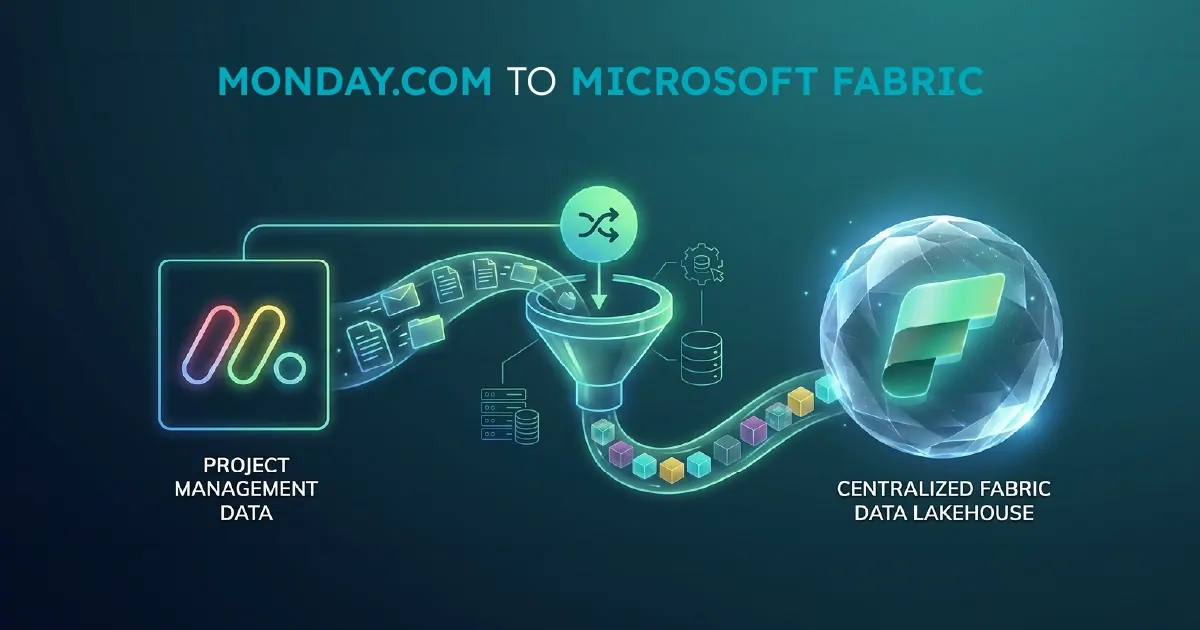
A proper monday.com to Fabric integration moves analytical work to a platform built for it. monday.com continues to run the operational workflows. Fabric holds a governed, modelled copy of the data, joined to your ERP, CRM, finance, time tracking, and other systems, ready for the cross-system analytical work that monday.com was never designed to deliver.
What You Need Before You Start
A monday.com to Fabric integration has a small set of hard prerequisites.
A clear inventory of which boards you actually need. Most organisations using monday.com seriously have dozens or hundreds of boards. Not all of them carry analytical value. Identifying which boards drive the metrics that matter, before you start, is the single largest factor in how clean the integration ends up.
monday.com API access. This requires an API token from an account with appropriate permissions across the boards you want to integrate. For multi-workspace organisations or partners aggregating across multiple monday.com accounts, the token structure becomes part of the architecture conversation.
A paid Fabric capacity. F2 or higher for evaluation. F4 to F16 for most mid-market production deployments. monday.com extraction is typically scheduled rather than continuous, so capacity sizing is driven by the downstream analytical workload more than by the extraction itself.
Awareness of your column type footprint. monday.com supports over 30 different column types, including ones that are simple to extract (text, numbers, dates) and ones that are not (mirror columns that reference other boards, connect_boards columns that model many-to-many relationships, formula columns whose values are computed at read time). The complexity of your boards' column footprint is what determines whether the integration runs in four weeks or twelve.
If any of these are missing, the integration will be slower and more expensive than it should be. Most first-time issues are around scoping (which boards) and column complexity (mirror and formula columns specifically), not Fabric configuration.
The Three Ways to Integrate monday.com with Fabric
There are three real integration patterns. Each one has a place, though the practical default for most organisations is narrower than for sources like Salesforce or Business Central.
monday.com GraphQL API with a Metadata-Driven Framework
The production-grade pattern. A Fabric pipeline calls monday.com's GraphQL API, paginates through items and subitems, decodes the complex column types into queryable shapes, and lands data into Bronze as Delta tables. Authentication uses a long-lived API token or OAuth depending on the deployment. Incremental loads use the updated_at field with a watermark per board. This is what we build for most clients, and it is the path described in detail in the next section.
monday.com Export Reports and Manual Ingestion
The fallback pattern. monday.com supports exporting boards to CSV or Excel, which can then be ingested into Fabric through scheduled file uploads or shortcuts. This works for one-off analysis or for small footprints where the boards do not change often. It does not scale, and it skips the parts of the column model that exports do not capture well (mirror columns, complex relationships). Use this where speed of initial delivery matters and the analytical requirement is genuinely simple.
Third-Party SaaS Connectors
Fivetran, Hightouch, and similar tools offer monday.com connectors as managed services. Less mature than their Salesforce or HubSpot connectors, often limited in column type coverage, and the recurring cost compounds. For organisations committed to Microsoft Fabric as a strategic platform, the metadata-driven GraphQL approach is almost always the better long-term choice.
How to Build a Production Integration
A production monday.com to Fabric integration has five components.
Board Metadata Table
A single table that defines every monday.com board being integrated: the board ID, its target Bronze table name, the column mapping that translates monday.com column IDs to analytical field names, the load type (full refresh or incremental), the schedule, and any board-specific transformation rules. The metadata table lives in a Fabric Warehouse and is the single source of truth for what the pipeline does. Adding a new board is a metadata change. Adding a new column to an existing board is a metadata change. Onboarding a new monday.com workspace is a metadata change.
Orchestration Pipeline
A single Fabric Data Pipeline using the ForEach activity, reading the board metadata at the start and iterating across every row. The pipeline calls a parameterised sub-pipeline or notebook for each board, regardless of structure. Complexity budget tracking, error handling, logging, and observability are centralised. Where boards belong together for analytical purposes (multiple boards representing the same business process across teams), the pipeline writes them to consistent target tables for downstream unification.
Bronze Ingestion Notebook
A parameterised Python or PowerShell notebook that handles the actual GraphQL extraction. It accepts the board metadata row and uses monday.com's GraphQL API to paginate items, retrieve column values, resolve subitems where present, and write the result to a Delta table in Bronze. The notebook handles monday.com-specific concerns: complexity-based rate limiting (querying the remaining complexity budget before each call and backing off when needed), column type decoding (mirror columns, connect_boards columns, and formula columns each have their own resolution logic), and the items-vs-subitems hierarchy. Incremental loads use the updated_at field with a watermark table per board.
Silver Transformation Layer
monday.com's raw API responses are usable but not analytical. The data comes back as JSON with column values stored generically and column metadata stored separately, so Silver flattens this into typed columns with proper names. Where boards share a structural pattern (for example, multiple project boards using the same column template), Silver unions them into a single analytical table with a source_board dimension. Mirror columns are resolved against their target boards. connect_boards relationships become proper many-to-many junction tables. Formula columns are recalculated against the raw inputs where the analytical semantics require them.
Gold Layer
Business-ready, semantic-model-friendly tables designed against the analytical questions the business actually asks. For project tracking footprints: project portfolios, milestone facts, resource utilisation dimensions. For sales pipeline footprints: opportunity facts, pipeline stage dimensions, win rate measures. For HR footprints: candidate funnels, time-to-hire facts, role demand dimensions. The Gold layer is what Power BI semantic models bind to through Direct Lake mode, and it is where the analytical sense of the operational data lives.
What Is the Strategic Point Most Organisations Miss?
The defining challenge of a monday.com integration is not the API. It is the schema variability.
Every monday.com board is structurally different. The columns are different. The semantics are different. A Status column on one board might have values like Working on it, Done, Stuck. On another board, the same column might have Open, Won, Lost. On a third, the values might be Phase 1, Phase 2, Phase 3, Complete. Same column type. Completely different meaning. The integration cannot assume any of it.
This is why hard-coded monday.com integrations fail. The naive approach builds a pipeline for the projects board and a separate pipeline for the pipeline board and a separate pipeline for the HR board. Each one is brittle. Each one breaks the next time someone adds a column or modifies a status value. The maintenance burden grows linearly with the number of boards integrated, and the inconsistency between pipelines becomes a real operational problem within months.
The metadata-driven approach absorbs schema variability as configuration. New boards become metadata rows. New columns become metadata entries. Different status semantics on different boards become per-board mapping tables. The same framework supports a project tracking board and a sales pipeline board and a content calendar board, with the differences expressed as configuration rather than code.
This is the part most internal monday.com integration projects underestimate. The first board looks easy. The tenth board reveals the schema variability problem. The fiftieth board makes it obvious why the architecture had to be metadata-driven from the start. For any organisation that expects monday.com to be a meaningful analytical source across more than a handful of boards, the metadata-driven approach is the only architecture that scales.
Who Will Get the Most From a monday.com to Fabric Integration?
This integration is most relevant for organisations that:
- Use monday.com as a meaningful operational platform with data that drives analytical or executive-level reporting
- Have outgrown monday.com's native dashboards and cross-board widgets
- Operate dozens or hundreds of boards across multiple teams, business units, or workspaces
- Need to join monday.com data with ERP, CRM, finance, time tracking, or other systems in a unified analytical model
- Run in regulated or hardened environments where standard SaaS connectors are not viable
- Are building toward a broader Fabric data platform and need monday.com to be one of several governed sources
Organisations with a small monday.com footprint, simple board structures, and basic reporting needs may be served adequately by monday.com's built-in dashboards and Analytics views. The case for a full integration scales with board count, column complexity, and cross-system analytical ambition.
Why Work With Solv Systems on monday.com to Fabric?
At Solv Systems, we build monday.com to Microsoft Fabric integrations that hold up to schema variability, regulated environments, and the operational complexity that defines every serious monday.com deployment.
Production monday.com experience. We have delivered monday.com to Fabric integrations in production, including in WDAC-enforced enterprise environments where standard tooling does not run. Our PowerShell-based extraction has been rewritten for Constrained Language Mode compatibility, the kind of work nobody mentions in a project plan until the security team says no to the proof of concept.
Metadata-driven by default. The schema variability that breaks hard-coded monday.com integrations is what our framework was designed to absorb. New boards, new columns, and new column semantics become metadata changes rather than pipeline rewrites. The framework survives the monday.com evolution that would break a hard-coded integration.
Multi-tenant aggregation. For organisations or partners running monday.com across multiple workspaces, accounts, or client tenants, we design aggregation architectures that consolidate data across them with consistent dimensions and unified Gold layer reporting.
Engineered, not just built. CI/CD via Azure DevOps, version-controlled transformations, environment separation, and operational runbooks come as standard. The integration is engineered for production support, not assembled for the first demo. The same metadata-driven pattern powers our Salesforce to Fabric integrations.
Sources and Further Reading
- monday.com API reference
- Fabric Data Factory documentation
- Microsoft Fabric documentation
- OneLake overview
Frequently asked
Yes. The monday.com GraphQL API supports reading and querying any board the API token has access to. It is complexity-rate-limited rather than call-rate-limited, which is a different operational constraint than most APIs. The integration framework respects this by tracking remaining complexity budget and adjusting query patterns accordingly.
Mirror columns are resolved against their target boards during Silver transformation, so analytical queries see the actual value rather than just the mirror reference. connect_boards columns are decomposed into proper many-to-many junction tables in Silver, which makes joins straightforward in Gold.
Formula values are returned by the API as text, with the underlying inputs available alongside. The Silver layer recalculates formula values where the analytical semantics require it, which avoids the trap of treating monday.com formulas as fixed values when the inputs change.
Yes. Multi-workspace and multi-account aggregation is a common pattern for organisations with separate monday.com instances per region, brand, or business unit, and for partners aggregating data across multiple client tenants. The board metadata table includes workspace and account context, and the Silver layer unifies across them.
monday.com supports webhooks that fire on board events. For real-time use cases, webhooks can be combined with Fabric Eventstream to push changes into Bronze as they happen, alongside the scheduled extraction for full board coverage.
Subitems are integrated as a separate dimension joined to their parent items, preserving the parent-child relationship while allowing analytical queries against either level. This pattern works for project breakdowns, task hierarchies, and any other parent-child structure monday.com supports.
Yes. We have delivered monday.com integrations in WDAC-enforced enterprise environments using PowerShell rewritten for Constrained Language Mode compatibility, which rules out most off-the-shelf connectors. For regulated environments where standard tooling fails security review, the extraction code can be adapted to fit.
The pattern is the same metadata-driven medallion architecture we apply to any multi-table source. The Bronze ingestion notebook is monday.com-specific, with particular attention to complexity-based rate limiting and column type decoding. The Silver layer addresses monday.com-specific concerns around schema variability and column resolution. The framework around them is shared with our other source integrations, giving a consistent architecture across all systems.