In Short: What Is Data Factory in Microsoft Fabric?
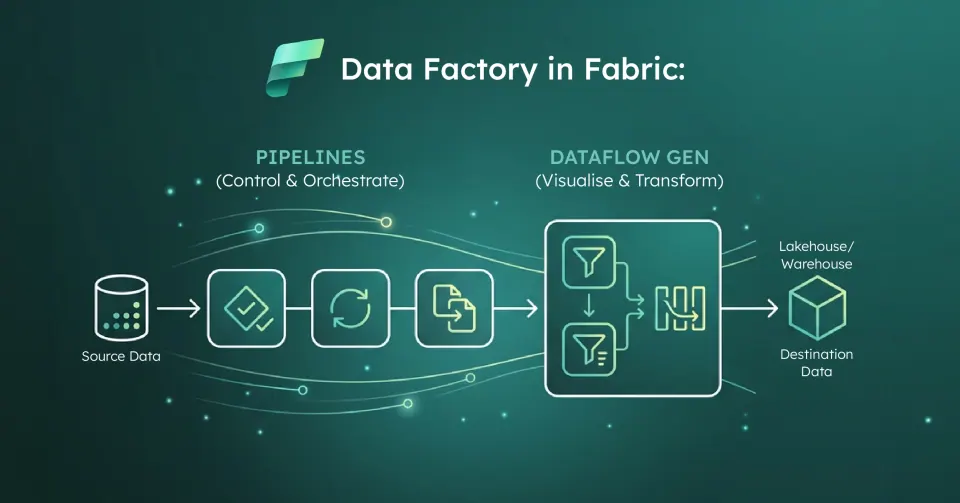
Data Factory in Microsoft Fabric is the data integration layer of Microsoft Fabric. It moves, transforms and orchestrates data into OneLake for ETL and ELT. Microsoft describes Fabric Data Factory as the next generation of Azure Data Factory. It connects to more than 170 data sources, including on-premises systems through gateways.
In 2026 it is no longer just pipelines and dataflows. It has four main building blocks - pipelines, Dataflow Gen2, copy job and mirroring - and most of the design work is choosing the right one for each job.
The Building Blocks of Fabric Data Factory
- Pipelines group activities into a workflow: copy, notebooks, stored procedures, dataflows, semantic model refreshes, Teams and Outlook notifications. They add control flow such as loops, conditions and failure paths. They run on demand, on schedules or from event triggers. From 30 October 2026 the legacy Teams and Outlook activities can no longer be added to pipelines; existing ones keep running and can still be edited, and Microsoft recommends the modern Microsoft Teams and Outlook 365 Email activities for new notifications.
- Dataflow Gen2 is a low-code transformation tool built on Power Query, with over 300 transformations and fast copy for larger volumes. It can write to many destinations: Lakehouse tables and files, Warehouse, SQL database in Fabric, KQL databases, Azure SQL, Snowflake and others. Since April 2026, every new Dataflow Gen2 is created with CI/CD and Git support by default.
- Copy job is Microsoft's preferred tool for simple data movement, with no pipeline required. It supports full copy, watermark-based incremental copy and CDC-based replication. It can append, overwrite, merge or keep SCD Type 2 history in the destination. It tracks its own state, so a failed run resumes from the last successful one. Change data capture and SCD Type 2 in copy job became generally available at FabCon Europe 2026 (29 September 2026), alongside audit columns, workspace monitoring integration and SharePoint folders as a source and destination.
- Mirroring continuously replicates an operational database into OneLake as read-only Delta tables, with a SQL analytics endpoint on top. Supported sources include Azure SQL, SQL Server, Cosmos DB, PostgreSQL, Oracle, Snowflake, Google BigQuery, SAP and SharePoint lists; BigQuery and SharePoint list mirroring became generally available on 29 September 2026. Our guide to mirroring in Fabric covers it in depth.
- Also in the workload: Apache Airflow jobs for teams that orchestrate in Python, and dbt jobs for SQL-first transformation. Microsoft announced at FabCon Europe 2026 (29 September 2026) that dbt jobs are generally available, with dbt logs landing in OneLake and environment configuration carried through deployment pipelines with variable library support; support for dbt Core v2 (previously known as Fusion) is coming soon.
Pipelines vs Dataflow Gen2 vs Copy Job vs Mirroring: Which to Use
Microsoft's data movement decision guide follows the medallion layers, and it matches what we see in projects:
- Curated or gold data already processed elsewhere: mirroring. It is the simplest option and the replication itself is free.
- Raw bronze ingestion from many tables: copy job. It gives you incremental loading, schema mapping and scheduling without building a pipeline.
- Business-owned transformation logic: Dataflow Gen2, so analysts can maintain it in a tool they already know.
- Heavy or code-first transformation: notebooks or dbt, called from a pipeline.
- Anything with dependencies, branching or metadata-driven loops: a pipeline orchestrating the other items.
- Streaming events: eventstreams in Real-Time Intelligence, not Data Factory.
The usual anti-pattern is a single "mega-pipeline" doing all of the above. Small, single-purpose items called by a thin orchestration pipeline are easier to monitor, rerun and hand over.
Connectors, Gateways and Orchestration
Cloud sources connect through Fabric connections. These are defined once at tenant level and reused across items.
On-premises sources go through the on-premises data gateway, the same gateway Power BI uses. It serves pipelines, Dataflow Gen2, copy job and mirroring. Gateway clusters can have up to 10 nodes for high availability. Only the last six monthly releases are supported, so gateway patching belongs on someone's calendar. Sources inside an Azure virtual network use the virtual network data gateway instead.
Orchestration runs through pipeline schedules (a pipeline can have several) and event triggers built on Fabric's Activator framework. Invoke pipeline chains pipelines together, and Variable libraries hold environment-specific values across Dev, Test and Prod. Runs appear in the Monitoring hub alongside notebooks and dataflows, which is a genuine step up from checking each tool separately. For the underlying concepts, see what a data pipeline is.
How Fabric Data Factory Differs From Azure Data Factory
The engine and expression language will feel familiar. The surrounding model is different:
- Linked services become connections, and datasets disappear, with their properties set inline in each activity
- Integration runtimes go away. The self-hosted IR is replaced by the on-premises data gateway, and managed VNet IRs by the virtual network gateway
- Mapping data flows move to Dataflow Gen2. Standard Dataflow Gen2 runs Power Query rather than Spark, but Mapping Data Flow transforms in Dataflow Gen2 (preview) convert existing mapping data flows and keep their visual transformation logic
- Global parameters become Variable libraries, and managed identity becomes workspace identity
- No publish step: you save and run, with Git and deployment pipelines for CI/CD instead of ARM templates
- Tumbling window triggers become interval-based schedules, so watermark and backfill logic needs redesigning
Microsoft says around 90% of ADF activities are already available in Fabric. The gaps worth checking early are SSIS (Microsoft's pages currently differ on the route, so check the latest guidance), some long-tail SAP and SaaS connectors, and Key Vault integration, which is more limited than in ADF.
The ADF-to-Fabric Migration Position
Microsoft's position is unusually explicit: Azure Data Factory remains fully supported, with no forced upgrade and no deadline, but future innovation is being built into Fabric Data Factory. The migration path is gradual by design:
- Mount the factory in Fabric. Your existing ADF appears in a Fabric workspace, but execution and billing stay in Azure.
- Assess and upgrade. The View in Fabric (Preview) entry point runs a read-only readiness assessment, then upgrades the pipelines you select, with triggers turned off until you validate them. Pipelines that are not ready keep running in ADF, and a partial upgrade is a supported outcome.
- Script it. The Microsoft.FabricPipelineUpgrade PowerShell module handles bulk or CI/CD-driven moves.
Update, 29 September 2026: Microsoft announced at FabCon Europe 2026 that this upgrade experience now brings Synapse environments into Fabric as well as ADF, with a readiness assessment, connection mapping and migration guidance before you upgrade supported pipelines incrementally. Mapping Data Flow transforms in Dataflow Gen2 (preview) now migrate Synapse Mapping Data Flows as well as ADF ones. For Power BI dataflows, Fabric REST APIs (preview) can now assess readiness and bulk-upgrade Dataflows Gen1 to Dataflow Gen2 (CI/CD) in place, and workspace admins can upgrade dataflows they do not own while the original owner and supported connections are preserved.
Synapse pipelines can also start from the Migrate to Fabric (Preview) option in Synapse Studio. If that is your starting point, our Synapse to Fabric migration runbook covers the full sequence.
Pricing: It All Runs on Capacity
Fabric Data Factory has no separate price list. Each tool consumes capacity units from your F SKU through its own meters:
- Pipelines: Data Orchestration and Data Movement
- Dataflow Gen2: Standard Compute and High Scale Compute
- Copy job: Data Movement and Data Movement - Incremental copy
Mirroring's replication compute is free, and each capacity unit you buy includes one terabyte of free mirroring storage: an F64 includes 64 TB. Queries against mirrored data are charged as normal. To see what your loads actually consume, use the Capacity Metrics app. Our guide to how Fabric measures usage explains smoothing and throttling.
Where Solv Systems Comes In
We implement Fabric Data Factory as a repeatable ingestion product, not a pile of pipelines. That means the right split between mirroring, copy job, dataflows and code, a gateway design that someone owns, and ADF or Synapse upgrades sequenced around business risk. Microsoft's Osmos acquisition points to where this layer is heading next: autonomous data preparation. Preparing for certification? Data Factory is a core part of our DP-700 exam study guide.
Sources and Further Reading
- What is Data Factory in Microsoft Fabric?
- Comparing copy job, mirroring, copy activity and eventstreams
- What is copy job in Data Factory?
- Differences between Data Factory in Fabric and Azure
- Upgrade your Azure Data Factory pipelines to Fabric Data Factory
- Data Factory pricing in Microsoft Fabric
- Fabric September 2026 Feature Summary
- FabCon/SQLCon Barcelona 2026: What's new in Fabric Data Factory
- Upcoming changes to legacy Teams and Outlook activities in Fabric Data Factory pipelines
Frequently asked
It is Fabric's data integration workload: the tools for moving, transforming and orchestrating data into OneLake. It includes pipelines, Dataflow Gen2, copy job and mirroring, plus Apache Airflow jobs and dbt jobs (generally available since September 2026). Microsoft describes it as the next generation of Azure Data Factory, connecting to more than 170 data sources.
Pipelines orchestrate: they sequence activities with schedules, triggers, loops and error handling. Dataflow Gen2 transforms: it is low-code Power Query with over 300 transformations. Copy job moves data without building a pipeline, supporting bulk, incremental and CDC-based copies. Mirroring continuously replicates operational databases into OneLake as read-only Delta tables, with the replication compute free.
Yes. Pipelines, Dataflow Gen2, copy job and mirroring all use the on-premises data gateway to reach sources behind a firewall. For sources in an Azure virtual network, use the virtual network data gateway. The gateway replaces the self-hosted integration runtime used in Azure Data Factory, and only the last six gateway releases are supported, so plan for regular updates.
Fabric Data Factory is SaaS and runs on Fabric capacity; Azure Data Factory is PaaS and billed per activity run, data movement and compute. In Fabric, linked services become connections, datasets disappear (their properties are set inline in activities), integration runtimes give way to gateways, mapping data flows give way to Dataflow Gen2, and there is no separate publish step. Microsoft says about 90% of ADF activities are already available in Fabric.
No. Microsoft's documentation says Azure Data Factory remains fully supported, with no forced upgrade and no deadline, but future innovation is being built into Fabric Data Factory. You can view an existing factory in Fabric, run a readiness assessment and upgrade supported pipelines when it suits you. Upgrading pipelines is in preview.
Through Fabric capacity. Pipelines consume the Data Orchestration and Data Movement meters. Dataflow Gen2 uses Standard Compute and High Scale Compute. Copy job uses Data Movement and Data Movement - Incremental copy. All of it draws capacity units from your F SKU, alongside OneLake storage. Replication compute for mirroring is free, and each capacity unit includes one terabyte of free mirroring storage.